
Examcollection offers free demo for Associate-Cloud-Engineer exam. "Google Cloud Certified - Associate Cloud Engineer", also known as Associate-Cloud-Engineer exam, is a Google Certification. This set of posts, Passing the Google Associate-Cloud-Engineer exam, will help you answer those questions. The Associate-Cloud-Engineer Questions & Answers covers all the knowledge points of the real exam. 100% real Google Associate-Cloud-Engineer exams and revised by experts!
Online Associate-Cloud-Engineer free questions and answers of New Version:
NEW QUESTION 1
A colleague handed over a Google Cloud Platform project for you to maintain. As part of a security checkup, you want to review who has been granted the Project Owner role. What should you do?
- A. In the console, validate which SSH keys have been stored as project-wide keys.
- B. Navigate to Identity-Aware Proxy and check the permissions for these resources.
- C. Enable Audit Logs on the IAM & admin page for all resources, and validate the results.
- D. Use the command gcloud projects get–iam–policy to view the current role assignments.
Answer: D
Explanation:
A simple approach would be to use the command flags available when listing all the IAM policy for a given project. For instance, the following command: `gcloud projects get-iam-policy $PROJECT_ID
--flatten="bindings[].members" --format="table(bindings.members)" --filter="bindings.role:roles/owner"`
outputs all the users and service accounts associated with the role ‘roles/owner’ in the project in question. https://groups.google.com/g/google-cloud-dev/c/Z6sZs7TvygQ?pli=1
NEW QUESTION 2
Users of your application are complaining of slowness when loading the application. You realize the slowness is because the App Engine deployment serving the application is deployed in us-central whereas all users of this application are closest to europe-west3. You want to change the region of the App Engine application to europe-west3 to minimize latency. What’s the best way to change the App Engine region?
- A. Create a new project and create an App Engine instance in europe-west3
- B. Use the gcloud app region set command and supply the name of the new region.
- C. From the console, under the App Engine page, click edit, and change the region drop-down.
- D. Contact Google Cloud Support and request the change.
Answer: A
Explanation:
App engine is a regional service, which means the infrastructure that runs your app(s) is located in a specific region and is managed by Google to be redundantly available across all the zones within that region. Once an app engine deployment is created in a region, it cant be changed. The only way is to create a new project and create an App Engine instance in europe-west3, send all user traffic to this instance and delete the app engine instance in us-central.
Ref: https://cloud.google.com/appengine/docs/locations
NEW QUESTION 3
Your managed instance group raised an alert stating that new instance creation has failed to create new instances. You need to maintain the number of running instances specified by the template to be able to process expected application traffic. What should you do?
- A. Create an instance template that contains valid syntax which will be used by the instance grou
- B. Delete any persistent disks with the same name as instance names.
- C. Create an instance template that contains valid syntax that will be used by the instance grou
- D. Verify that the instance name and persistent disk name values are not the same in the template.
- E. Verify that the instance template being used by the instance group contains valid synta
- F. Delete any persistent disks with the same name as instance name
- G. Set the disks.autoDelete property to true in the instance template.
- H. Delete the current instance template and replace it with a new instance templat
- I. Verify that the instance name and persistent disk name values are not the same in the templat
- J. Set the disks.autoDelete property to true in the instance template.
Answer: A
Explanation:
https://cloud.google.com/compute/docs/troubleshooting/troubleshooting-migs https://cloud.google.com/compute/docs/instance-templates#how_to_update_instance_templates
NEW QUESTION 4
You have a batch workload that runs every night and uses a large number of virtual machines (VMs). It is fault- tolerant and can tolerate some of the VMs being terminated. The current cost of VMs is too high. What should you do?
- A. Run a test using simulated maintenance event
- B. If the test is successful, use preemptible N1 Standard VMs when running future jobs.
- C. Run a test using simulated maintenance event
- D. If the test is successful, use N1 Standard VMs when running future jobs.
- E. Run a test using a managed instance grou
- F. If the test is successful, use N1 Standard VMs in the managed instance group when running future jobs.
- G. Run a test using N1 standard VMs instead of N2. If the test is successful, use N1 Standard VMs when running future jobs.
Answer: A
Explanation:
Creating and starting a preemptible VM instance This page explains how to create and use a preemptible virtual machine (VM) instance. A preemptible instance is an instance you can create and run at a much lower price than normal instances. However, Compute Engine might terminate (preempt) these instances if it requires access to those resources for other tasks. Preemptible instances will always terminate after 24 hours. To learn more about preemptible instances, read the preemptible instances documentation. Preemptible instances are recommended only for fault-tolerant applications that can withstand instance preemptions. Make sure your application can handle preemptions before you decide to create a preemptible instance. To understand the risks and value of preemptible instances, read the preemptible instances documentation. https://cloud.google.com/compute/docs/instances/create-start-preemptible-instance
NEW QUESTION 5
You need to create a Compute Engine instance in a new project that doesn’t exist yet. What should you do?
- A. Using the Cloud SDK, create a new project, enable the Compute Engine API in that project, and then create the instance specifying your new project.
- B. Enable the Compute Engine API in the Cloud Console, use the Cloud SDK to create the instance, and then use the ––project flag to specify a new project.
- C. Using the Cloud SDK, create the new instance, and use the ––project flag to specify the new project.Answer yes when prompted by Cloud SDK to enable the Compute Engine API.
- D. Enable the Compute Engine API in the Cloud Consol
- E. Go to the Compute Engine section of the Console to create a new instance, and look for the Create In A New Project option in the creation form.
Answer: A
Explanation:
https://cloud.google.com/sdk/gcloud/reference/projects/create Quickstart: Creating a New Instance Using the Command Line Before you begin
* 1. In the Cloud Console, on the project selector page, select or create a Cloud project.
* 2. Make sure that billing is enabled for your Google Cloud project. Learn how to confirm billing is enabled for your project.
To use the gcloud command-line tool for this quickstart, you must first install and initialize the Cloud SDK:
* 1. Download and install the Cloud SDK using the instructions given on Installing Google Cloud SDK.
* 2. Initialize the SDK using the instructions given on Initializing Cloud SDK.
To use gcloud in Cloud Shell for this quickstart, first activate Cloud Shell using the instructions given on Starting Cloud Shell.
https://cloud.google.com/ai-platform/deep-learning-vm/docs/quickstart-cli#before-you-begin
NEW QUESTION 6
You are using multiple configurations for gcloud. You want to review the configured Kubernetes Engine cluster of an inactive configuration using the fewest possible steps. What should you do?
- A. Use gcloud config configurations describe to review the output.
- B. Use gcloud config configurations activate and gcloud config list to review the output.
- C. Use kubectl config get-contexts to review the output.
- D. Use kubectl config use-context and kubectl config view to review the output.
Answer: D
NEW QUESTION 7
You are migrating a production-critical on-premises application that requires 96 vCPUs to perform its task. You want to make sure the application runs in a similar environment on GCP. What should you do?
- A. When creating the VM, use machine type n1-standard-96.
- B. When creating the VM, use Intel Skylake as the CPU platform.
- C. Create the VM using Compute Engine default setting
- D. Use gcloud to modify the running instance to have 96 vCPUs.
- E. Start the VM using Compute Engine default settings, and adjust as you go based on Rightsizing Recommendations.
Answer: A
Explanation:
Ref: https://cloud.google.com/compute/docs/machine-types#n1_machine_type
NEW QUESTION 8
You are analyzing Google Cloud Platform service costs from three separate projects. You want to use this information to create service cost estimates by service type, daily and monthly, for the next six months using standard query syntax. What should you do?
- A. Export your bill to a Cloud Storage bucket, and then import into Cloud Bigtable for analysis.
- B. Export your bill to a Cloud Storage bucket, and then import into Google Sheets for analysis.
- C. Export your transactions to a local file, and perform analysis with a desktop tool.
- D. Export your bill to a BigQuery dataset, and then write time window-based SQL queries for analysis.
Answer: D
Explanation:
"...we recommend that you enable Cloud Billing data export to BigQuery at the same time that you create a Cloud Billing account. " https://cloud.google.com/billing/docs/how-to/export-data-bigquery
https://medium.com/google-cloud/analyzing-google-cloud-billing-data-with-big-query-30bae1c2aae4
NEW QUESTION 9
You have downloaded and installed the gcloud command line interface (CLI) and have authenticated with your Google Account. Most of your Compute Engine instances in your project run in the europe-west1-d zone. You want to avoid having to specify this zone with each CLI command when managing these instances. What should you do?
- A. Set the europe-west1-d zone as the default zone using the gcloud config subcommand.
- B. In the Settings page for Compute Engine under Default location, set the zone to europe–west1-d.
- C. In the CLI installation directory, create a file called default.conf containing zone=europe–west1–d.
- D. Create a Metadata entry on the Compute Engine page with key compute/zone and value europe–west1–d.
Answer: A
Explanation:
Change your default zone and region in the metadata server Note: This only applies to the default configuration. You can change the default zone and region in your metadata server by making a request to the metadata server. For example: gcloud compute project-info add-metadata \ --metadata
google-compute-default-region=europe-west1,google-compute-default-zone=europe-west1-b The gcloud command-line tool only picks up on new default zone and region changes after you rerun the gcloud init command. After updating your default metadata, run gcloud init to reinitialize your default configuration. https://cloud.google.com/compute/docs/gcloud-compute#change_your_default_zone_and_region_in_the_metad
NEW QUESTION 10
The storage costs for your application logs have far exceeded the project budget. The logs are currently being retained indefinitely in the Cloud Storage bucket myapp-gcp-ace-logs. You have been asked to remove logs older than 90 days from your Cloud Storage bucket. You want to optimize ongoing Cloud Storage spend. What should you do?
- A. Write a script that runs gsutil Is -| – gs://myapp-gcp-ace-logs/** to find and remove items older than 90 day
- B. Schedule the script with cron.
- C. Write a lifecycle management rule in JSON and push it to the bucket with gsutil lifecycle set config-json-file.
- D. Write a lifecycle management rule in XML and push it to the bucket with gsutil lifecycle set config-xml-file.
- E. Write a script that runs gsutil Is -Ir gs://myapp-gcp-ace-logs/** to find and remove items older than 90 day
- F. Repeat this process every morning.
Answer: B
Explanation:
You write a lifecycle management rule in XML and push it to the bucket with gsutil lifecycle set config-xml-file. is not right.
gsutil lifecycle set enables you to set the lifecycle configuration on one or more buckets based on the configuration file provided. However, XML is not a valid supported type for the configuration file.
Ref: https://cloud.google.com/storage/docs/gsutil/commands/lifecycle Write a script that runs gsutil ls -lr gs://myapp-gcp-ace-logs/** to find and remove items older than 90 days. Repeat this process every morning. is not right.
This manual approach is error-prone, time-consuming and expensive. GCP Cloud Storage provides lifecycle management rules that let you achieve this with minimal effort. Write a script that runs gsutil ls -l gs://myapp-gcp-ace-logs/** to find and remove items older than 90 days. Schedule the script with cron. is not right.
This manual approach is error-prone, time-consuming and expensive. GCP Cloud Storage provides lifecycle management rules that let you achieve this with minimal effort. Write a lifecycle management rule in JSON and push it to the bucket with gsutil lifecycle set config-json-file. is the right answer.
You can assign a lifecycle management configuration to a bucket. The configuration contains a set of rules which apply to current and future objects in the bucket. When an object meets the criteria of one of the rules, Cloud Storage automatically performs a specified action on the object. One of the supported actions is to Delete objects. You can set up a lifecycle management to delete objects older than 90 days. gsutil lifecycle set enables you to set the lifecycle configuration on the bucket based on the configuration file. JSON is the only supported type for the configuration file. The config-json-file specified on the command line should be a path to a local file containing the lifecycle configuration JSON document.
Ref: https://cloud.google.com/storage/docs/gsutil/commands/lifecycle Ref: https://cloud.google.com/storage/docs/lifecycle
NEW QUESTION 11
You are designing an application that uses WebSockets and HTTP sessions that are not distributed across the web servers. You want to ensure the application runs properly on Google Cloud Platform. What should you do?
- A. Meet with the cloud enablement team to discuss load balancer options.
- B. Redesign the application to use a distributed user session service that does not rely on WebSockets and HTTP sessions.
- C. Review the encryption requirements for WebSocket connections with the security team.
- D. Convert the WebSocket code to use HTTP streaming.
Answer: A
Explanation:  Google HTTP(S) Load Balancing has native support for the WebSocket protocol when you use HTTP or HTTPS, not HTTP/2, as the protocol to the backend.
Ref: https://cloud.google.com/load-balancing/docs/https#websocket_proxy_support We dont need to convert WebSocket code to use HTTP streaming or Redesign the application, as
WebSocket support is offered by Google HTTP(S) Load Balancing. Reviewing the encryption requirements is a good idea but it has nothing to do with WebSockets.
NEW QUESTION 12
You need to set a budget alert for use of Compute Engineer services on one of the three Google Cloud Platform projects that you manage. All three projects are linked to a single billing account. What should you do?
- A. Verify that you are the project billing administrato
- B. Select the associated billing account and create a budget and alert for the appropriate project.
- C. Verify that you are the project billing administrato
- D. Select the associated billing account and create a budget and a custom alert.
- E. Verify that you are the project administrato
- F. Select the associated billing account and create a budget for the appropriate project.
- G. Verify that you are project administrato
- H. Select the associated billing account and create a budget and a custom alert.
Answer: A
Explanation:
https://cloud.google.com/iam/docs/understanding-roles#billing-roles
NEW QUESTION 13
You are working with a user to set up an application in a new VPC behind a firewall. The user is concerned about data egress. You want to configure the fewest open egress ports. What should you do?
- A. Set up a low-priority (65534) rule that blocks all egress and a high-priority rule (1000) that allows only the appropriate ports.
- B. Set up a high-priority (1000) rule that pairs both ingress and egress ports.
- C. Set up a high-priority (1000) rule that blocks all egress and a low-priority (65534) rule that allows only the appropriate ports.
- D. Set up a high-priority (1000) rule to allow the appropriate ports.
Answer: A
Explanation:
Implied rules Every VPC network has two implied firewall rules. These rules exist, but are not shown in the Cloud Console: Implied allow egress rule. An egress rule whose action is allow, destination is 0.0.0.0/0, and priority is the lowest possible (65535) lets any instance send traffic to any destination, except for traffic blocked by Google Cloud. A higher priority firewall rule may restrict outbound access. Internet access is allowed if no other firewall rules deny outbound traffic and if the instance has an external IP address or uses a Cloud NAT instance. For more information, see Internet access requirements. Implied deny ingress rule. An ingress rule whose action is deny, source is 0.0.0.0/0, and priority is the lowest possible (65535) protects all instances by blocking incoming connections to them. A higher priority rule might allow incoming access. The default network includes some additional rules that override this one, allowing certain types of incoming connections. https://cloud.google.com/vpc/docs/firewalls#default_firewall_rules
NEW QUESTION 14
You created an instance of SQL Server 2017 on Compute Engine to test features in the new version. You want to connect to this instance using the fewest number of steps. What should you do?
- A. Install a RDP client on your deskto
- B. Verify that a firewall rule for port 3389 exists.
- C. Install a RDP client in your deskto
- D. Set a Windows username and password in the GCP Consol
- E. Use the credentials to log in to the instance.
- F. Set a Windows password in the GCP Consol
- G. Verify that a firewall rule for port 22 exist
- H. Click the RDP button in the GCP Console and supply the credentials to log in.
- I. Set a Windows username and password in the GCP Consol
- J. Verify that a firewall rule for port 3389 exist
- K. Click the RDP button in the GCP Console, and supply the credentials to log in.
Answer: D
Explanation:
https://cloud.google.com/compute/docs/instances/connecting-to-windows#remote-desktop-connection-app https://cloud.google.com/compute/docs/instances/windows/generating-credentials https://cloud.google.com/compute/docs/instances/connecting-to-windows#before-you-begin
NEW QUESTION 15
Several employees at your company have been creating projects with Cloud Platform and paying for it with their personal credit cards, which the company reimburses. The company wants to centralize all these projects under a single, new billing account. What should you do?
- A. Contact cloud-billing@google.com with your bank account details and request a corporate billing account for your company.
- B. Create a ticket with Google Support and wait for their call to share your credit card details over the phone.
- C. In the Google Platform Console, go to the Resource Manage and move all projects to the root Organization.
- D. In the Google Cloud Platform Console, create a new billing account and set up a payment method.
Answer: D
Explanation:
(https://cloud.google.com/resource-manager/docs/project-migration#change_billing_account) https://cloud.google.com/billing/docs/concepts
https://cloud.google.com/resource-manager/docs/project-migration
NEW QUESTION 16
Your organization uses Active Directory (AD) to manage user identities. Each user uses this identity for federated access to various on-premises systems. Your security team has adopted a policy that requires users to log into Google Cloud with their AD identity instead of their own login. You want to follow the
Google-recommended practices to implement this policy. What should you do?
- A. Sync Identities with Cloud Directory Sync, and then enable SAML for single sign-on
- B. Sync Identities in the Google Admin console, and then enable Oauth for single sign-on
- C. Sync identities with 3rd party LDAP sync, and then copy passwords to allow simplified login with (he same credentials
- D. Sync identities with Cloud Directory Sync, and then copy passwords to allow simplified login with the same credentials.
Answer: A
NEW QUESTION 17
You are building an archival solution for your data warehouse and have selected Cloud Storage to archive your data. Your users need to be able to access this archived data once a quarter for some regulatory requirements. You want to select a cost-efficient option. Which storage option should you use?
- A. Coldline Storage
- B. Nearline Storage
- C. Regional Storage
- D. Multi-Regional Storage
Answer: A
Explanation:
Coldline Storage is a very-low-cost, highly durable storage service for storing infrequently accessed data. Coldline Storage is ideal for data you plan to read or modify at most once a quarter. Since we have a requirement to access data once a quarter and want to go with the most cost-efficient option, we should select Coldline Storage.
Ref: https://cloud.google.com/storage/docs/storage-classes#coldline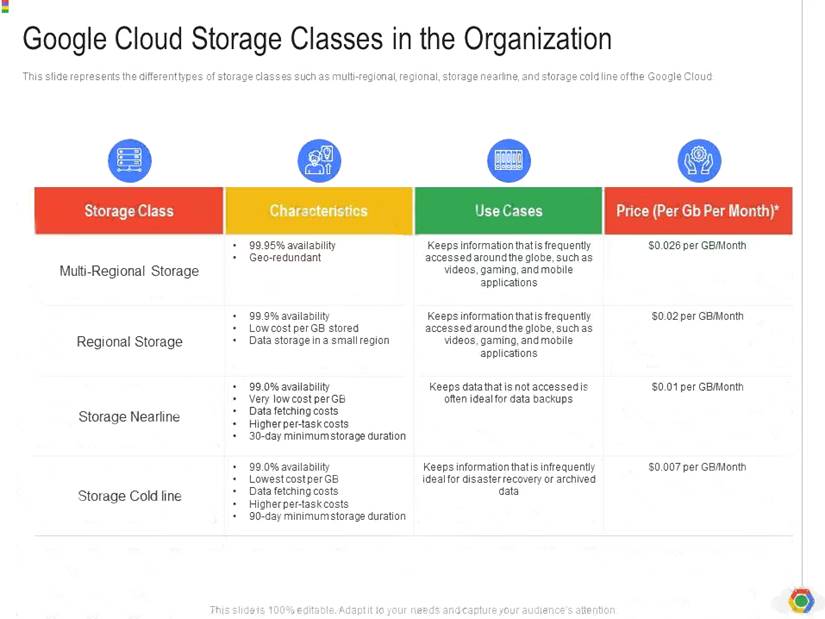
NEW QUESTION 18
You are the project owner of a GCP project and want to delegate control to colleagues to manage buckets and files in Cloud Storage. You want to follow Google-recommended practices. Which IAM roles should you grant your colleagues?
- A. Project Editor
- B. Storage Admin
- C. Storage Object Admin
- D. Storage Object Creator
Answer: B
Explanation:
Storage Admin (roles/storage.admin) Grants full control of buckets and objects.
When applied to an individual bucket, control applies only to the specified bucket and objects within the bucket.
firebase.projects.get resourcemanager.projects.get
resourcemanager.projects.list storage.buckets.* storage.objects.*
https://cloud.google.com/storage/docs/access-control/iam-roles
This role grants full control of buckets and objects. When applied to an individual bucket, control applies only to the specified bucket and objects within the bucket.
Ref: https://cloud.google.com/iam/docs/understanding-roles#storage-roles
NEW QUESTION 19
You have developed a containerized web application that will serve Internal colleagues during business hours. You want to ensure that no costs are incurred outside of the hours the application is used. You have just created a new Google Cloud project and want to deploy the application. What should you do?
- A. Deploy the container on Cloud Run for Anthos, and set the minimum number of instances to zero
- B. Deploy the container on Cloud Run (fully managed), and set the minimum number of instances to zero.
- C. Deploy the container on App Engine flexible environment with autoscalin
- D. and set the value min_instances to zero in the app yaml
- E. Deploy the container on App Engine flexible environment with manual scaling, and set the value instances to zero in the app yaml
Answer: B
Explanation:
https://cloud.google.com/kuberun/docs/architecture-overview#components_in_the_default_installation
NEW QUESTION 20
......
Thanks for reading the newest Associate-Cloud-Engineer exam dumps! We recommend you to try the PREMIUM Dumpscollection.com Associate-Cloud-Engineer dumps in VCE and PDF here: https://www.dumpscollection.net/dumps/Associate-Cloud-Engineer/ (244 Q&As Dumps)
