
Your success in Microsoft MD-102 is our sole target and we develop all our MD-102 braindumps in a way that facilitates the attainment of this target. Not only is our MD-102 study material the best you can find, it is also the most detailed and the most updated. MD-102 Practice Exams for Microsoft MD-102 are written to the highest standards of technical accuracy.
Also have MD-102 free dumps questions for you:
NEW QUESTION 1
You have a Microsoft 365 subscription.
You need provide a user the ability to disable Security defaults and principle of least privilege. Which role should you assign to the user?
- A. Global Administrator
- B. Conditional Access Administrator
- C. Security Administrator
- D. Intune Administrator
Answer: B
Explanation:
To enable or disable security defaults in your directory, sign in to theAzure portalas a security administrator, Conditional Access administrator, or global administrator.
Note: Conditional Access Administrator
Users with this role have the ability to manage Azure Active Directory Conditional Access settings.
Reference:
https://docs.microsoft.com/en-us/azure/active-directory/fundamentals/concept-fundamentals-security-defaults
NEW QUESTION 2
You have computers that run Windows 10 and are managed by using Microsoft Intune. Users store their files in a folder named D:\Folder1.
You need to ensure that only a trusted list of applications is granted write access to D:\Folder1. What should you configure in the device configuration profile?
- A. Microsoft Defender Exploit Guard
- B. Microsoft Defender Application Guard
- C. Microsoft Defender SmartScreen
- D. Microsoft Defender Application Control
Answer: A
NEW QUESTION 3
You have a Microsoft 365 E5 subscription that contains the devices shown in the following table. All devices have Microsoft Edge installed.
From the Microsoft Intune admin center, you create a Microsoft You need to apply Edge1 to all the supported devices.
To which devices should you apply Edge1?
- A. Device1 only
- B. Device1 and Device2 only
- C. Device1, Device2, and Device3 only
- D. Device1, Device2, and Device4 only
- E. Device1, Device2, Device3, and Device4
Answer: E
NEW QUESTION 4
You have two computers named Computer1 and Computed that run Windows 10. Computed has Remote Desktop enabled.
From Computer1, you connect to Computer2 by using Remote Desktop Connection.
You need to ensure that you can access the local drives on Computer1 from within the Remote Desktop session.
What should you do?
- A. From Computer 2, configure the Remote Desktop settings.
- B. From Windows Defender Firewall on Computer 1, allow Remote Desktop.
- C. From Windows Defender Firewall on Computer 2, allow File and Printer Sharing.
- D. From Computer1, configure the Remote Desktop Connection settings.
Answer: D
NEW QUESTION 5
You have an Azure AD tenant named contoso.com.
You have a workgroup computer named Computer! that runs Windows 11. You need to add Computer1 to contoso.com.
What should you use?
- A. dsreecmd.exe
- B. Computer Management
- C. netdom.exe
- D. the Settings app
Answer: A
NEW QUESTION 6
You have a Microsoft 365 subscription that includes Microsoft Intune.
You need to implement a Microsoft Defender for Endpoint solution that meets the following requirements:
• Enforces compliance for Defender for Endpoint by using Conditional Access
• Prevents suspicious scripts from running on devices
What should you configure? To answer, drag the appropriate features to the correct requirements. Each feature may be used once, more than once, or not at all. You may need to drag the split bar between panes or scroll to view content.
NOTE: Each correct selection is worth one point.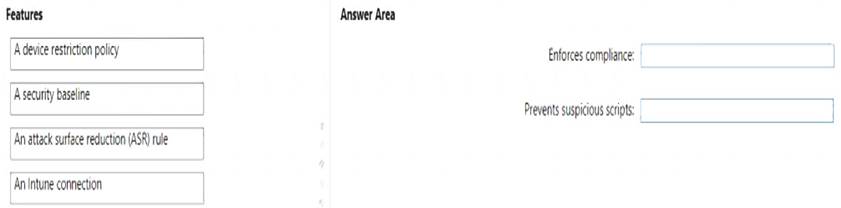
Solution:
To enforce compliance for Defender for Endpoint by using Conditional Access, you need to configure an Intune connection in the Defender for Endpoint portal. This allows you to use Intune device compliance policies to evaluate the health and compliance status of devices that are enrolled in Defender for Endpoint. You can then use Conditional Access policies to block or allow access to cloud apps based on the device compliance status. References:
https://docs.microsoft.com/en-us/windows/security/threat-protection/microsoft-defender-atp/conditional-access
To prevent suspicious scripts from running on devices, you need to configure an attack surface reduction (ASR) rule in Intune. ASR rules are part of the endpoint protection settings that you can apply to devices by using device configuration profiles. You can use the ASR rule “Block Office applications from creating child processes” to prevent Office applications from launching child processes such as scripts or executables. References:
https://docs.microsoft.com/en-us/mem/intune/protect/endpoint-protection-windows-10#attack-surface-reduction
Does this meet the goal?
- A. Yes
- B. Not Mastered
Answer: A
NEW QUESTION 7
Your company implements Azure AD, Microsoft 365, Microsoft Intune, and Azure Information Protection. The company's security policy states the following:
• Personal devices do not need to be enrolled in Intune.
• Users must authenticate by using a PIN before they can access corporate email data.
• Users can use their personal iOS and Android devices to access corporate cloud services.
• Users must be prevented from copying corporate email data to a cloud storage service other than Microsoft OneDrive for Business.
You need to configure a solution to enforce the security policy. What should you create?
- A. a device configuration profile from the Microsoft Intune admin center
- B. a data loss prevention (DIP) policy from the Microsoft Purview compliance portal
- C. an insider risk management policy from the Microsoft Purview compliance portal
- D. an app protection policy from the Microsoft Intune admin center
Answer: B
NEW QUESTION 8
You have a Microsoft 365 E5 subscription. The subscription contains 25 computers that run Windows 11 and are enrolled in Microsoft Intune. You need to onboard the devices to Microsoft Defender for Endpoint. What should you create in the Microsoft Intune admin center?
- A. an attack surface reduction (ASR) policy
- B. a security baseline
- C. an endpoint detection and response (EDR) policy
- D. an account protection policy
- E. an antivirus policy
Answer: C
Explanation:
To onboard the devices to Microsoft Defender for Endpoint, you need to create an endpoint detection and response (EDR) policy in the Microsoft Intune admin center. This policy enables EDR capabilities on devices that are enrolled in Intune and allows you to configure various settings for EDR functionality. You can then assign the policy to groups of users or devices. References:
https://docs.microsoft.com/en-us/mem/intune/protect/edr-windows
NEW QUESTION 9
You need to meet the technical requirements for the new HR department computers.
How should you configure the provisioning package? To answer, select the appropriate options in the answer area.
NOTE: Each correct selection is worth one point.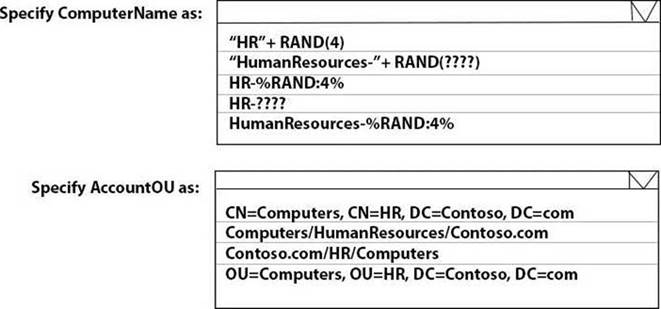
Solution:
Reference:
https://docs.microsoft.com/en-us/windows/configuration/wcd/wcd-accounts
Does this meet the goal?
- A. Yes
- B. Not Mastered
Answer: A
NEW QUESTION 10
You have a Microsoft 365 subscription that contains 1,000 iOS devices and includes Microsoft Intune. You need to prevent the printing of corporate data from managed apps on the devices, should you configure?
- A. an app configuration policy
- B. a security baseline
- C. an app protection policy
- D. an iOS app provisioning profile
Answer: C
Explanation:
An app protection policy is a set of rules that controls how data is accessed and handled by managed apps on mobile devices. App protection policies can prevent the printing of corporate data from managed apps on iOS devices by using the Restrict cut, copy, and paste with other apps setting. This setting can be configured to block printing from the iOS share menu. An app configuration policy is used to customize the behavior of a managed app, such as specifying a VPN profile or a web link. A security baseline is a collection of recommended security settings for Windows 10 devices that are managed by Intune. An iOS app provisioning profile is a file that contains information about the app’s identity, entitlements, and distribution method
NEW QUESTION 11
Note: This question is part of a series of questions that present the same scenario. Each question in the series contains a unique solution that might meet the stated goals. Some question sets might have more than one correct solution, while others might not have a correct solution.
After you answer a question in this section, you will NOT be able to return to it. As a result, these questions will not appear in the review screen.
Your network contains an Active Directory domain. The domain contains a computer named Computer1 that runs Windows 8.1.
Computer1 has apps that are compatible with Windows 10.
You need to perform a Windows 10 in-place upgrade on Computer1.
Solution: You copy the Windows 10 installation media to a Microsoft Deployment Toolkit (MDT) deployment
share. You create a task sequence, and then you run the MDT deployment wizard on Computer1. Does this meet the goal?
- A. Yes
- B. No
Answer: B
NEW QUESTION 12
You have a Windows 11 capable device named Device1 that runs the 64-bit version of Windows 10 Enterprise and has Microsoft Office 2019 installed. You have the Windows 11 Enterprise images shown in the following table.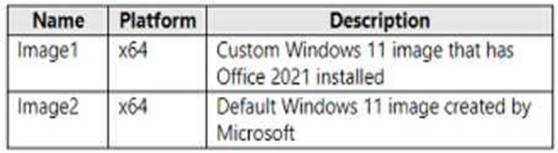
Which images can be used to perform an in-place upgrade of Device1?
- A. image1 only
- B. lmage2only
- C. Image1 and Image2
Answer: B
NEW QUESTION 13
You have 100 Windows 10 devices enrolled in Microsoft Intune.
You need to configure the devices to retrieve Windows updates from the internet and from other computers on a local network.
Which Delivery Optimization setting should you configure, and which type of Intune object should you create? To answer, select the appropriate options in the answer area.
NOTE: Each correct selection is worth one point.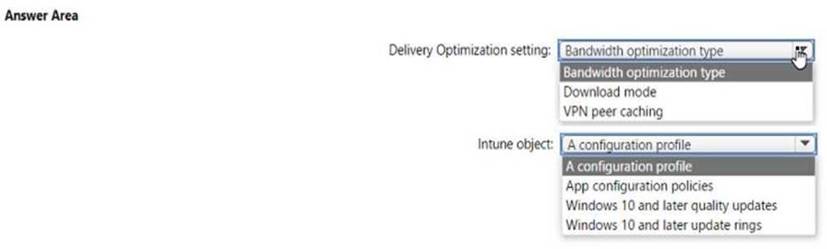
Solution:
Delivery Optimization setting: B. Download mode Intune object: A configuration profile
To configure the devices to retrieve Windows updates from the internet and from other computers on a local network, you need to configure the Download mode setting in a Delivery Optimization device configuration profile. This setting specifies how the devices use Delivery Optimization to download updates. You can choose from several options, such as HTTP only, LAN only, or Group. For example, you can set the Download mode to Group and specify a group ID for the devices to share updates among themselves and with other devices that have the same group ID. You can also set the Download mode to Internet to allow the devices to download updates from Microsoft or other devices on the internet that use Delivery Optimization. References: https://docs.microsoft.com/en-us/mem/intune/configuration/delivery-optimization-windows
Does this meet the goal?
- A. Yes
- B. Not Mastered
Answer: A
NEW QUESTION 14
You have a Microsoft Deployment Toolkit (MDT) deployment share named DS1. You import a Windows 11 image to DS1.
You have an executable installer for an application named App1.
You need to ensure that App1 will be installed for all the task sequences that deploy the image.
Which three actions should you perform in sequence? To answer, move the appropriate actions from the list of actions to the answer area and arrange them in the correct order.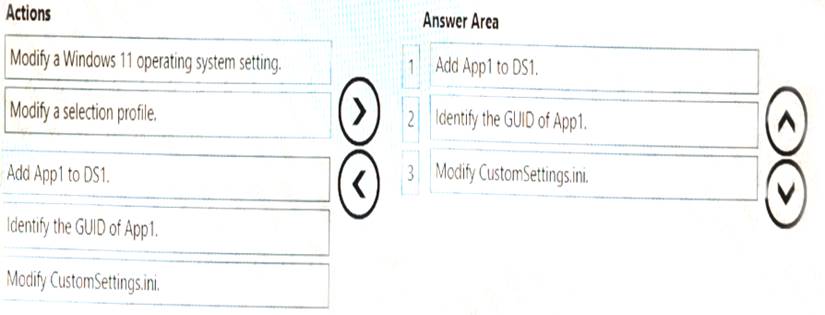
Solution:
MDT is a tool that allows you to automate the deployment of Windows operating systems and applications. To install an application for all the task sequences that deploy a Windows 11 image, you need to perform the following three actions in sequence:
 Add App1 to DS1. You can use the Deployment Workbench to import the executable installer of App1 to a folder in your deployment share. This will create an application entry with a unique GUID that identifies App11. Identify the GUID of App1. You can find the GUID of App1 by opening the application properties in the Deployment Workbench and looking at the Application GUID field1. You can copy the GUID to use it later. Modify CustomSettings.ini. You can edit the CustomSettings.ini file in your deployment share to specify which applications to install for each task sequence. You can use the Applications property to list the GUIDs of the applications you want to install, separated by commas1. For example, if you want to install App1 and another application with GUID {1234-5678-90AB-CDEF}, you can use this line:
Applications={GUID of App1},{1234-5678-90AB-CDEF}
These are the three actions you need to perform to ensure that App1 will be installed for all the task sequences that deploy the Windows 11 image from DS1. I hope this helps you.
If you want to learn more about MDT and how to deploy applications with it, you can check out these resources:
How to deploy applications with the Microsoft Deployment ToolkitDoes this meet the goal?
- A. Yes
- B. Not Mastered
Answer: A
NEW QUESTION 15
You have an Azure AD tenant named contoso.com that contains a user named Used. User! has a user principal name (UPN) of user1@contoso.com.
You join a Windows 11 device named Client 1 to contoso.com. You need to add User1 to the local Administrators group of Client1.
How should you complete the command? To answer, select the appropriate options in the answer area. NOTE: Each correct selection is worth one point.
Solution:
net localgroup Administrators /add “AzureAD\user1@contoso.com”
This command will add the Azure AD user with the UPN of user1@contoso.com to the local Administrators group of the device1. You need to use the AzureAD prefix and double backslashes to specify the user’s domain2. You also need to enclose the user’s name in quotation marks if it contains special characters like
@1.
You can run this command from an elevated command prompt on Client1, or remotely by using PowerShell or other tools1. You can also use the Intune Role Administrator role or the Additional local administrators on all Azure AD joined devices setting to manage the local administrators group on Azure AD joined devices34.
Does this meet the goal?
- A. Yes
- B. Not Mastered
Answer: A
NEW QUESTION 16
You have a Microsoft 365 E5 subscription and 100 computers that run Windows 10.
You need to deploy Microsoft Office Professional Plus 2019 to the computers by using Microsoft Office Deployment Tool (ODT).
What should you use to create a customization file for ODT?
- A. the Microsoft 365 admin center
- B. the Microsoft Intune admin center
- C. the Microsoft Purview compliance portal
- D. the Microsoft 365 Apps admin center
Answer: D
NEW QUESTION 17
......
P.S. Easily pass MD-102 Exam with 98 Q&As Dumps-hub.com Dumps & pdf Version, Welcome to Download the Newest Dumps-hub.com MD-102 Dumps: https://www.dumps-hub.com/MD-102-dumps.html (98 New Questions)
