
Exam Code: NSE4_FGT-7.2 (Practice Exam Latest Test Questions VCE PDF)
Exam Name: Fortinet NSE 4 - FortiOS 7.2
Certification Provider: Fortinet
Free Today! Guaranteed Training- Pass NSE4_FGT-7.2 Exam.
Fortinet NSE4_FGT-7.2 Free Dumps Questions Online, Read and Test Now.
NEW QUESTION 1
The HTTP inspection process in web filtering follows a specific order when multiple features are enabled in the web filter profile. What order must FortiGate use when the web filter profile has features enabled, such as safe search?
- A. DNS-based web filter and proxy-based web filter
- B. Static URL filter, FortiGuard category filter, and advanced filters
- C. Static domain filter, SSL inspection filter, and external connectors filters
- D. FortiGuard category filter and rating filter
Answer: B
Explanation:
FortiGate Security 7.2 Study Guide (p.285): "Remember that the web filtering profile has several features. So, if you have enabled many of them, the inspection order flows as follows: 1. The local static URL filter 2. FortiGuard category filtering (to determine a rating) 3. Advanced filters (such as safe search or removing Active X components)"
NEW QUESTION 2
Which two configuration settings are synchronized when FortiGate devices are in an active-active HA cluster? (Choose two.)
- A. FortiGuard web filter cache
- B. FortiGate hostname
- C. NTP
- D. DNS
Answer: CD
Explanation:
In the 7.2 Infrastructure Guide (page 306) the list of configuration settings that are NOT synchronized includes both 'FortiGate host name' and 'Cache'
NEW QUESTION 3
Which two statements are correct regarding FortiGate FSSO agentless polling mode? (Choose two.)
- A. FortiGate points the collector agent to use a remote LDAP server.
- B. FortiGate uses the AD server as the collector agent.
- C. FortiGate uses the SMB protocol to read the event viewer logs from the DCs.
- D. FortiGate queries AD by using the LDAP to retrieve user group information.
Answer: CD
Explanation:
Fortigate Infrastructure 7.0 Study Guide P.272-273 https://kb.fortinet.com/kb/documentLink.do?externalID=FD47732
NEW QUESTION 4
Refer to the exhibit.
The exhibit shows the output of a diagnose command.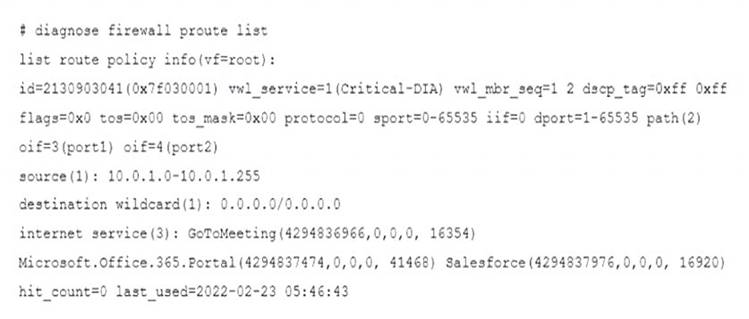
What does the output reveal about the policy route?
- A. It is an ISDB route in policy route.
- B. It is a regular policy route.
- C. It is an ISDB policy route with an SDWAN rule.
- D. It is an SDWAN rule in policy route.
Answer: D
Explanation:
FortiGate Infrastructure 7.2 Study Guide (p.59): "ISDB routes and SD-WAN rules are assigned an ID higher than 65535. However, SD-WAN rule entries include the vwl_service field, and ISDB route entries don’t."
NEW QUESTION 5
An administrator is configuring an Ipsec between site A and siteB. The Remotes Gateway setting in both sites has been configured as Static IP Address. For site A, the local quick mode selector is 192. 16. 1.0/24 and the remote quick mode selector is 192. 16.2.0/24. How must the administrator configure the local quick mode selector for site B?
- A. 192. 168.3.0/24
- B. 192. 168.2.0/24
- C. 192. 168. 1.0/24
- D. 192. 168.0.0/8
Answer: B
NEW QUESTION 6
Which two types of traffic are managed only by the management VDOM? (Choose two.)
- A. FortiGuard web filter queries
- B. PKI
- C. Traffic shaping
- D. DNS
Answer: AD
NEW QUESTION 7
An administrator is configuring an IPsec VPN between site A and site B. The Remote Gateway setting in both sites has been configured as Static IP Address. For site A, the local quick mode selector is 192. 168. 1.0/24 and the remote quick mode selector is 192. 168.2.0/24.
Which subnet must the administrator configure for the local quick mode selector for site B?
- A. 192. 168. 1.0/24
- B. 192. 168.0.0/24
- C. 192. 168.2.0/24
- D. 192. 168.3.0/24
Answer: C
Explanation:
For an IPsec VPN between site A and site B, the administrator has configured the local quick mode selector for site A as 192.168.1.0/24 and the remote quick mode selector as 192.168.2.0/24. This means that the VPN will allow traffic to and from the 192.168.1.0/24 subnet at site A to reach the 192.168.2.0/24 subnet at site B.
To complete the configuration, the administrator must configure the local quick mode selector for site B. To do this, the administrator must use the same subnet as the remote quick mode selector for site A, which is 192.168.2.0/24. This will allow traffic to and from the 192.168.2.0/24 subnet at site B to reach the 192.168.1.0/24 subnet at site A.
Therefore, the administrator must configure the local quick mode selector for site B as 192.168.2.0/24.
NEW QUESTION 8
An employee needs to connect to the office through a high-latency internet connection.
Which SSL VPN setting should the administrator adjust to prevent SSL VPN negotiation failure?
- A. idle-timeout
- B. login-timeout
- C. udp-idle-timer
- D. session-ttl
Answer: B
Explanation:
FortiGate Infrastructure 7.2 Study Guide (p.222):
"When connected to SSL VPN over high latency connections, FortiGate can time out the client before the client can finish the negotiation process, such as DNS lookup and time to enter a token. Two new CLI commands under config vpn ssl settings have been added to address this. The first command allows you to set up the login timeout, replacing the previous hard timeout value. The second command allows you to set up the maximum DTLS hello timeout for SSL VPN connections."
NEW QUESTION 9
Examine the exhibit, which contains a virtual IP and firewall policy configuration.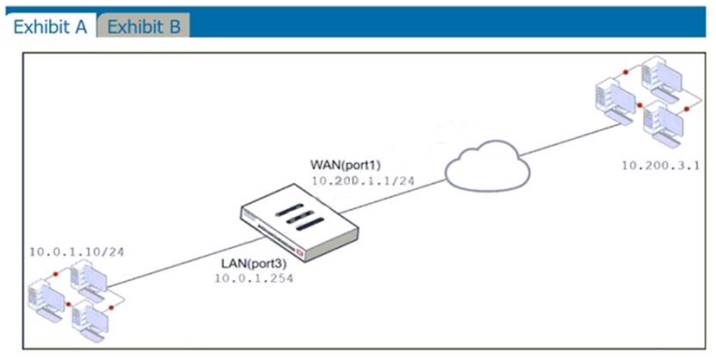
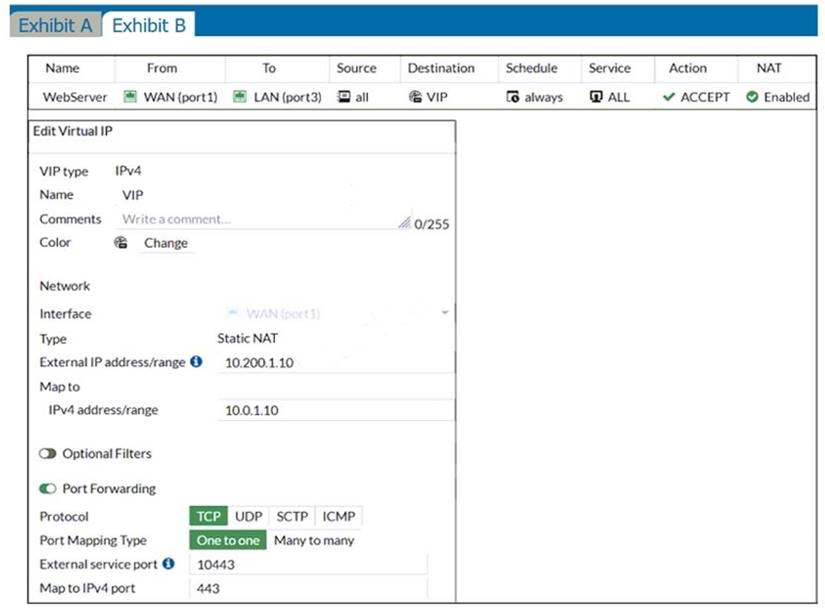
The WAN (port1) interface has the IP address 10.200. 1. 1/24. The LAN (port2) interface has the IP address 10.0. 1.254/24.
The first firewall policy has NAT enabled on the outgoing interface address. The second firewall policy is configured with a VIP as the destination address. Which IP address will be used to source NAT the Internet traffic coming from a workstation with the IP address 10.0. 1. 10/24?
- A. 10.200. 1. 10
- B. Any available IP address in the WAN (port1) subnet 10.200. 1.0/24 66 of 108
- C. 10.200. 1. 1
- D. 10.0. 1.254
Answer: A
Explanation:
https://help.fortinet.com/fos50hlp/54/Content/FortiOS/fortigate-firewall-52/Firewall%20Objects/Virtual%20IPs.
NEW QUESTION 10
An administrator must disable RPF check to investigate an issue.
Which method is best suited to disable RPF without affecting features like antivirus and intrusion prevention system?
- A. Enable asymmetric routing, so the RPF check will be bypassed.
- B. Disable the RPF check at the FortiGate interface level for the source check.
- C. Disable the RPF check at the FortiGate interface level for the reply check .
- D. Enable asymmetric routing at the interface level.
Answer: B
NEW QUESTION 11
Why does FortiGate keep TCP sessions in the session table for some seconds even after both sides (client and server) have terminated the session?
- A. To remove the NAT operation.
- B. To generate logs
- C. To finish any inspection operations.
- D. To allow for out-of-order packets that could arrive after the FIN/ACK packets.
Answer: D
NEW QUESTION 12
Refer to the FortiGuard connection debug output.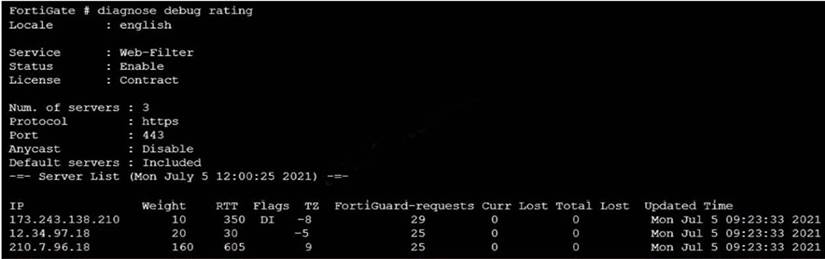
Based on the output shown in the exhibit, which two statements are correct? (Choose two.)
- A. A local FortiManager is one of the servers FortiGate communicates with.
- B. One server was contacted to retrieve the contract information.
- C. There is at least one server that lost packets consecutively.
- D. FortiGate is using default FortiGuard communication settings.
Answer: BD
Explanation:
FortiGate Security 7.2 Study Guide (p.287-288): "Flags: D (IP returned from DNS), I (Contract server contacted), T (being timed), F (failed)" "By default, FortiGate is configured to enforce the use of HTTPS port 443 to perform live filtering with FortiGuard or FortiManager. Other ports and protocols are available by disabling the FortiGuard anycast setting on the CLI."
NEW QUESTION 13
How does FortiGate act when using SSL VPN in web mode?
- A. FortiGate acts as an FDS server.
- B. FortiGate acts as an HTTP reverse proxy.
- C. FortiGate acts as DNS server.
- D. FortiGate acts as router.
Answer: B
NEW QUESTION 14
Which statement about video filtering on FortiGate is true?
- A. Video filtering FortiGuard categories are based on web filter FortiGuard categories.
- B. It does not require a separate FortiGuard license.
- C. Full SSL inspection is not required.
- D. its available only on a proxy-based firewall policy.
Answer: D
Explanation:
FortiGate Security 7.2 Study Guide (p.279): "To apply the video filter profile, proxy-based firewall polices currently allow you to enable the video filter profile. You must enable full SSL inspection on the firewall policy."
https://docs.fortinet.com/document/fortigate/7.2.4/administration-guide/860867/filtering-based-on-fortiguard-cat
NEW QUESTION 15
An administrator has configured the following settings: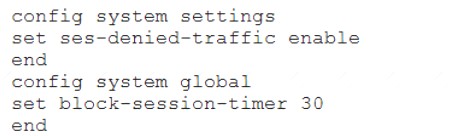
What are the two results of this configuration? (Choose two.)
- A. Device detection on all interfaces is enforced for 30 minutes.
- B. Denied users are blocked for 30 minutes.
- C. A session for denied traffic is created.
- D. The number of logs generated by denied traffic is reduced.
Answer: CD
Explanation:
ses-denied-traffic
Enable/disable including denied session in the session table. https://docs.fortinet.com/document/fortigate/7.0.6/cli-reference/20620/config-system-settings block-session-timer
Duration in seconds for blocked sessions . integer
Minimum value: 1 Maximum value: 300
30
https://docs.fortinet.com/document/fortigate/7.0.6/cli-reference/1620/config-system-global
NEW QUESTION 16
Which two statements explain antivirus scanning modes? (Choose two.)
- A. In proxy-based inspection mode, files bigger than the buffer size are scanned.
- B. In flow-based inspection mode, FortiGate buffers the file, but also simultaneously transmits it to the client.
- C. In proxy-based inspection mode, antivirus scanning buffers the whole file for scanning, before sending it to the client.
- D. In flow-based inspection mode, files bigger than the buffer size are scanned.
Answer: BC
Explanation:
An antivirus profile in full scan mode buffers up to your specified file size limit. The default is 10 MB. That is large enough for most files, except video files. If your FortiGate model has more RAM, you may be able to increase this threshold. Without a limit, very large files could exhaust the scan memory. So, this threshold balances risk and performance. Is this tradeoff unique to FortiGate, or to a specific model? No. Regardless of vendor or model, you must make a choice. This is because of the difference between scans in theory, that have no limits, and scans on real-world devices, that have finite RAM. In order to detect 100% of malware regardless of file size, a firewall would need infinitely large RAM--something that no device has in the real world. Most viruses are very small. This table shows a typical tradeoff. You can see that with the default 10 MB threshold, only 0.01% of viruses pass through.
FortiGate Security 7.2 Study Guide (p.350 & 352): "In flow-based inspection mode, the IPS engine reads the payload of each packet, caches a local copy, and forwards the packet to the receiver at the same time. Because the file is ransmitted simultaneously, flow-based mode consumes more CPU cycles than proxy-based." "Each protocol’s proxy picks up a connection and buffers the entire file first (or waits until the oversize limit is reached) before scanning. The client must wait for the scanning to finish."
NEW QUESTION 17
A network administrator is configuring a new IPsec VPN tunnel on FortiGate. The remote peer IP address is dynamic. In addition, the remote peer does not support a dynamic DNS update service.
What type of remote gateway should the administrator configure on FortiGate for the new IPsec VPN tunnel to work?
- A. Static IP Address
- B. Dialup User
- C. Dynamic DNS
- D. Pre-shared Key
Answer: B
Explanation:
Dialup user is used when the remote peer's IP address is unknown. The remote peer whose IP address is unknown acts as the dialup clien and this is often the case for branch offices and mobile VPN clients that use dynamic IP address and no dynamic DNS
NEW QUESTION 18
Refer to the exhibits.
Exhibit A shows the application sensor configuration. Exhibit B shows the Excessive-Bandwidth and Apple
filter details.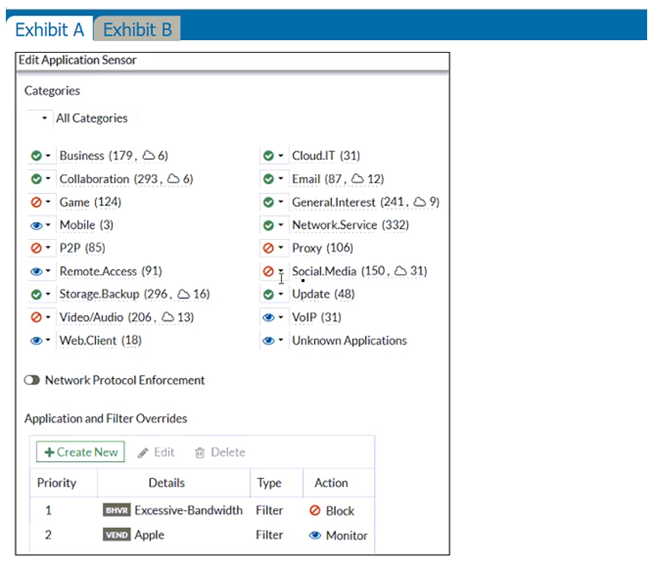
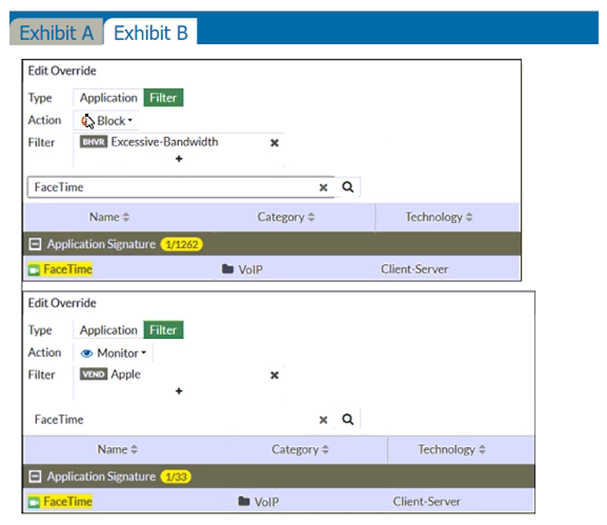
Based on the configuration, what will happen to Apple FaceTime if there are only a few calls originating or incoming?
- A. Apple FaceTime will be allowed, based on the Categories configuration.
- B. Apple FaceTime will be blocked, based on the Excessive-Bandwidth filter configuration.
- C. Apple FaceTime will be allowed, based on the Apple filter configuration.
- D. Apple FaceTime will be allowed only if the Apple filter in Application and Filter Overrides is set to Allow.
Answer: B
Explanation:
FortiGate Security 7.2 Study Guide (p.310): "Then, FortiGate scans packets for matches, in this order, for the application control profile: 1. Application and filter overrides: If you have configured any application overrides or filter overrides, the application control profile considers those first. It looks for a matching override starting at the top of the list, like firewall policies. 2. Categories: Finally, the application control profile applies the action that you’ve configured for applications in your selected categories."
NEW QUESTION 19
......
Thanks for reading the newest NSE4_FGT-7.2 exam dumps! We recommend you to try the PREMIUM Allfreedumps.com NSE4_FGT-7.2 dumps in VCE and PDF here: https://www.allfreedumps.com/NSE4_FGT-7.2-dumps.html (156 Q&As Dumps)
