
Exam Code: PL-100 (Practice Exam Latest Test Questions VCE PDF)
Exam Name: Microsoft Power Platform App Maker
Certification Provider: Microsoft
Free Today! Guaranteed Training- Pass PL-100 Exam.
Also have PL-100 free dumps questions for you:
NEW QUESTION 1
A company uses Power Automate and Power Apps to streamline business processes. You need to use AI Builder to analyze customer reviews of the company’s products.
In which order should you perform the actions? To answer, move all actions from the list of actions to the answer area and arrange them in the correct order.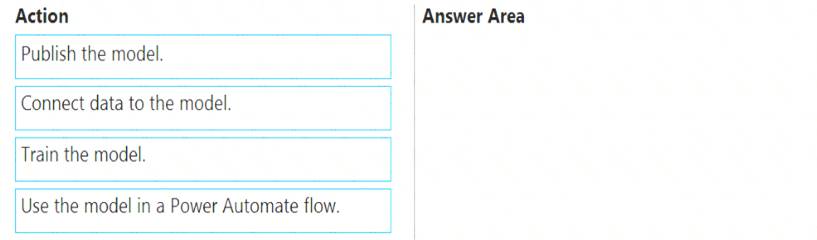
- A. Mastered
- B. Not Mastered
Answer: A
Explanation:
Step 1: Connect data to the model.
First create an AI Builder form processing model for the customer reviews you want to process.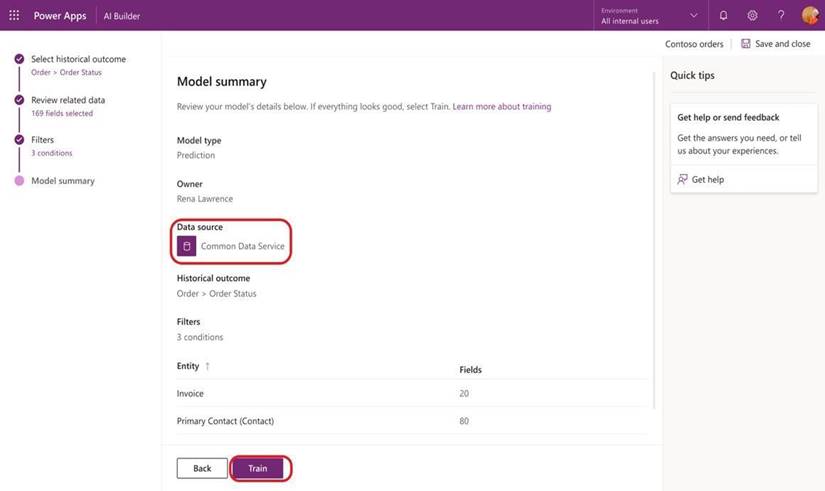
Step 2: Train the model. Step 3: Publish the model.
Step 4: Use the model in a Power Automate flow.
Once you train and publish the model, create a solution-aware flow in Power Automate. Reference:
https://powerapps.microsoft.com/en-us/blog/introducing-simplified-ai-builder-experience-in-power-automate/
NEW QUESTION 2
Note: This question is part of a series of questions that present the same scenario. Each question in the series contains a unique solution that might meet the stated goals. Some question sets might have more than one correct solution, while others might not have a correct solution.
After you answer a question in this section, you will NOT be able to return to it. As a result, these questions will not appear in the review screen.
You are creating a canvas app that displays a list of accounts.
Users must be able to select an account and view details for the account. The app must include a feature that brings the user back to the list of accounts.
You add a blank screen named Screen_Accounts and add a gallery named Gallery_Accounts to the screen. You set the data source of Gallery_Accounts to Accounts and add another blank screen named Screen_AccountDetail.
You need to complete the app. Solution: Add an edit form to Screen_AccountDetail and set the Default Mode of the form to New Set the OnSelect property of Gallery_Accounts to Navigate(Screen_AccountDetail). Set the data source of the form to Accounts. Set the Item property of the form to Selected. Add a back icon on Screen_AccountDetail and set its OnSelect property to Navigate(Screen_Accounts).
Does the solution meet the goal?
- A. Yes
- B. No
Answer: B
Explanation:
FormMode.New: the form is populated with default values and the user can modify the values of the fields. Once complete, the user can add the record to the data source.
Reference:
https://docs.microsoft.com/en-us/powerapps/maker/canvas-apps/functions/function-form
NEW QUESTION 3
You need to provide all app components of the application to Tailwind Traders. What should you do?
- A. Package the application and flow components into a single solution for export.
- B. Run the app checker and flow checker prior to publishing each component for export.
- C. Export each component separately but use the same version number for each component.
- D. Publish the application and flow solutions at the same time before exporting each one.
Answer: B
Explanation:
Scenario: When identifying versions of the app solution, all dependencies, entities, and user interfaces components must be identified to avoid any unintentional issues caused by reverting individual components to a previous version.
Power Apps has added components to the rule set that encourages best practices in the Power Apps Checker. You can check your canvas apps and flows that are included in solutions and then review all issues in a single, consolidated report.
Reference:
https://docs.microsoft.com/en-us/power-platform-release-plan/2019wave2/microsoft-powerapps/checker-include
NEW QUESTION 4
An administrator plans to create and deploy dashboards for use only by sales associates. The dashboards will display the current sales pipeline, open cases, recent major wins, and key opportunities by postal code. Sales associates must be able to act on the specific data displayed in dashboards.
You need to create the dashboards.
Which type of dashboards should you create? To answer, select the appropriate options in the answer area.
NOTE: Each correct selection is worth one point.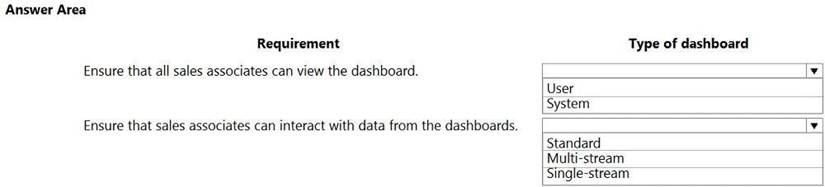
- A. Mastered
- B. Not Mastered
Answer: A
Explanation:
Box 1: User
Type of dashboard: If you want your dashboards to be available across the organization and do not want to manage the access levels at a more detailed level, you might want to create an organization-owned dashboard. However, if you are concerned about the access privileges and security of your dashboard, consider creating a user-owned dashboard where you have more control on who can access it.
Box 2: Single-stream
The single-stream dashboards display real-time data over one stream based on an entity view or queue. The single-stream dashboards are typically helpful to Tier 2 service leads or managers, who monitor fewer, but more complex or escalated cases.
Reference:
https://docs.microsoft.com/en-us/powerapps/developer/model-driven-apps/create-dashboard https://docs.microsoft.com/en-us/powerapps/maker/model-driven-apps/configure-interactive-experience-dashbo
NEW QUESTION 5
You create a Power Platform solution. Solution data is stored in a variety of documented cloud services. You must also be able to connect to one or more industry data sources.
You need to configure the data sources. What should you do?
- A. Create a business process flow.
- B. Create a data policy template.
- C. Create a UI flow.
- D. Use an existing data connector.
Answer: D
Explanation:
In Power Apps, add a data connection to an existing canvas app or to an app that you're building from scratch. Your app can connect to SharePoint, Common Data Service, Salesforce, OneDrive, or many other data sources.
Note:
Add data source
* 1. In the center pane, select connect to data to open the Data pane.
* 2. Select Add data source.
* 3. If the list of connections includes the one that you want, select it to add it to the app. Otherwise, skip to the next step.
* 4. Select New connection to display a list of connections.
* 5. In the search bar, type or paste the first few letters of the connection you want, and then select the connection when it appears.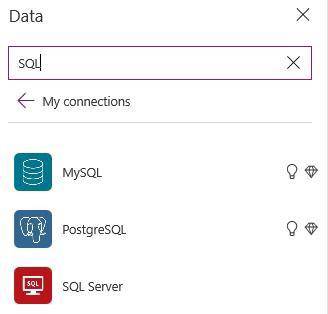
* 6. Select Create to both create the connection and add it to your app. Reference:
https://docs.microsoft.com/en-us/powerapps/maker/canvas-apps/add-data-connection
NEW QUESTION 6
You create a model-driven app for a company. The app will be used to manage events that the company organizes.
The Events entity ownership type is set to User or team. Members of the marketing team are assigned the MarketingTeam security role. All privileges for the role are set to User access.
All employees must be able to view event records. Only members of the marketing team are permitted to create or edit event records. You create a role named OtherEmployees.
You need to configure the MarketingTeam and OtherEmployees security roles.
Which three actions should you perform? Each correct selection presents a part of the solution.
NOTE: Each correct selection is worth one point.
- A. Set the access level for the OtherEmployees security role to Organization for the Read permission.
- B. Set the access level for the MarketingTeam security role to Organization for the Read permission.
- C. Set the access level for the OtherEmployees security role to None Selected for the Read permission.
- D. Set the access level for the MarketingTeam security role to None Selected for the Read permission.
- E. Set the access level for the MarketingTeam security role to None Selected for the Create and White permission.
- F. Set the access level for the OtherEmployees security role to None Selected for the Create and Write permission.
Answer: ABE
NEW QUESTION 7
Note: This question is part of a series of questions that present the same scenario. Each question in the series contains a unique solution that might meet the stated goals. Some question sets might have more than one correct solution, while others might not have a correct solution.
After you answer a question in this section, you will NOT be able to return to it. As a result, these questions will not appear in the review screen.
You are creating a canvas app that displays a list of accounts.
Users must be able to select an account and view details for the account. The app must include a feature that brings the user back to the list of accounts.
You add a blank screen named Screen_Accounts and add a gallery named Gallery_Accounts to the screen. You set the data source of Gallery_Accounts to Accounts and add another blank screen named Screen_AccountDetail.
You need to complete the app. Solution: Add an edit form to Screen_AccountDetail and set the Default Mode of the form to View. Set the OnSelect property of Gallery_Accounts to Navigate(Screen_AccountDetail). Set the data source of the form to Accounts. Set the Item property of the form to Selected. Add a back icon on Screen_AccountDetail and set its OnSelect property to Navigate(Screen_Accounts).
Does the solution meet the goal?
- A. Yes
- B. No
Answer: A
Explanation:
View, edit, or create an item, save the contents, and reset the controls in an Edit form control. FormMode.View: The form is populated with an existing record but the user cannot modify the values of the
fields.
This function is often invoked from the OnSelect formula of a Button or Image control. Reference:
https://docs.microsoft.com/en-us/powerapps/maker/canvas-apps/functions/function-form
NEW QUESTION 8
You are an app maker. You are creating a canvas app. You do not have access to Power BI.
You need to add charts to the app.
Which three chart types can you add directly to the canvas app? Each correct answer presents a complete solution.
NOTE: Each correct selection is worth one point.
- A. pie
- B. area
- C. funnel
- D. column
- E. line
Answer: ADE
Explanation:
You can use line charts, pie charts, and bar charts to display your data in a canvas app. Add a bar chart to display your data:
* 1. On the Home tab, add a screen.
* 2. On the Insert tab, select Charts, and then select Column Chart. Reference:
https://docs.microsoft.com/en-us/powerapps/maker/canvas-apps/use-line-pie-bar-chart
NEW QUESTION 9
You create a canvas app.
You need to make the app available to other people in your company.
What are two possible ways to achieve the goal? Each correct answer presents a complete solution.
NOTE: Each correct selection is worth one point.
- A. Grant access to individual users in your company.
- B. Share the app with a Microsoft Exchange distribution list.
- C. Grant access to a Microsoft Teams team.
- D. Share the app with a Microsoft Azure Active Directory security group.
Answer: AD
Explanation:
After you build a canvas app that addresses a business need, specify which users in your organization can run the app and which can modify and even reshare it. Specify each user by name, or specify a security group in Azure Active Directory.
Reference:
https://docs.microsoft.com/en-us/powerapps/maker/canvas-apps/share-app
NEW QUESTION 10
Note: This question is part of a series of questions that present the same scenario. Each question in the series contains a unique solution that might meet the stated goals. Some question sets might have more than one correct solution, while others might not have a correct solution.
After you answer a question in this section, you will NOT be able to return to it. As a result, these questions will not appear in the review screen.
You build a canvas app for a manufacturing company. The company receives parts and materials from many vendors. You create a form to collect information from packing slips.
Receivers must be able to take a picture of packing slips to receive materials instead of manually entering data in the app.
You need to ensure that users can scan packing slip information into the form. Proposed solution: Use a Key Phrase Extraction model.
Does the solution meet the goal?
- A. Yes
- B. No
Answer: B
Explanation:
The key phrase extraction prebuilt model identifies the main points in a text document. Reference:
https://docs.microsoft.com/en-us/ai-builder/prebuilt-key-phrase
NEW QUESTION 11
You create a canvas app for technicians at a computer store. You assign technicians cases to work on. The technicians update cases at the end of customer site visit.
The manager wants the technicians to sell warranties to the customers. If a customer agrees to purchase a warranty, technicians use the canvas app to immediately alert the sales team, and then the technician records details about the warranty into the app.
You need to create a flow to alert the sales team. Which type of trigger should you use?
- A. Flow button for mobile
- B. Power Apps
- C. Office 365 Outlook
- D. Common Data Service
Answer: A
Explanation:
Create a button flow to run routine tasks by simply tapping a button. Customize your flow by allowing the user to provide specific details that will be used when the flow runs.
Note: There are many repetitive tasks that we all wish we could run with just a tap of a button. For example, you may need to quickly email your team to remind them to join the daily team sync, or you may want to start a new Visual Studio Codespaces build of your code base after you've been notified that there are no more checkins planned for the day. Button flows allow you to accomplish these and many other tasks simply by tapping a button on your mobile device.
Reference:
https://docs.microsoft.com/en-us/power-automate/button-flow-with-user-input-tokens
NEW QUESTION 12
You are designing a canvas app that will be used by all users including users who have vision impairments. Which outcome is achieved by each action? To answer, drag the appropriate outcomes to the correct actions.
Each outcome may be used once, more than once, or not at all. You may need to drag the split bar between
panes or scroll to view content.
NOTE: Each correct selection is worth one point.
- A. Mastered
- B. Not Mastered
Answer: A
Explanation:
Reference:
https://docs.microsoft.com/sv-se/powerapps/maker/canvas-apps/accessible-apps
NEW QUESTION 13
Note: This question is part of a series of questions that present the same scenario. Each question in the series contains a unique solution that might meet the stated goals. Some question sets might have more than one correct solution, while others might not have a correct solution.
After you answer a question in this section, you will NOT be able to return to it. As a result, these questions will not appear in the review screen.
You build a canvas app for a manufacturing company. The company receives parts and materials from many vendors. You create a form to collect information from packing slips.
Receivers must be able to take a picture of packing slips to receive materials instead of manually entering data in the app.
You need to ensure that users can scan packing slip information into the form. Proposed solution: Use an Entity Extraction model.
Does the solution meet the goal?
- A. Yes
- B. No
Answer: A
Explanation:
AI Builder entity extraction models recognize specific data in the text that you target based on your business needs.
The model identifies key elements in the text and then classifies them into predefined categories. This can help you transform unstructured data into structured data that’s machine-readable. You can then apply processing to retrieve information, extract facts, and answer questions.
Note: Create a canvas app and add the text recognizer AI Builder component to your screen. This component takes a photo or loads an image from the local device, and then processes it to detect and extract text based on the text recognition prebuilt model. If it detects text in the image, the component outputs the text and identifies the instances by showing a rectangle for each instance in the image.
Reference:
https://knowledgefrommanish.com/powerplatform/ai-builder-entity-extraction-ai-model/ https://docs.microsoft.com/en-us/ai-builder/prebuilt-text-recognizer-component-in-powerapps
NEW QUESTION 14
......
Thanks for reading the newest PL-100 exam dumps! We recommend you to try the PREMIUM Dumps-hub.com PL-100 dumps in VCE and PDF here: https://www.dumps-hub.com/PL-100-dumps.html (47 Q&As Dumps)
