
Act now and download your Google Professional-Cloud-Network-Engineer test today! Do not waste time for the worthless Google Professional-Cloud-Network-Engineer tutorials. Download Up to the minute Google Google Cloud Certified - Professional Cloud Network Engineer exam with real questions and answers and begin to learn Google Professional-Cloud-Network-Engineer with a classic professional.
Free demo questions for Google Professional-Cloud-Network-Engineer Exam Dumps Below:
NEW QUESTION 1
You want to implement an IPSec tunnel between your on-premises network and a VPC via Cloud VPN. You need to restrict reachability over the tunnel to specific local subnets, and you do not have a device capable of speaking Border Gateway Protocol (BGP).
Which routing option should you choose?
- A. Dynamic routing using Cloud Router
- B. Route-based routing using default traffic selectors
- C. Policy-based routing using a custom local traffic selector
- D. Policy-based routing using the default local traffic selector
Answer: C
NEW QUESTION 2
Your company's web server administrator is migrating on-premises backend servers for an application to GCP. Libraries and configurations differ significantly across these backend servers. The migration to GCP will be lift-and-shift, and all requests to the servers will be served by a single network load balancer frontend. You want to use a GCP-native solution when possible.
How should you deploy this service in GCP?
- A. Create a managed instance group from one of the images of the on-premises servers, and link thisinstance group to a target pool behind your load balancer.
- B. Create a target pool, add all backend instances to this target pool, and deploy the target pool behind your load balancer.
- C. Deploy a third-party virtual appliance as frontend to these servers that will accommodate the significant differences between these backend servers.
- D. Use GCP's ECMP capability to load-balance traffic to the backend servers by installing multiple equal-priority static routes to the backend servers.
Answer: B
NEW QUESTION 3
You are using a 10-Gbps direct peering connection to Google together with the gsutil tool to upload files to Cloud Storage buckets from on-premises servers. The on-premises servers are 100 milliseconds away from the Google peering point. You notice that your uploads are not using the full 10-Gbps bandwidth available to you. You want to optimize the bandwidth utilization of the connection.
What should you do on your on-premises servers?
- A. Tune TCP parameters on the on-premises servers.
- B. Compress files using utilities like tar to reduce the size of data being sent.
- C. Remove the -m flag from the gsutil command to enable single-threaded transfers.
- D. Use the perfdiag parameter in your gsutil command to enable faster performance: gsutil perfdiag gs://[BUCKET NAME].
Answer: A
Explanation:
https://cloud.google.com/solutions/tcp-optimization-for-network-performance-in-gcp-and-hybrid https://cloud.google.com/solutions/tcp-optimization-for-network-performance-in-gcp-and-hybrid
https://cloud.google.com/blog/products/gcp/5-steps-to-better-gcp-network-performance?hl=ml
NEW QUESTION 4
In your Google Cloud organization, you have two folders: Dev and Prod. You want a scalable and consistent way to enforce the following firewall rules for all virtual machines (VMs) with minimal cost:
Port 8080 should always be open for VMs in the projects in the Dev folder.
Any traffic to port 8080 should be denied for all VMs in your projects in the Prod folder. What should you do?
- A. Create and associate a firewall policy with the Dev folder with a rule to open port 8080. Create and associate a firewall policy with the Prod folder with a rule to deny traffic to port 8080.
- B. Create a Shared VPC for the Dev projects and a Shared VPC for the Prod project
- C. Create a VPC firewall rule to open port 8080 in the Shared VPC for De
- D. Create a firewall rule to deny traffic to port 8080 in the Shared VPC for Pro
- E. Deploy VMs to those Shared VPCs.
- F. In all VPCs for the Dev projects, create a VPC firewall rule to open port 8080. In all VPCs for the Prod projects, create a VPC firewall rule to deny traffic to port 8080.
- G. Use Anthos Config Connector to enforce a security policy to open port 8080 on the Dev VMs and deny traffic to port 8080 on the Prod VMs.
Answer: A
NEW QUESTION 5
You are configuring an HA VPN connection between your Virtual Private Cloud (VPC) and on-premises network. The VPN gateway is named VPN_GATEWAY_1. You need to restrict VPN tunnels created in the project to only connect to your on-premises VPN public IP address: 203.0.113.1/32. What should you do?
- A. Configure a firewall rule accepting 203.0.113.1/32, and set a target tag equal to VPN_GATEWAY_1.
- B. Configure the Resource Manager constraint constraints/compute.restrictVpnPeerIPs to use an allowList consisting of only the 203.0.113.1/32 address.
- C. Configure a Google Cloud Armor security policy, and create a policy rule to allow 203.0.113.1/32.
- D. Configure an access control list on the peer VPN gateway to deny all traffic except 203.0.113.1/32, and attach it to the primary external interface.
Answer: B
NEW QUESTION 6
Your company has just launched a new critical revenue-generating web application. You deployed the application for scalability using managed instance groups, autoscaling, and a network load balancer as frontend. One day, you notice severe bursty traffic that the caused autoscaling to reach the maximum number of instances, and users of your application cannot complete transactions. After an investigation, you think it as a DDOS attack. You want to quickly restore user access to your application and allow successful transactions while minimizing cost.
Which two steps should you take? (Choose two.)
- A. Use Cloud Armor to blacklist the attacker’s IP addresses.
- B. Increase the maximum autoscaling backend to accommodate the severe bursty traffic.
- C. Create a global HTTP(s) load balancer and move your application backend to this load balancer.
- D. Shut down the entire application in GCP for a few hour
- E. The attack will stop when the application is offline.
- F. SSH into the backend compute engine instances, and view the auth logs and syslogs to further understand the nature of the attack.
Answer: BE
NEW QUESTION 7
You have the following routing design. You discover that Compute Engine instances in Subnet-2 in the asia-southeast1 region cannot communicate with compute resources on-premises. What should you do?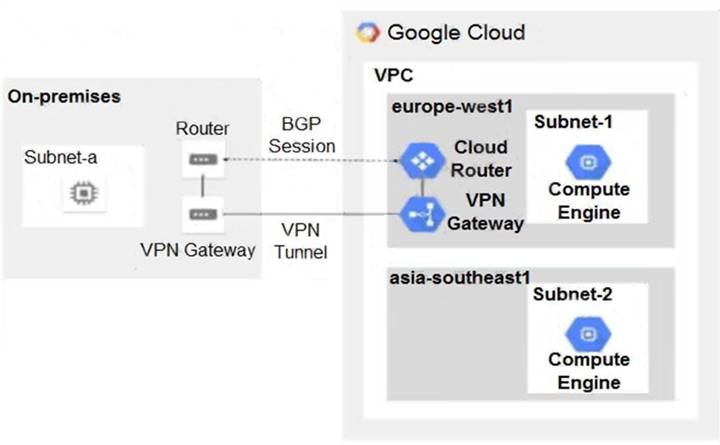
- A. Configure a custom route advertisement on the Cloud Router.
- B. Enable IP forwarding in the asia-southeast1 region.
- C. Change the VPC dynamic routing mode to Global.
- D. Add a second Border Gateway Protocol (BGP) session to the Cloud Router.
Answer: C
NEW QUESTION 8
You have a storage bucket that contains the following objects:
- folder-a/image-a-1.jpg
- folder-a/image-a-2.jpg
- folder-b/image-b-1.jpg
- folder-b/image-b-2.jpg
Cloud CDN is enabled on the storage bucket, and all four objects have been successfully cached. You want to remove the cached copies of all the objects with the prefix folder-a, using the minimum number of commands.
What should you do?
- A. Add an appropriate lifecycle rule on the storage bucket.
- B. Issue a cache invalidation command with pattern /folder-a/*.
- C. Make sure that all the objects with prefix folder-a are not shared publicly.
- D. Disable Cloud CDN on the storage bucke
- E. Wait 90 second
- F. Re-enable Cloud CDN on the storage bucket.
Answer: B
Explanation:
https://docs.aws.amazon.com/AmazonCloudFront/latest/DeveloperGuide/Invalidation.html
NEW QUESTION 9
Your company has 10 separate Virtual Private Cloud (VPC) networks, with one VPC per project in a single region in Google Cloud. Your security team requires each VPC network to have private connectivity to the main on-premises location via a Partner Interconnect connection in the same region. To optimize cost and operations, the same connectivity must be shared with all projects. You must ensure that all traffic between different projects, on-premises locations, and the internet can be inspected using the same third-party appliances. What should you do?
- A. Configure the third-party appliances with multiple interfaces and specific Partner Interconnect VLAN attachments per projec
- B. Create the relevant routes on the third-party appliances and VPC networks.
- C. Configure the third-party appliances with multiple interfaces, with each interface connected to a separate VPC networ
- D. Create separate VPC networks for on- premises and internet connectivit
- E. Create the relevant routes on the third-party appliances and VPC networks.
- F. Consolidate all existing projects’ subnetworks into a single VP
- G. Create separate VPC networks for on-premises and internet connectivit
- H. Configure the third-party appliances with multiple interfaces, with each interface connected to a separate VPC networ
- I. Create the relevant routes on the third-party appliances and VPC networks.
- J. Configure the third-party appliances with multiple interface
- K. Create a hub VPC network for all projects, and create separate VPC networks for on-premises and internet connectivit
- L. Create the relevant routes on the third-party appliances and VPC network
- M. Use VPC Network Peering to connect all projects’ VPC networks to the hub VP
- N. Export custom routes from the hub VPC and import on all projects’ VPC networks.
Answer: D
NEW QUESTION 10
You need to centralize the Identity and Access Management permissions and email distribution for the WebServices Team as efficiently as possible.
What should you do?
- A. Create a Google Group for the WebServices Team.
- B. Create a G Suite Domain for the WebServices Team.
- C. Create a new Cloud Identity Domain for the WebServices Team.
- D. Create a new Custom Role for all members of the WebServices Team.
Answer: A
NEW QUESTION 11
You are designing a shared VPC architecture. Your network and security team has strict controls over which routes are exposed between departments. Your Production and Staging departments can communicate with each other, but only via specific networks. You want to follow Google-recommended practices.
How should you design this topology?
- A. Create 2 shared VPCs within the shared VPC Host Project, and enable VPC peering between the
- B. Use firewall rules to filter access between the specific networks.
- C. Create 2 shared VPCs within the shared VPC Host Project, and create a Cloud VPN/Cloud Router between the
- D. Use Flexible Route Advertisement (FRA) to filter access between the specific networks.
- E. Create 2 shared VPCs within the shared VPC Service Project, and create a Cloud VPN/Cloud Router between the
- F. Use Flexible Route Advertisement (FRA) to filter access between the specific networks.
- G. Create 1 VPC within the shared VPC Host Project, and share individual subnets with the Service Projects to filter access between the specific networks.
Answer: D
NEW QUESTION 12
Your company offers a popular gaming service. Your instances are deployed with private IP addresses, and external access is granted through a global load balancer. You have recently engaged a traffic-scrubbing service and want to restrict your origin to allow connections only from the traffic-scrubbing service.
What should you do?
- A. Create a Cloud Armor Security Policy that blocks all traffic except for the traffic-scrubbing service.
- B. Create a VPC Firewall rule that blocks all traffic except for the traffic-scrubbing service.
- C. Create a VPC Service Control Perimeter that blocks all traffic except for the traffic-scrubbing service.
- D. Create IPTables firewall rules that block all traffic except for the traffic-scrubbing service.
Answer: A
Explanation:
Global load balancer will proxy the connection . thus no trace of session origin IP. you should use Cloud Armor to geofence your service.
https://cloud.google.com/load-balancing/docs/https
NEW QUESTION 13
Your organization's security policy requires that all internet-bound traffic return to your on-premises data center through HA VPN tunnels before egressing to the internet, while allowing virtual machines (VMs) to leverage private Google APIs using private virtual IP addresses 199.36.153.4/30. You need to configure the routes to enable these traffic flows. What should you do?
- A. Configure a custom route 0.0.0.0/0 with a priority of 500 whose next hop is the default internet gateway.Configure another custom route 199.36.153.4/30 with priority of 1000 whose next hop is the VPN tunnel back to the on-premises data center.
- B. Configure a custom route 0.0.0.0/0 with a priority of 1000 whose next hop is the internet gateway.Configure another custom route 199.36.153.4/30 with a priority of 500 whose next hop is the VPN tunnel back to the on-premises data center.
- C. Announce a 0.0.0.0/0 route from your on-premises router with a MED of 1000. Configure a custom route 199.36.153.4/30 with a priority of 1000 whose next hop is the default internet gateway.
- D. Announce a 0.0.0.0/0 route from your on-premises router with a MED of 500. Configure another custom route 199.36.153.4/30 with a priority of 1000 whose next hop is the VPN tunnel back to the onpremises data center.
Answer: A
NEW QUESTION 14
Your company just completed the acquisition of Altostrat (a current GCP customer). Each company has a separate organization in GCP and has implemented a custom DNS solution. Each organization will retain its current domain and host names until after a full transition and architectural review is done in one year. These are the assumptions for both GCP environments.
• Each organization has enabled full connectivity between all of its projects by using Shared VPC.
• Both organizations strictly use the 10.0.0.0/8 address space for their instances, except for bastion hosts (for accessing the instances) and load balancers for serving web traffic.
• There are no prefix overlaps between the two organizations.
• Both organizations already have firewall rules that allow all inbound and outbound traffic from the 10.0.0.0/8 address space.
• Neither organization has Interconnects to their on-premises environment.
You want to integrate networking and DNS infrastructure of both organizations as quickly as possible and with minimal downtime.
Which two steps should you take? (Choose two.)
- A. Provision Cloud Interconnect to connect both organizations together.
- B. Set up some variant of DNS forwarding and zone transfers in each organization.
- C. Connect VPCs in both organizations using Cloud VPN together with Cloud Router.
- D. Use Cloud DNS to create A records of all VMs and resources across all projects in both organizations.
- E. Create a third organization with a new host project, and attach all projects from your company and Altostrat to it using shared VPC.
Answer: BC
Explanation:
https://cloud.google.com/dns/docs/best-practices
NEW QUESTION 15
You are creating an instance group and need to create a new health check for HTTP(s) load balancing. Which two methods can you use to accomplish this? (Choose two.)
- A. Create a new health check using the gcloud command line tool.
- B. Create a new health check using the VPC Network section in the GCP Console.
- C. Create a new health check, or select an existing one, when you complete the load balancer’s backend configuration in the GCP Console.
- D. Create a new legacy health check using the gcloud command line tool.
- E. Create a new legacy health check using the Health checks section in the GCP Console.
Answer: AC
Explanation:
https://cloud.google.com/load-balancing/docs/health-checks#creating_and_modifying_health_checks
NEW QUESTION 16
You have just deployed your infrastructure on Google Cloud. You now need to configure the DNS to meet the following requirements:
Your on-premises resources should resolve your Google Cloud zones. Your Google Cloud resources should resolve your on-premises zones.
You need the ability to resolve “.internal” zones provisioned by Google Cloud. What should you do?
- A. Configure an outbound server policy, and set your alternative name server to be your on-premises DNS resolve
- B. Configure your on-premises DNS resolver to forward Google Cloud zone queries to Google's public DNS 8.8.8.8.
- C. Configure both an inbound server policy and outbound DNS forwarding zones with the target as the on-premises DNS resolve
- D. Configure your on-premises DNS resolver to forward Google Cloud zone queries to Google Cloud's DNS resolver.
- E. Configure an outbound DNS server policy, and set your alternative name server to be your on-premises DNS resolve
- F. Configure your on-premises DNS resolver to forward Google Cloud zone queries to Google Cloud's DNS resolver.
- G. Configure Cloud DNS to DNS peer with your on-premises DNS resolve
- H. Configure your on-premises DNS resolver to forward Google Cloud zone queries to Google's public DNS 8.8.8.8.
Answer: A
NEW QUESTION 17
Your company has recently installed a Cloud VPN tunnel between your on-premises data center and your Google Cloud Virtual Private Cloud (VPC). You need to configure access to the Cloud Functions API for your on-premises servers. The configuration must meet the following requirements:
Certain data must stay in the project where it is stored and not be exfiltrated to other projects.
Traffic from servers in your data center with RFC 1918 addresses do not use the internet to access Google Cloud APIs.
All DNS resolution must be done on-premises.
The solution should only provide access to APIs that are compatible with VPC Service Controls. What should you do?
- A. Create an A record for private.googleapis.com using the 199.36.153.8/30 address range.Create a CNAME record for *.googleapis.com that points to the A record.Configure your on-premises routers to use the Cloud VPN tunnel as the next hop for the addresses you used in the A record.Remove the default internet gateway from the VPC where your Cloud VPN tunnel terminates.
- B. Create an A record for restricted.googleapis.com using the 199.36.153.4/30 address range.Create a CNAME record for *.googleapis.com that points to the A record.Configure your on-premises routers to use the Cloud VPN tunnel as the next hop for the addresses you used in the A record.Configure your on-premises firewalls to allow traffic to the restricted.googleapis.com addresses.
- C. Create an A record for restricted.googleapis.com using the 199.36.153.4/30 address range.Create a CNAME record for *.googleapis.com that points to the A record.Configure your on-premises routers to use the Cloud VPN tunnel as the next hop for the addresses you used in the A record.Remove the default internet gateway from the VPC where your Cloud VPN tunnel terminates.
- D. Create an A record for private.googleapis.com using the 199.36.153.8/30 address range.Create a CNAME record for *.googleapis.com that points to the A record.Configure your on-premises routers to use the Cloud VPN tunnel as the next hop for the addresses you used in the A record.Configure your on-premises firewalls to allow traffic to the private.googleapis.com addresses.
Answer: C
NEW QUESTION 18
......
Recommend!! Get the Full Professional-Cloud-Network-Engineer dumps in VCE and PDF From Allfreedumps.com, Welcome to Download: https://www.allfreedumps.com/Professional-Cloud-Network-Engineer-dumps.html (New 153 Q&As Version)
