
We provide real SK0-005 exam questions and answers braindumps in two formats. Download PDF & Practice Tests. Pass CompTIA SK0-005 Exam quickly & easily. The SK0-005 PDF type is available for reading and printing. You can print more and practice many times. With the help of our CompTIA SK0-005 dumps pdf and vce product and material, you can easily pass the SK0-005 exam.
CompTIA SK0-005 Free Dumps Questions Online, Read and Test Now.
NEW QUESTION 1
An administrator receives an alert stating a S.MAR.T. error has been detected. Which of the following should the administrator run FIRST to determine the issue?
- A. A hard drive test
- B. A RAM test
- C. A power supply swap
- D. A firmware update
Answer: A
Explanation:
A S.M.A.R.T. error is an indication of a potential failure of a hard drive.
S.M.A.R.T. stands for Self-Monitoring, Analysis and Reporting Technology and it is a feature that monitors the health and performance of hard drives. A hard drive test can help diagnose the issue and determine if the drive needs to be replaced.References: https://www.comptia.org/training/resources/exam-objectives/comptia-server-sk0-005-exam- objectives (Objective 1.1)
NEW QUESTION 2
A global organization keeps personnel application servers that are local to each country. However, a security audit shows these application servers are accessible from sites in other countries. Which of the following hardening techniques should the organization use to restrict access to only sites that are in the same country?
- A. Configure a firewall
- B. Close the unneeded ports
- C. Install a HIDS
- D. Disable unneeded services.
Answer: A
Explanation:
Monitors Network Traffic Reference:https://www.fortinet.com/resources/cyberglossary/benefits-of-firewall
NEW QUESTION 3
An organization purchased six new 4TB drives for a server. An administrator is tasked with creating an efficient RAID given the minimum disk space requirement of 19TBs. Which of the following should the administrator choose to get the most efficient use of space?
- A. RAID 1
- B. RAID 5
- C. RAID 6
- D. RAID 10
Answer: B
Explanation:
RAID 5 is a RAID level that uses disk striping with parity. It requires a minimum of three disks and can handle one disk failure. RAID 5 distributes the parity information across all the disks in the array, which improves the read performance and reduces the write penalty. The capacity of a RAID 5 array is (N-1) times the size of the smallest disk, where N is the number of disks in the array. Therefore, for six 4TB disks, the capacity of a RAID 5 array would be (6-1) x 4TB = 20TB, which meets the minimum disk space requirement of 19TB. RAID 5 also has the leastamount of disk space lost to RAID overhead among the options, as it only uses onedisk’s worth of space for parity
NEW QUESTION 4
A server administrator has connected a new server to the network. During testing, the administrator discovers the server is not reachable via server but can be accessed by IP address. Which of the following steps should the server administrator take NEXT? (Select TWO).
- A. Check the default gateway.
- B. Check the route tables.
- C. Check the hosts file.
- D. Check the DNS server.
- E. Run the ping command.
- F. Run the tracert command
Answer: CD
Explanation:
If the server is not reachable by name but can be accessed by IP address, it means that there is a problem with name resolution. The hosts file and the DNS server are both responsible for mapping hostnames to IP addresses. Therefore, the server administrator should check these two files for any errors or inconsistencies that might prevent the server from being resolved by name. References: https://www.howtogeek.com/662249/how-to-edit-the-hosts-file-on-linux/ https://www.howtogeek.com/164981/how-to-use-nslookup-to-check-domain-name-information-in-microsoft-windows/
NEW QUESTION 5
DRAG DROP
A recent power Outage caused email services to go down. A sever administrator also received alerts from the datacenter’s UPS.
After some investigation, the server administrator learned that each POU was rated at a maximum Of 12A.
INSTRUCTIONS
Ensure power redundancy is implemented throughout each rack and UPS alarms are resolved. Ensure the maximum potential PDU consumption does not exceed 80% or 9.6A).
* a. PDU selections must be changed using the pencil icon.
* b. VM Hosts 1 and 2 and Mail Relay can be moved between racks.
* c. Certain devices contain additional details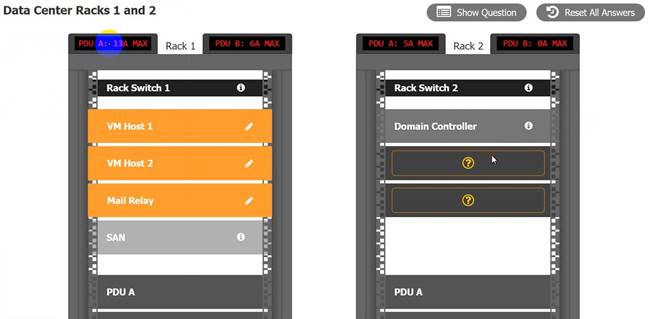
Solution:
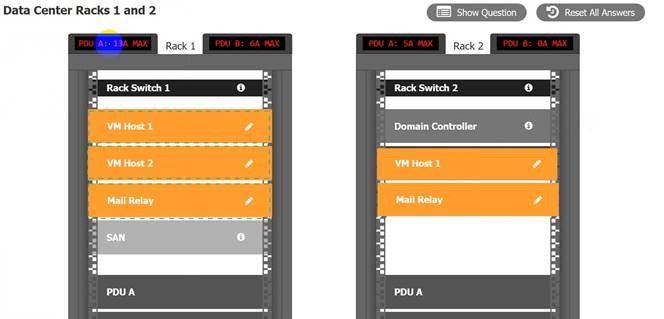
Does this meet the goal?
- A. Yes
- B. Not Mastered
Answer: A
NEW QUESTION 6
A systems administrator has several different types of hard drives. The administrator is setting up a MAS that will allow end users to see all the drives within the NAS. Which of the following storage types should the administrator use?
- A. RAID array
- B. Serial Attached SCSI
- C. Solid-state drive
- D. Just a bunch of disks
Answer: D
Explanation:
JBOD (Just a Bunch Of Disks) is a storage configuration that combines different types and sizes of hard drives into one logical unit without any RAID level or redundancy. It allows users to see all the drives within the unit as one large storage space. JBOD can utilize all the available capacity of the drives but does not provide any performance or fault tolerance benefits. Verified References: [JBOD], [RAID]
NEW QUESTION 7
A technician needs to deploy an operating system that would optimize server resources. Which of the following server installation methods would BEST meet this requirement?
- A. Full
- B. Bare metal
- C. Core
- D. GUI
Answer: C
Explanation:
The server installation method that would optimize server resources is core. Core is a minimal installation option that is available for some operating systems, such as Windows Server and Linux. Core installs only the essential components and features of the operating system, without any graphical user interface (GUI) or other unnecessary services or applications. Core reduces the disk footprint, memory usage, CPU consumption, and attack surface of the server, making it more efficient and secure. Core can be managed remotely using command-line tools, PowerShell, or GUI tools.
Reference:
https://docs.microsoft.com/en-us/windows-server/administration/performance- tuning/hardware/
NEW QUESTION 8
A server is performing slowly, and users are reporting issues connecting to the application on that server. Upon investigation, the server administrator notices several unauthorized services running on that server that are successfully communicating to an external site. Which of the following are MOST likely causing the issue?
(Choose two.)
- A. Adware is installed on the users’ devices
- B. The firewall rule for the server is misconfigured
- C. The server is infected with a virus
- D. Intrusion detection is enabled on the network
- E. Unnecessary services are disabled on the server
- F. SELinux is enabled on the server
Answer: CF
Explanation:
The server is infected with a virus and SELinux is enabled on the server are most likely causing the issue of unauthorized services running on the server. A virus is a type of malicious software that infects a system and performs unwanted or harmful actions, such as creating, modifying, deleting, or executing files. A virus can also create backdoors or open ports on a system to allow remote access or communication with external sites. SELinux (Security-Enhanced Linux) is a security module for Linux systems that enforces mandatory access control policies on processes and files. SELinux can prevent unauthorized services from running on a server by restricting their access to resources based on their security context. However, SELinux can also cause problems if it is not configured properly or if it conflicts with other security tools.
NEW QUESTION 9
The management team has mandated the use of data-at-rest encryption for all data. Which of the following forms of encryption best achieves this goal?
- A. Drive
- B. Database
- C. Folder
- D. File
Answer: A
Explanation:
Drive encryption is a form of encryption that best achieves the goal of data-at-rest encryption for all data. Drive encryption encrypts the entire hard drive, including the operating system, applications, and files. This prevents unauthorized access to the data if the drive is lost or stolen. Database, folder, and file encryption are forms of encryption that only encrypt specific data sets, not all data. References: [CompTIA Server+Certification Exam Objectives], Domain 5.0: Security, Objective 5.3: Given a scenario involving a security threat/vulnerability/risk, implement appropriate mitigation techniques.
NEW QUESTION 10
IDS alerts indicate abnormal traffic patterns are coming from a specific server in a data center that hosts sensitive data. Upon further investigation, the server administrator notices this server has been infected with a virus due to an exploit of a known vulnerability from its database software. Which of the following should the administrator perform after removing the virus to mitigate this issue from reoccurring and to maintain high availability? (Select three).
- A. Run a vulnerability scanner on the server.
- B. Repartition the hard drive that houses the database.
- C. Patch the vulnerability.
- D. Enable a host firewall.
- E. Reformat the OS on the server.
- F. Update the antivirus software.
- G. Remove the database software.
- H. Air gap the server from the network.
Answer: ACF
Explanation:
After removing the virus from the server, the administrator should perform the following actions to mitigate the issue from reoccurring and to maintain high availability:
✑ Run a vulnerability scanner on the server to identify any other potential weaknesses or exposures that could be exploited by attackers.
✑ Patch the vulnerability that allowed the virus to infect the server in the first place, using the latest updates from the database software vendor or a trusted source.
✑ Update the antivirus software on the server to ensure it has the most recent virus definitions and can detect and prevent future infections. The other options are either unnecessary or counterproductive for this scenario. Repartitioning the hard drive, reformatting the OS, removing the database software, or air gapping the server from the network would cause downtime and data loss, while enabling a host firewall would not prevent a virus infection from within the network. References: CompTIA Server+ Certification Exam Objectives, Domain 5.0: Security, Objective 5.2: Given a scenario involving a security threat/vulnerability/risk, implement appropriate mitigation techniques.
NEW QUESTION 11
A server technician installs a new NIC on a server and configures the NIC for IP connectivity. The technician then tests the connection using thepingcommand. Given the following partial output of thepingandipconfigcommands: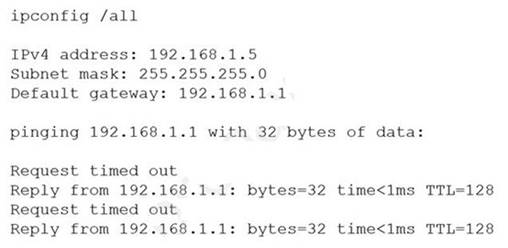
Which of the following caused the issue?
- A. Duplicate IP address
- B. Incorrect default gateway
- C. DHCP misconfiguration
- D. Incorrect routing table
Answer: A
Explanation:
✑ The ping command output shows that the NIC has an IP address of 192.168.1.100 and a default gateway of 192.168.1.1. However, when the technician tries to ping the default gateway, the reply comes from another IP address: 192.168.1.101. This means that there is another device on the network that has the same IP address as the default gateway, and it is responding to the ping request instead of the intended destination.
✑ A duplicate IP address can cause network connectivity problems, such as packet loss, routing errors, or unreachable hosts. To resolve this issue, the technician should either change the IP address of the default gateway or the device that is conflicting with it, or use DHCP to assign IP addresses automatically and avoid conflicts.
✑ The other options are not correct because they do not explain the ping output. An incorrect default gateway would cause no reply or a destination unreachable message, not a reply from a different IP address. A DHCP misconfiguration would cause an invalid or no IP address on the NIC, not a duplicate IP address on the network. An incorrect routing table would cause routing errors or unreachable destinations, not a reply from a different IP address.
References:
✑ https://askleo.com/what_is_ping_and_what_does_its_output_tell_me/
✑ https://learn.microsoft.com/en-us/windows-server/administration/windows- commands/ping
NEW QUESTION 12
A server administrator wants to run a performance monitor for optimal system utilization. Which of the following metrics can the administrator use for monitoring? (Choose two.)
- A. Memory
- B. Page file
- C. Services
- D. Application
- E. CPU
- F. Heartbeat
Answer: AE
Explanation:
Memory and CPU are two metrics that can be used for monitoring system utilization. Memory refers to the amount of RAM that is available and used by the system and its processes. CPU refers to the percentage of processor time that is consumed by the system and its processes. Both memory and CPU can affect the performance and responsiveness of the system and its applications. Monitoring memory and CPU can help identify bottlenecks, resource contention, memory leaks, high load, etc.
NEW QUESTION 13
A technician is checking a server rack. Upon entering the room, the technician notices the tans on a particular server in the rack are running at high speeds. This is the only server in the rack that is experiencing this behavior. The ambient temperature in the room appears to be normal. Which of the following is the MOST likely reason why the fans in that server are operating at full speed?
- A. The server is In the process of shutting down, so fan speed operations have been defaulted to high.
- B. An incorrect fan size was inserted into the server, and the server has had to Increase the fan speed to compensate.
- C. A fan failure has occurred, and the other fans have increased speed to compensate.
- D. The server is utilizing more memory than the other servers, so it has increased the fans to compensate.
Answer: C
Explanation:
This is the most likely reason why the fans in that server are operating at full speed while the ambient temperature in the room is normal and the other servers in the rack are not experiencing this behavior. A fan failure is a situation where one or more fans in a server stop working or malfunction due to wear and tear, dust, or other factors. This can cause overheating and performance issues on the server. To prevent this, most servers have a fan redundancy feature that allows the other fans to increase their speed and airflow to compensate for the failed fan and maintain a safe temperature level. The server is not likely to be in the process of shutting down, as this would not cause the fans to run at high speeds. An incorrect fan size is not likely to be inserted into the server, as most fans are standardized and compatible with the server chassis and motherboard. The server is not likely to be utilizing more memory than the other servers, as this would not cause a significant increase in temperature or fan speed. References: https://www.howtogeek.com/303282/how-to-manage-your-pcs-fans-for-optimal-airflow-and-cooling/https://www.howtogeek.com/174288/how-to-tell-if-your-computer-is-overheating-and-what-to-do-about-it/
NEW QUESTION 14
Due to a recent application migration, a company’s current storage solution does not meet the necessary requirements tor hosting data without impacting performance when the data is accessed in real time by multiple users. Which of the following is the BEST solution for this Issue?
- A. Install local external hard drives for affected users.
- B. Add extra memory to the server where data is stored.
- C. Compress the data to increase available space.
- D. Deploy a new Fibre Channel SAN solution.
Answer: D
Explanation:
A Fibre Channel SAN solution is a type of storage area network (SAN) that uses high-speed optical fiber cables to connect servers and storage devices. A SAN allows for hosting data without impacting performance when the data is accessed in real time by multiple users, as it provides fast data transfer rates, low latency, high availability, and scalability12. A local external hard drive (A) would not be suitable for multiple users, as it would limit the accessibility and security of the data. Adding extra memory to the server (B) would not solve the problem of data access performance, as it would not increase the bandwidth or reduce the congestion of the network. Compressing the data © would not improve the performance either, as it would add extraoverhead and complexity to the data processing and retrieval. References: 1 https://www.techradar.com/best/best-cloud- storage 2 https://solutionsreview.com/data-storage/the-best-enterprise-data-storage- solutions/
NEW QUESTION 15
The management team has mandated the use of data-at-rest encryption for all data. Which of the following forms of encryption best achieves this goal?
- A. Drive
- B. Database
- C. Folder
- D. File
Answer: A
Explanation:
Drive encryption is a form of data-at-rest encryption that encrypts the entire hard drive or solid state drive. This means that all the data on the drive, including the operating system, applications, and files, are protected from unauthorized access. Drive encryption is usually implemented at the hardware or firmware level, and requires a password, PIN, or biometric authentication to unlock the drive. Drive encryption is the most comprehensive and secure way to achieve data-at-rest encryption, as it prevents anyone from accessing the data without the proper credentials, even if they physically remove the drive from the server.
References: CompTIA Server+ Study Guide, Chapter 9: Security, page 367.
NEW QUESTION 16
......
100% Valid and Newest Version SK0-005 Questions & Answers shared by Certshared, Get Full Dumps HERE: https://www.certshared.com/exam/SK0-005/ (New 265 Q&As)
