
Ucertify 220-1101 Questions are updated and all 220-1101 answers are verified by experts. Once you have completely prepared with our 220-1101 exam prep kits you will be ready for the real 220-1101 exam without a problem. We have Improve CompTIA 220-1101 dumps study guide. PASSED 220-1101 First attempt! Here What I Did.
CompTIA 220-1101 Free Dumps Questions Online, Read and Test Now.
NEW QUESTION 1
The owner of a restaurant reports that wireless network connections are lost intermittently throughout the day. Which of the following steps should a technician take to troubleshoot the issue? (Select TWO).
- A. Identify the location of devices that utilize 2.4GHz.
- B. Check to see if the phones are IJTP or STP lines.
- C. Test to see if the copper electrical Wires are causing interference.
- D. Map all of the wireless signals in the restaurant.
- E. Verify T568B is being used in the wiring closet patch panel.
- F. Schedule timed router reboots throughout the day.
Answer: AD
Explanation:
The correct answers are A. Identify the location of devices that utilize 2.4GHz and D. Map all of the wireless signals in the restaurant. In order to troubleshoot the issue, the technician should first identify the location of devices that utilize the 2.4GHz frequency, as this can cause interference with the wireless signal. Additionally, the technician should map all of the wireless signals in the restaurant in order to identify any potential sources of interference. Checking to see if the phones are IJTP or STP lines, testing to see if the copper electrical wires are causing interference, verifying T568B is being used in the wiring closet patch panel, and scheduling timed router reboots throughout the day are not necessary steps for troubleshooting this issue.
NEW QUESTION 2
While using a popular videoconferencing program, the user selects a webcam, but the software is unable to open the webcam. The webcam was working the previous day. Which of the following should be done to address this issue?
- A. Close other video software and retry.
- B. Adjust the conference software to a compatible resolution.
- C. Switch the video from the webcam to "conference" mode.
- D. Reseat or replace the webcam.
Answer: A
Explanation:
One possible solution to address the issue of a webcam not working with a videoconferencing program is to close other video software and retry (option A). It’s possible that another video software program is currently using the webcam and preventing the videoconferencing program from accessing it. By closing any other video software that may be running on the computer, the user can ensure that the webcam is available for use by the videoconferencing program.
NEW QUESTION 3
A network technician needs to connect into the console of a switch. Which of the following connection types should the technician most likely utilize?
- A. Serial interface
- B. Bluetooth
- C. Near-field communication
- D. Port replicator
Answer: A
Explanation:
A serial interface is a common way to connect to the console port of a switch using a
rollover cable and a terminal emulator program. This allows the network technician to configure and troubleshoot the switch. Bluetooth, near-field communication, and port replicator are not used for console connections.
Reference: CompTIA A+ Core 1 (220-1101) Certification Study Guide, page 31.
NEW QUESTION 4
Which of the following are default ports for HTTP and HTTPS traffic? (Select TWO).
- A. 23
- B. 25
- C. 80
- D. 143
- E. 389
- F. 443
Answer: CF
NEW QUESTION 5
A laser printer is making humming and grinding noises, and the printouts have ghost images on the pages. Which of the following should be replaced?
- A. Cartridge
- B. Paper
- C. Fuser
- D. Rollers
Answer: C
Explanation:
The most likely answer is C. Fuser.
A fuser is a component in a laser printer that uses heat and pressure to fuse the toner powder onto the paper. If the fuser is damaged or worn out, it can cause humming and grinding noises, as well as ghost images on the printouts. Ghost images are faint copies of previous images that appear on the same page. They are caused by the fuser not heating the toner properly, or by the toner sticking to the fuser roller and transferring to the next page12.
To fix this problem, you should replace the fuser unit with a new one. You can check your printer manual for instructions on how to remove and install the fuser unit. You can also use a diagnostic ruler to measure the distance between the ghost images and determine if the fuser is the source of the problem2. If the ghost images are far apart (between 4cm and 5cm), then the fuser is likely to be faulty.
References:
1: Solved: “Ghost Images” When Printing - HP Support Community
2: How to Fix Ghosting When Using a Laser Printer and Toner Cartridges – Inksaver
NEW QUESTION 6
Client-side virtualization guest machines have security requirements similar to physical machines, but they also need to ensure separation from other guest machines. Which of the following BEST describes this client-side guest security requirement?
- A. Isolation
- B. Authentication
- C. Hardening
- D. Authorization
Answer: A
Explanation:
Client-side virtualization guest machines require isolation from other guest machines to maintain their security. Isolation ensures that each virtual machine is separated from others and runs its own operating system and applications, making it less vulnerable to attacks from other guest machines. References: CompTIA A+ Certification Exam Objectives 220-1002 - Virtualization and cloud computing - 4.1
NEW QUESTION 7
The GPS on a user's phone has been unreliable. Which of the following will MOST likely resolve the issue?
- A. Enabling high-accuracy mode
- B. Replacing the battery
- C. Disabling Wi-Fi connections
- D. Utilizing a third-party map application
Answer: A
Explanation:
Enabling high-accuracy mode is the most likely action to resolve the issue of unreliable GPS on a user’s phone. High-accuracy mode uses multiple sources of location data, such as Wi-Fi, cellular networks, and Bluetooth, to improve the accuracy and reliability of GPS. Replacing the battery, disabling Wi-Fi connections, or utilizing a third- party map application are unlikely to fix the GPS issue, as they are not directly related to the GPS function
NEW QUESTION 8
HOTSPOT
A customer built a computer for gaming, sourcing individual components and then assembling the system. The OS starts up, but within a few minutes the machine locks up.
The customer brought the computer to a technician to diagnose the issue.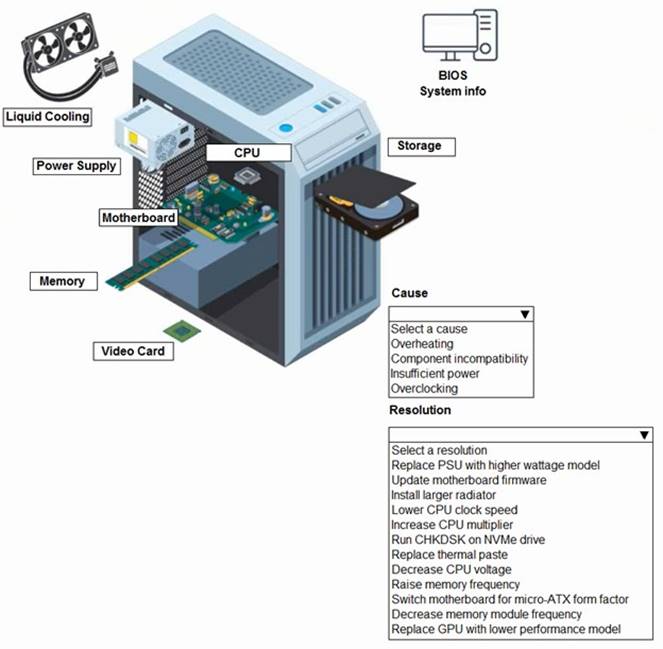
Solution:
correct answer is "Overclocking" and "Reduce CPU Clock speed" CPU is at 4.5 Ghz when normal is 3.2 Ghz. Overclocking too much can cause freezes, and this is a gaming computer so the user probably took it too far. http://blog.logicalincrements.com/2018/12/4- troubleshooting-tips-overclocking-pc/
Does this meet the goal?
- A. Yes
- B. Not Mastered
Answer: A
NEW QUESTION 9
An application developer formats and reconfigures a development PC after every application test is complete. Which of the following is the best way to improve the efficiency of this process?
- A. Installing an SSD
- B. Implementing a sandbox
- C. Disabling hyperthreading
- D. Enabling hardware acceleration
Answer: B
Explanation:
The best way to improve the efficiency of the process of formatting and reconfiguring a development PC after every application test is complete is to implement a sandbox. A sandbox is a virtual environment that isolates the application from the rest of the system, allowing the developer to test the application without affecting the main operating system, files, or settings. A sandbox can also be easily reset, deleted, or duplicated, saving the time and effort of formatting and reconfiguring the PC. A sandbox can also provide security benefits, such as preventing malware or bugs from spreading to the system or the network.
Other options, such as installing an SSD, disabling hyperthreading, or enabling hardware acceleration, may improve the performance of the PC, but they do not address the issue of formatting and reconfiguring the PC after each test. An SSD (solid state drive) is a storage device that uses flash memory instead of spinning disks, and it can offer faster data access, lower power consumption, and less noise and heat. Hyperthreading is a feature of some CPUs (central processing units) that allows each core to run two threads simultaneously, increasing the multitasking and parallel processing capabilities of the PC. Hardware acceleration is a technique that uses the GPU (graphics processing unit) or other specialized hardware to perform some tasks faster than the CPU, such as rendering graphics, video, or audio.
References:
✑ What is a Sandbox? | How Does a Sandbox Work? | Avast1
✑ What is a Sandbox Environment? | Definition and FAQs2
✑ How to Use a Sandbox to Test Software - Lifewire3
✑ What is a Sandbox and How to Use One - Norton4
✑ What is a Sandbox? - Definition from Techopedia5
NEW QUESTION 10
A technician is unable to connect to a network device via SSH_ Which of the following cables should the technician use as an alternative connection method with a laptop?
- A. Serial
- B. HDMI
- C. Parallel
- D. Lightning
Answer: A
Explanation:
The correct answer is A. Serial.
A serial cable is a type of cable that can be used to connect a laptop to a network device via a serial port. A serial port is a physical interface that allows data transmission between devices using serial communication, which is a method of sending data one bit at a time over a single wire. Serial ports are often used for console access to network devices, such as routers, switches, firewalls, or servers, when other methods of connection, such as SSH (Secure Shell), are not available or not working.
SSH is a protocol that allows secure and encrypted remote login and command execution over a network. SSH uses public key cryptography to authenticate the client and the server, and to encrypt the data exchanged between them. SSH can be accessed through different ports, depending on the configuration of the server and the client. The default port for SSH is 22, but it can be changed to any other port for security reasons.
HDMI (High-Definition Multimedia Interface) is a type of cable that can be used to transmit audio and video signals between devices, such as laptops, monitors, TVs, or projectors. HDMI cables support high-definition video and audio formats, and can also carry Ethernet and power signals. HDMI cables are not suitable for connecting to network devices via SSH, as they are designed for multimedia purposes.
Parallel cables are a type of cable that can be used to connect devices that use parallel communication, which is a method of sending data multiple bits at a time over multiple wires. Parallel cables are often used for connecting printers or scanners to computers, but they are not commonly used for network devices or SSH connections.
Lightning cables are a type of cable that can be used to connect Apple devices, such as iPhones, iPads, or iPods, to computers or chargers. Lightning cables support data transfer and power delivery, and can also be used with adapters to connect to other types of ports, such as USB or HDMI. Lightning cables are not compatible with network devices or SSH connections, as they are specific to Apple products.
Therefore, the only cable that can be used as an alternative connection method with a laptop when SSH is not working is a serial cable. Serial cables can provide console access to network devices and allow configuration and troubleshooting commands to be executed. For more information about SSH and its alternatives, you can refer to the following web search results: Alternatives to SSH, How To Configure Custom Connection Options for your SSH Client, Understanding the SSH Encryption and Connection Process, How to Use Public Key Authentication with SSH.
NEW QUESTION 11
A user is unable to access the internet on a PC. A technician examines the PC and runs the following commands: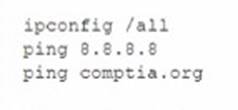
Which of the following steps in the troubleshooting process does this series of commands represent?
- A. Establish a theory.
- B. Verify full system functionality.
- C. Establish a plan of action.
- D. Identify the problem.
Answer: B
NEW QUESTION 12
Which of the following models is an example of metered utilization?
- A. Reserved instance
- B. Pay-as-you-go
- C. Subscription-based
- D. Multitenant
Answer: B
Explanation:
Metered utilization is a pricing model for cloud computing services, where the customer pays only for the amount of resources that are consumed, such as CPU time, memory, storage, bandwidth, etc. The customer is billed based on the actual usage of the resources, rather than a fixed or upfront fee. Metered utilization is also known as usage- based pricing or pay-per-use12.
Pay-as-you-go is an example of metered utilization, where the customer pays for the cloud resources on demand, without any long-term commitment or contract. The customer can scale up or down the resources as needed, and only pay for what is used. Pay-as-you-go is a flexible and cost-effective option for customers who have unpredictable or variable workloads, or who want to try out new services or features12.
The other options are not examples of metered utilization. Reserved instance is a pricing model where the customer pays a discounted rate for a fixed amount of cloud resources for a specified period of time, such as one or three years. The customer can reserve the resources in advance, and benefit from lower costs and guaranteed availability. Reserved instance is suitable for customers who have predictable or steady workloads, or who want to optimize their budget12.
Subscription-based is a pricing model where the customer pays a fixed fee for a set of cloud services or features for a certain period of time, such as monthly or annually. The customer can access the services or features as much as needed, without worrying about the usage or consumption of the resources. Subscription-based is suitable for customers who want to have a consistent and predictable cost, or who want to access premium or exclusive services or features12.
Multitenant is not a pricing model, but a cloud architecture where multiple customers share the same physical or virtual resources, such as servers, databases, applications, etc. The resources are isolated and secured for each customer, and the customers can benefit from lower costs, higher scalability, and faster updates. Multitenant is a common characteristic of public cloud services, where the cloud provider manages and maintains the resources for the customers12.
References:
✑ CompTIA A+ Core 1 (220-1101) Certification Study Guide, Chapter 4: Cloud Computing and Virtualization, Section 4.2: Cloud Computing Concepts, Page 261
✑ CompTIA A+ Core 1 (220-1101) and Core 2 (220-1102) Exam Cram, Chapter 6: Cloud Computing and Virtualization, Section 6.2: Cloud Computing Concepts, Page 241
NEW QUESTION 13
In a SOHO environment, a user wants to make sensitive, scanned documents available to other users on the domain. The logs need to indicate who accessed the documents and at what time they were accessed. Which of the following settings should a technician set up on the MFP device?
- A. Scan to email
- B. ADF tray
- C. PCL
- D. SMB share
Answer: D
Explanation:
The correct answer is D. SMB share.
SMB stands for Server Message Block, which is a network protocol that allows file and printer sharing among different devices on a local area network (LAN). An SMB share is a folder or drive that is shared using the SMB protocol and can be accessed by authorized users on the network. An MFP device is a multifunction printer that can perform multiple tasks, such as printing, scanning, copying, and faxing.
In a SOHO (small office/home office) environment, a user who wants to make sensitive, scanned documents available to other users on the domain can set up an SMB share on the MFP device. This way, the user can scan the documents to the SMB share and grant access permissions to the other users who need to view or edit them. The SMB share can also enable logging, which can record who accessed the documents and at what time they were accessed .
The other options are not the best settings for this scenario. Scan to email is a feature that allows the user to scan a document and send it as an email attachment to a recipient. This option may not be secure or convenient for sharing sensitive documents with multiple users on the domain. ADF tray stands for automatic document feeder tray, which is a component of an MFP device that can feed multiple pages of a document into the scanner or copier without manual intervention. This option is not related to sharing or logging scanned documents. PCL stands for Printer Command Language, which is a page description language that controls the layout and printing of documents. This option is not related to sharing or logging scanned documents either.
NEW QUESTION 14
A user indicates that a laptop is not performing well. A technician determines the laptop has a conventional HDD and that installing a SSD will improve the laptop's performance. Which of the following lists of steps describes what the technician should do to complete the upgrade with the LEAST amount of downtime?
- A. * 1. Remove the HDD and install the SSD in the laptop.* 2. Install the operating system and necessary applications on the SSD.* 3. Connect the HDD to the laptop using a USB enclosure.* 4. Copy over all of the user's data.
- B. * 1. Leave the HDD in place.* 2. Install the SSD in an empty drive bay.* 3. Leave all data intact on the HDD.* 4. Confirm the SSD is accessible in the operating system.
- C. * 1. Connect the SSD to the laptop using a USB enclosure.* 2. Clone the HDD to the SSD using cloning software.* 3. Remove the HDD.* 4. Install the SSD.
- D. * 1. Remove the HDD and install the SSD in the laptop.* 2. Install the operating system and necessary applications on the SSD.* 3. Install the HDD in a USB enclosure.* 4. Provide the external HDD for the user to access the old data.
Answer: C
Explanation:
The best way to complete the upgrade with the least amount of downtime is to clone the HDD to the SSD using cloning software, and then replace the HDD with the SSD. This way, the user does not have to reinstall the operating system and applications, or copy over their data manually. The other options would either take more time or result in data loss or inaccessibility. Verified References: [How to Upgrade Your Laptop’s Hard Drive to an SSD].
NEW QUESTION 15
A user who is facilitating a videoconference reports that the participants can be heard. However, when the user attempts to speak, none of the participants can hear the user. Which of the following is the FIRST step the technician should take?
- A. Restart the Videoconference.
- B. Replace the laptop.
- C. Check the audio inputs.
- D. Try another microphone.
Answer: C
Explanation:
The technician should check that the audio inputs are configured correctly for the videoconference software and that they are not muted or disabled.The technician should also make sure that the microphone is plugged in properly and that it is not faulty or damaged.If possible, the technician should test the microphone on another device or use another microphone on the same device to isolate the problem. Reference: https://partners.comptia.org/docs/default-source/resources/a-core-1-content-guide (page 11)
NEW QUESTION 16
......
Thanks for reading the newest 220-1101 exam dumps! We recommend you to try the PREMIUM Surepassexam 220-1101 dumps in VCE and PDF here: https://www.surepassexam.com/220-1101-exam-dumps.html (443 Q&As Dumps)
