
Pass4sure offers free demo for CCST-Networking exam. "Cisco Certified Support Technician (CCST) NetworkingExam", also known as CCST-Networking exam, is a Cisco Certification. This set of posts, Passing the Cisco CCST-Networking exam, will help you answer those questions. The CCST-Networking Questions & Answers covers all the knowledge points of the real exam. 100% real Cisco CCST-Networking exams and revised by experts!
Online CCST-Networking free questions and answers of New Version:
NEW QUESTION 1
DRAG DROP
Move each network type from the list on the left to the correct example on the right.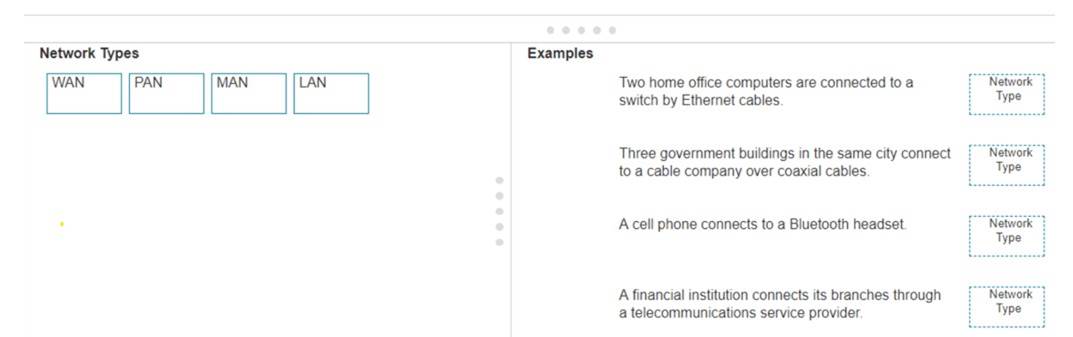
Solution:
✑ Two home office computers are connected to a switch by Ethernet cables.
✑ Three government buildings in the same city connect to a cable company over coaxial cables.
✑ A cell phone connects to a Bluetooth headset.
✑ A financial institution connects its branches through a telecommunications service provider.
✑ LAN (Local Area Network): Used for connecting devices within a small geographical area such as a single building or home.
✑ MAN (Metropolitan Area Network): Covers a larger geographical area than a LAN,
typically a city or campus.
✑ PAN (Personal Area Network): Connects devices within the range of an individual person, such as connecting a phone to a Bluetooth headset.
✑ WAN (Wide Area Network): Spans large geographical areas, connecting multiple LANs across cities, countries, or continents.
References:
✑ Network Types Overview: Cisco Networking Basics
✑ Understanding Different Network Types: Network Types Guide
Does this meet the goal?
- A. Yes
- B. Not Mastered
Answer: A
NEW QUESTION 2
HOTSPOT
You want to list the IPv4 addresses associated with the host name www.companypro.net. Complete the command by selecting the correct option from each drop-down list.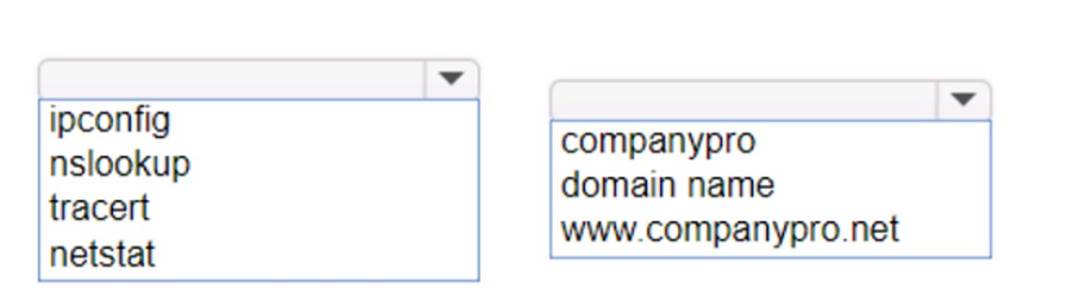
Solution:
To list the IPv4 addresses associated with the host name www.companypro.net, you should use the following command:
nslookup www.companypro.net
This command will query the DNS servers to find the IP address associated with the hostname provided.If you want to ensure that it returns the IPv4 address, you can specify the-type=Aoption, which stands for Address records that hold IPv4 addresses1. However,
thenslookupcommand by default should return the IPv4 address if available.
To list the IPv4 addresses associated with the host namewww.companypro.net, you should use thenslookupcommand.
✑ Command: nslookup
✑ Target:www.companypro.net So, the completed command is:
✑ nslookupwww.companypro.net
✑ nslookup: This command is used to query the Domain Name System (DNS) to obtain domain name or IP address mapping or for any other specific DNS record.
✑ www.companypro.net: This is the domain name you want to query to obtain its
associated IP addresses. References:
✑ Using nslookup: nslookup Command Guide
Does this meet the goal?
- A. Yes
- B. Not Mastered
Answer: A
NEW QUESTION 3
A user reports that a company website is not available. The help desk technician issues a tracert command to determine if the server hosting the website isreachable over the network. The output of the command is shown as follows: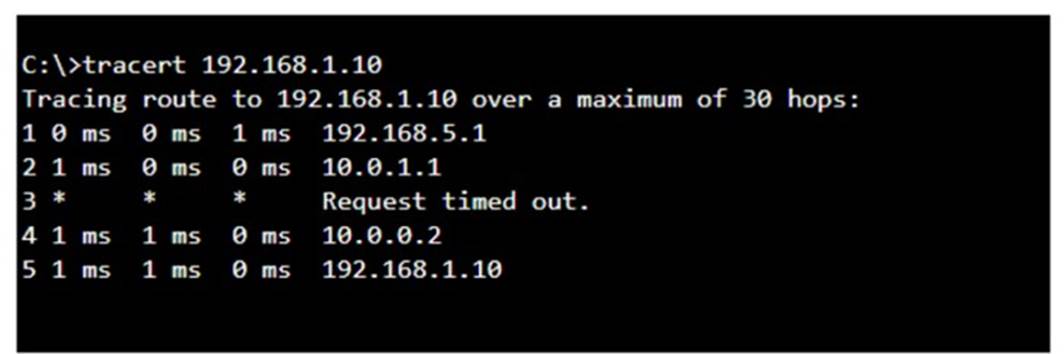
What can you tell from the command output?
- A. The router at hop 3 is not forwarding packets to the IP address 192.168.1.10.
- B. The server address 192.168.1.10 is being blocked by a firewall on the router at hop 3.
- C. The server with the address 192.168.1.10 is reachable over the network.
- D. Requests to the web server at 192.168.1.10 are being delayed and time out.
Answer: C
Explanation:
The tracert command output shows the path taken to reach the destination IP address, 192.168.1.10. The command output indicates:
•Hops 1 and 2 are successfully reached.
•Hop 3 times out, meaning the router at hop 3 did not respond to the tracert request. However, this does not necessarily indicate a problem with forwarding packets, as some routers may be configured to block or not respond to ICMP requests.
•Hops 4 and 5 are successfully reached, with hop 5 being the destination IP 192.168.1.10, indicating that the server is reachable.
Thus, the correct answer is C. The server with the address 192.168.1.10 is reachable over the network.
References :=
•Cisco Traceroute Command
•Understanding Traceroute
The tracert command output indicates that the server with the address 192.168.1.10 is reachable over the network. The asterisk (*) at hop 3 suggests that the probe sent to that hop did not return a response, which could be due to a variety of reasons such as a firewall blocking ICMP packets or the router at that hop being configured not to respond to ICMP requests. However, since the subsequent hops (4 and 5) are showing response times, it means that the packets are indeed getting through and the server is reachable12. References :=
•How to Use Traceroute Command to Read Its Results
•How to Use the Tracert Command in Windows
NEW QUESTION 4
Which information is included in the header of a UDP segment?
- A. IP addresses
- B. Sequence numbers
- C. Port numbers
- D. MAC addresses
Answer: C
Explanation:
The header of a UDP (User Datagram Protocol) segment includesport numbers. Specifically, it contains the source port number and the destination port number, which are used to identify the sending and receiving applications. UDP headers do not include IP addresses or MAC addresses, as those are part of the IP and Ethernet frame headers, respectively.Additionally, UDP does not use sequence numbers, which are a feature of TCP (Transmission Control Protocol) for ensuring reliable delivery of data segments1.
References:=
✑ Segmentation Explained with TCP and UDP Header
✑ User Datagram Protocol (UDP) - GeeksforGeeks
✑ Which three fields are used in a UDP segment header
=========================
✑ UDP Header: The header of a UDP segment includes the following key fields:
✑ IP Addresses: These are included in the IP header, not the UDP header.
✑ Sequence Numbers: These are part of the TCP header, not UDP.
✑ MAC Addresses: These are part of the Ethernet frame header and are not included in the UDP header.
References:
✑ RFC 768 - User Datagram Protocol: RFC 768
✑ Cisco Guide on UDP: Cisco UDP Guide
NEW QUESTION 5
What is the purpose of assigning an IP address to the management VLAN interface on a Layer 2 switch?
- A. To enable the switch to act as a default gateway for the attached devices
- B. To enable the switch to resolve URLs for the attached the devices
- C. To enable the switch to provide DHCP services to other switches in the network
- D. To enable access to the CLI on the switch through Telnet or SSH
Answer: D
Explanation:
The primary purpose of assigning an IP address to the management VLAN interface on a Layer 2 switch is to facilitate remote management of the switch. By configuring an IP address on the management VLAN, network administrators can access the switch??s Command Line Interface (CLI) remotely using protocols such as Telnet or Secure Shell (SSH). This allows for convenient configuration changes, monitoring, and troubleshooting without needing physical access to the switch1.
References :=
•Understanding the Management VLAN
•Cisco - VLAN Configuration Guide
•Remote Management of Switches
Assigning an IP address to the management VLAN interface (often the VLAN 1 interface by default) on a Layer 2 switch allows network administrators to remotely manage the switch using protocols such as Telnet or SSH. This IP address does not affect the switch's ability to route traffic between VLANs but provides a means to access and configure the switch through its Command Line Interface (CLI).
•A: The switch does not act as a default gateway; this is typically a function of a Layer 3 device like a router.
•B: The switch does not resolve URLs; this is typically a function of DNS servers.
•C: The switch can relay DHCP requests but does not typically provide DHCP services itself; this is usually done by a dedicated DHCP server or router.
Thus, the correct answer is D. To enable access to the CLI on the switch through Telnet or SSH.
References :=
•Cisco VLAN Management Overview
•Cisco Catalyst Switch Management
NEW QUESTION 6
Which protocol allows you to securely upload files to another computer on the internet?
- A. SFTP
- B. ICMP
- C. NTP
- D. HTTP
Answer: A
Explanation:
SFTP, or Secure File Transfer Protocol, is a protocol that allows for secure file transfer capabilities between networked hosts. It is a secure extension of the File Transfer Protocol (FTP). SFTP encrypts both commands and data, preventing passwords and sensitive information from being transmitted openly over the network. It is typically used for secure file transfers over the internet and is built on the Secure Shell (SSH) protocol1. References :=
•What Is SFTP? (Secure File Transfer Protocol)
•How to Use SFTP to Safely Transfer Files: A Step-by-Step Guide
•Secure File Transfers: Best Practices, Protocols And Tools
The Secure File Transfer Protocol (SFTP) is a secure version of the File Transfer Protocol (FTP) that uses SSH (Secure Shell) to encrypt all commands and data. This ensures that sensitive information, such as usernames, passwords, and files being transferred, are securely transmitted over the network.
•ICMP (Internet Control Message Protocol) is used for network diagnostics and is not designed for file transfer.
•NTP (Network Time Protocol) is used to synchronize clocks between computer systems and is not related to file transfer.
•HTTP (HyperText Transfer Protocol) is used for transmitting web pages over the internet and does not inherently provide secure file transfer capabilities.
Thus, the correct protocol that allows secure uploading of files to another computer on the internet is SFTP.
References :=
•Cisco Learning Network
•SFTP Overview (Cisco)
NEW QUESTION 7
DRAG DROP
Move the MFA factors from the list on the left to their correct examples on the right. You may use each factor once, more than once, or not at all.
Note: You will receive partial credit for each correct selection.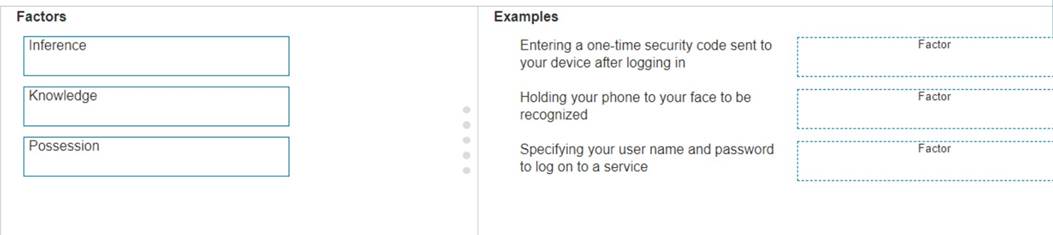
Solution:
The correct matching of the MFA factors to their examples is as follows:
✑ Entering a one-time security code sent to your device after logging in: Possession
✑ Holding your phone to your face to be recognized: Inherence
✑ Specifying your user name and password to log on to a service: Knowledge Here??s why each factor matches the example:
✑ Possession: This factor is something the user has, like a mobile device. A one-
time security code sent to this device falls under this category.
✑ Inherence: This factor is something the user is, such as a biometric characteristic.
Facial recognition using a phone is an example of this factor.
✑ Knowledge: This factor is something the user knows, like a password or PIN. Multi-Factor Authentication (MFA) enhances security by requiring two or more of these factors to verify a user??s identity before granting access.
✑ Entering a one-time security code sent to your device after logging in.
✑ Holding your phone to your face to be recognized.
✑ Specifying your username and password to log on to a service.
✑ Possession Factor: This involves something the user has in their possession.
Receiving a one-time security code on a device (e.g., phone) is an example of this.
✑ Inference Factor (Inherence/Biometric): This involves something inherent to the user, such as biometric verification (e.g., facial recognition or fingerprint scanning).
✑ Knowledge Factor: This involves something the user knows, such as login credentials (username and password).
References:
✑ Multi-Factor Authentication (MFA) Explained: MFA Guide
✑ Understanding Authentication Factors: Authentication Factors
Does this meet the goal?
- A. Yes
- B. Not Mastered
Answer: A
NEW QUESTION 8
HOTSPOT
You purchase a new Cisco switch, turn it on, and connect to its console port. You then run the following command: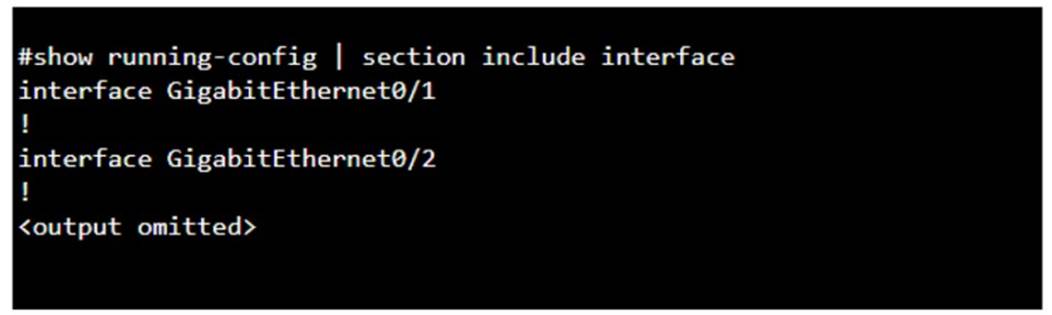
For each statement about the output, select True or False. Note: You will receive partial credit for each correct selection.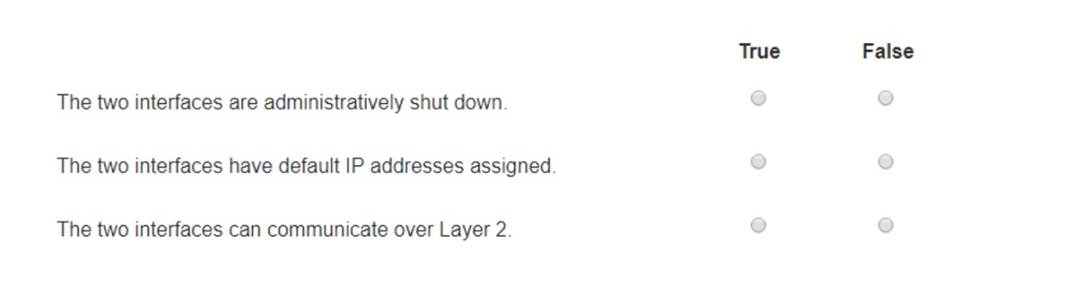
Solution:
✑ The two interfaces are administratively shut down:
✑ The two interfaces have default IP addresses assigned:
✑ The two interfaces can communicate over Layer 2:
✑ Interface Status: The absence of the "shutdown" command means the interfaces are not administratively shut down.
✑ IP Address Assignment: There is no evidence in the output that IP addresses have
been assigned to the interfaces, which would typically be shown as "ip address" entries.
✑ Layer 2 Communication: Switch interfaces in their default state operate at Layer 2,
enabling them to forward Ethernet frames and participate in Layer 2 communication.
References:
✑ Cisco IOS Interface Configuration: Cisco Interface Configuration
✑ Understanding Cisco Switch Interfaces: Cisco Switch Interfaces
Does this meet the goal?
- A. Yes
- B. Not Mastered
Answer: A
NEW QUESTION 9
A user initiates a trouble ticket stating that an external web page is not loading. You determine that other resources both internal and external are still reachable.
Which command can you use to help locate where the issue is in the network path to the external web page?
- A. ping -t
- B. tracert
- C. ipconfig/all
- D. nslookup
Answer: B
Explanation:
The tracert command is used to determine the route taken by packets across an IP network. When a user reports that an external web page is not loading, while other resources are accessible, it suggests there might be an issue at a certain point in the network path to the specific web page. The tracert command helps to diagnose where the breakdown occurs by displaying a list of routers that the packets pass through on their way to the destination. It can identify the network segment where the packets stop progressing, which is valuable for pinpointing where the connectivity issue lies. References := Cisco CCST Networking Certification FAQs – CISCONET Training Solutions, Command Prompt (CMD): 10 network-related commands you should know, Network Troubleshooting Commands Guide: Windows, Mac & Linux - Comparitech, How to Use the Traceroute and Ping Commands to Troubleshoot Network, Network Troubleshooting Techniques: Ping,
Traceroute, PathPing.
•tracert Command: This command is used to determine the path packets take to reach a destination. It lists all the hops (routers) along the way and can help identify where the delay or failure occurs.
•ping -t: This command sends continuous ping requests and is useful for determining if a host is reachable but does not provide path information.
•ipconfig /all: This command displays all current TCP/IP network configuration values and can be used to verify network settings but not to trace a network path.
•nslookup: This command queries the DNS to obtain domain name or IP address mapping, useful for DNS issues but not for tracing network paths.
References:
•Microsoft tracert Command: tracert Command Guide
•Troubleshooting Network Issues with tracert: Network Troubleshooting Guide
NEW QUESTION 10
During the data encapsulation process, which OSI layer adds a header that contains MAC addressing information and a trailer used for error checking?
- A. Network
- B. Transport
- C. Data Link
- D. Session
Answer: C
Explanation:
OSI model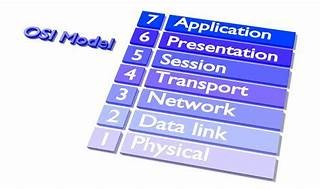
During the data encapsulation process, theData Link layerof the OSI model is responsible for adding a header that contains MAC addressing information and a trailer used for error checking.The header typically includes the source and destination MAC addresses, while the trailer contains a Frame Check Sequence (FCS) which is used for error detection1.
The Data Link layer ensures that messages are delivered to the proper device on a LAN using hardware addresses and translates messages from the Network layer into bits for the Physical layer to transmit. It also controls how data is placed onto the medium and is received from the medium through the physical hardware.
References:=
✑ The OSI Model – The 7 Layers of Networking Explained in Plain English
✑ OSI Model - Network Direction
✑ Which layer adds both header and trailer to the data?
✑ What is OSI Model | 7 Layers Explained - GeeksforGeeks
NEW QUESTION 11
Which device protects the network by permitting or denying traffic based on IP address, port number, or application?
- A. Firewall
- B. Access point
- C. VPN gateway
- D. Intrusion detection system
Answer: A
Explanation:
✑ Firewall: A firewall is a network security device that monitors and controls incoming and outgoing network traffic based on predetermined security rules. It permits or denies traffic based on IP addresses, port numbers, or applications.
✑ Access Point: This is a device that allows wireless devices to connect to a wired
network using Wi-Fi. It does not perform traffic filtering based on IP, port, or application.
✑ VPN Gateway: This device allows for secure connections between networks over
the internet, but it is not primarily used for traffic filtering based on IP, port, or application.
✑ Intrusion Detection System (IDS): This device monitors network traffic for
suspicious activity and policy violations, but it does not actively permit or deny traffic.
References:
✑ Understanding Firewalls: Firewall Basics
NEW QUESTION 12
DRAG DROP
Move each protocol from the list on the left to the correct TCP/IP model layer on the right. Note: You will receive partial credit for each correct match.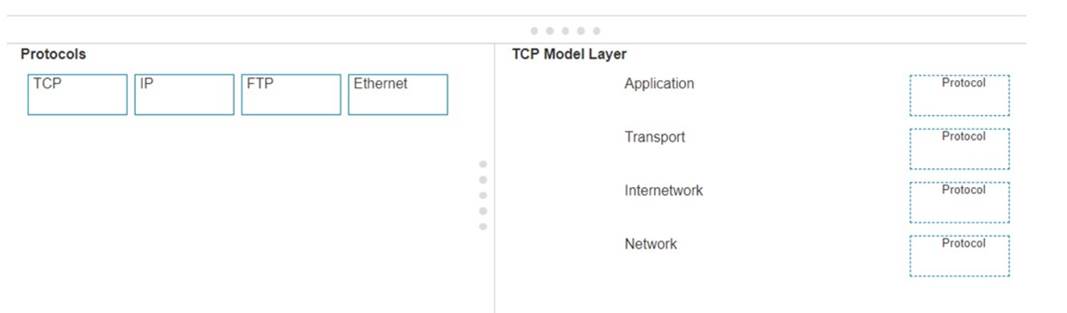
Solution:
Here??s how each protocol aligns with the correct TCP/IP model layer:
✑ TCP (Transmission Control Protocol): This protocol belongs to theTransportlayer, which is responsible for providing communication between applications on different hosts1.
✑ IP (Internet Protocol): IP is part of theInternetworklayer, which is tasked with routing packets across network boundaries to their destination1.
✑ FTP (File Transfer Protocol): FTP operates at theApplicationlayer, which supports application and end-user processes.It is used for transferring files over the network1.
✑ Ethernet: While not a protocol within the TCP/IP stack, Ethernet is associated with theNetwork Interfacelayer, which corresponds to the link layer of the TCP/IP model and is responsible for the physical transmission of data1.
The TCP/IP model layers are designed to work collaboratively to transmit data from one layer to another, with each layer having specific protocols that perform functions necessary for the data transmission process1.
✑ TCP:
✑ IP:
✑ FTP:
✑ Ethernet:
✑ Transport Layer: This layer is responsible for providing communication services directly to the application processes running on different hosts. TCP is a core protocol in this layer.
✑ Internetwork Layer: This layer is responsible for logical addressing, routing, and
packet forwarding. IP is the primary protocol for this layer.
✑ Application Layer: This layer interfaces directly with application processes and provides common network services. FTP is an example of a protocol operating in this layer.
✑ Network Layer: In the TCP/IP model, this layer includes both the data link and physical layers of the OSI model. Ethernet is a protocol used in this layer to define network standards and communication protocols at the data link and physical levels.
References:
✑ TCP/IP Model Overview: Cisco TCP/IP Model
✑ Understanding the TCP/IP Model: TCP/IP Layers
Does this meet the goal?
- A. Yes
- B. Not Mastered
Answer: A
NEW QUESTION 13
......
P.S. Easily pass CCST-Networking Exam with 40 Q&As Certleader Dumps & pdf Version, Welcome to Download the Newest Certleader CCST-Networking Dumps: https://www.certleader.com/CCST-Networking-dumps.html (40 New Questions)
