
Cause all that matters here is passing the Linux-Foundation CKA exam. Cause all that you need is a high score of CKA Certified Kubernetes Administrator (CKA) Program exam. The only one thing you need to do is downloading Certleader CKA exam study guides now. We will not let you down with our money-back guarantee.
Check CKA free dumps before getting the full version:
NEW QUESTION 1
CORRECT TEXT
Set the node named ek8s-node-1 as unavailable and reschedule all the pods running on it.
Solution:
solution
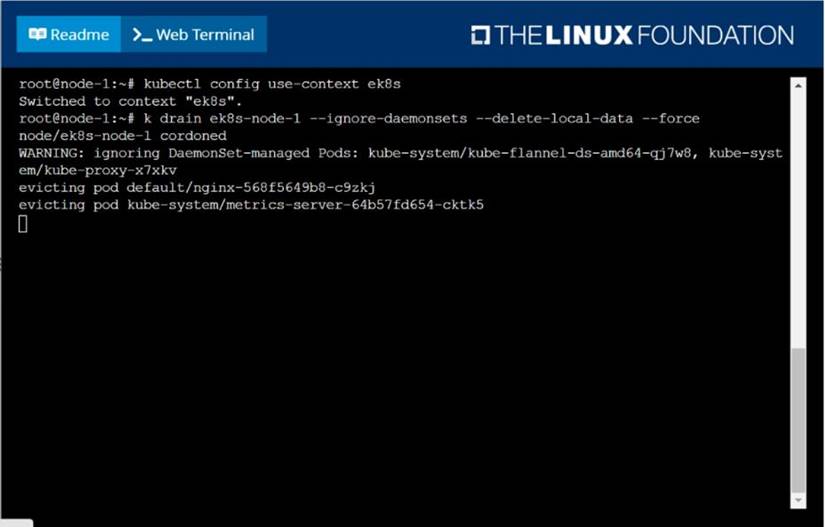
F:\Work\Data Entry Work\Data Entry\20200827\CKA\19 B.JPG
Does this meet the goal?
- A. Yes
- B. Not Mastered
Answer: A
NEW QUESTION 2
CORRECT TEXT
Score: 13%
Task
A Kubernetes worker node, named wk8s-node-0 is in state NotReady. Investigate why this is the case, and perform any appropriate steps to bring the node to a Ready state, ensuring that any changes are made permanent.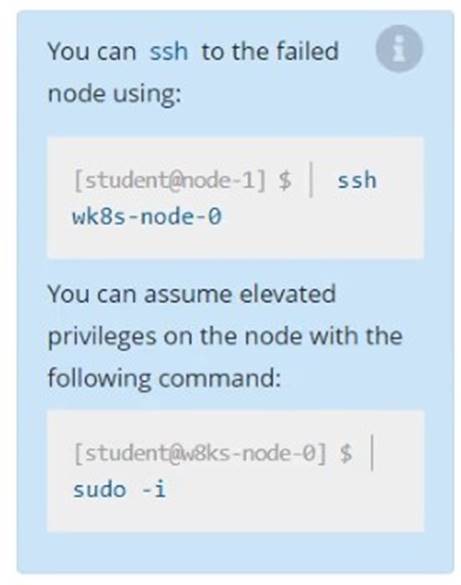
Solution:
Solution:
sudo -i
systemctl status kubelet
systemctl start kubelet
systemctl enable kubelet
Does this meet the goal?
- A. Yes
- B. Not Mastered
Answer: A
NEW QUESTION 3
CORRECT TEXT
Score: 4%
Task
Create a pod named kucc8 with a single app container for each of the following images running inside (there may be between 1 and 4 images specified): nginx + redis + memcached .
Solution:
Solution:
kubectl run kucc8 --image=nginx --dry-run -o yaml > kucc8.yaml
# vi kucc8.yaml
apiVersion: v1
kind: Pod
metadata:
creationTimestamp: null
name: kucc8
spec:
containers:
- image: nginx
name: nginx
- image: redis
name: redis
- image: memcached
name: memcached
- image: consul
name: consul
#
kubectl create -f kucc8.yaml
#12.07
Does this meet the goal?
- A. Yes
- B. Not Mastered
Answer: A
NEW QUESTION 4
CORRECT TEXT
List all the pods sorted by created timestamp
Solution:
kubect1 get pods--sort-by=.metadata.creationTimestamp
Does this meet the goal?
- A. Yes
- B. Not Mastered
Answer: A
NEW QUESTION 5
CORRECT TEXT
Score: 7%
Task
First, create a snapshot of the existing etcd instance running at https://127.0.0.1:2379, saving the snapshot to /srv/data/etcd-snapshot.db.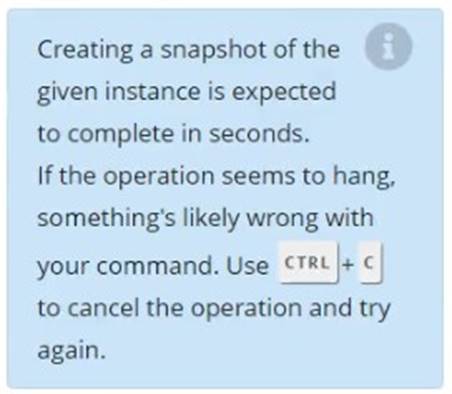
Next, restore an existing, previous snapshot located at /var/lib/backup/etcd-snapshot-previo us.db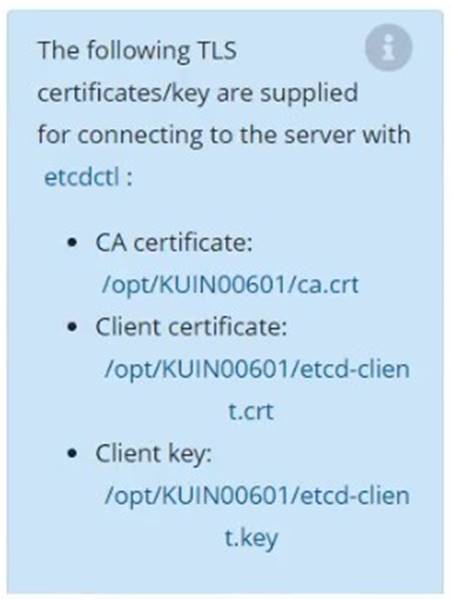
Solution:
Solution:
#backup
ETCDCTL_API=3 etcdctl --endpoints="https://127.0.0.1:2379" --
cacert=/opt/KUIN000601/ca.crt --cert=/opt/KUIN000601/etcd-client.crt -- key=/opt/KUIN000601/etcd-client.key snapshot save /etc/data/etcd-snapshot.db
#restore
ETCDCTL_API=3 etcdctl --endpoints="https://127.0.0.1:2379" --
cacert=/opt/KUIN000601/ca.crt --cert=/opt/KUIN000601/etcd-client.crt -- key=/opt/KUIN000601/etcd-client.key snapshot restore /var/lib/backup/etcd-snapshot- previoys.db
Does this meet the goal?
- A. Yes
- B. Not Mastered
Answer: A
NEW QUESTION 6
CORRECT TEXT
From the pod label name=cpu-utilizer, find pods running high CPU workloads and
write the name of the pod consuming most CPU to the file /opt/KUTR00102/KUTR00102.txt
(which already exists).
- A.
Answer: Seethesolutionbelow.
Explanation:
solution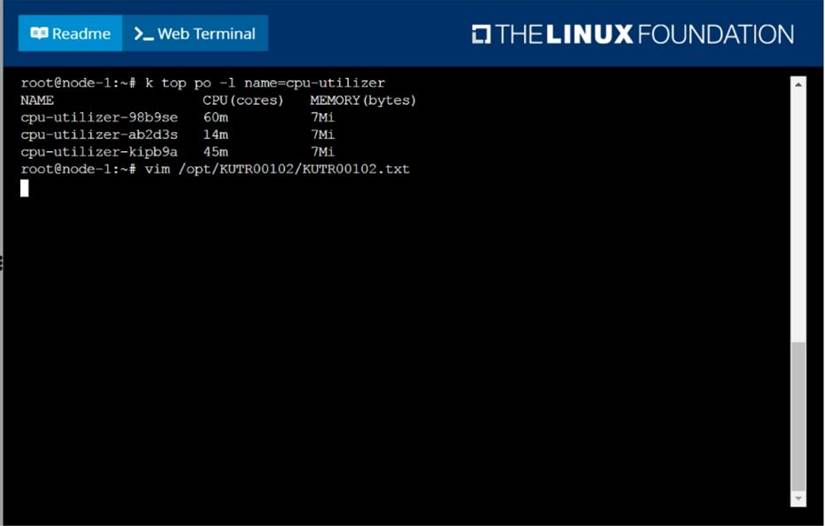
F:\Work\Data Entry Work\Data Entry\20200827\CKA\16 B.JPG
F:\Work\Data Entry Work\Data Entry\20200827\CKA\16 C.JPG
NEW QUESTION 7
CORRECT TEXT
Score: 4%
Task
Schedule a pod as follows:
• Name: nginx-kusc00401
• Image: nginx
• Node selector: disk=ssd
Solution:
Solution:
#yaml
apiVersion: v1
kind: Pod
metadata:
name: nginx-kusc00401
spec:
containers:
- name: nginx
image: nginx
imagePullPolicy: IfNotPresent
nodeSelector:
disk: spinning
#
kubectl create -f node-select.yaml
Does this meet the goal?
- A. Yes
- B. Not Mastered
Answer: A
NEW QUESTION 8
CORRECT TEXT
Schedule a pod as follows:
✑ Name: nginx-kusc00101
✑ Image: nginx
✑ Node selector: disk=ssd
Solution:
solution
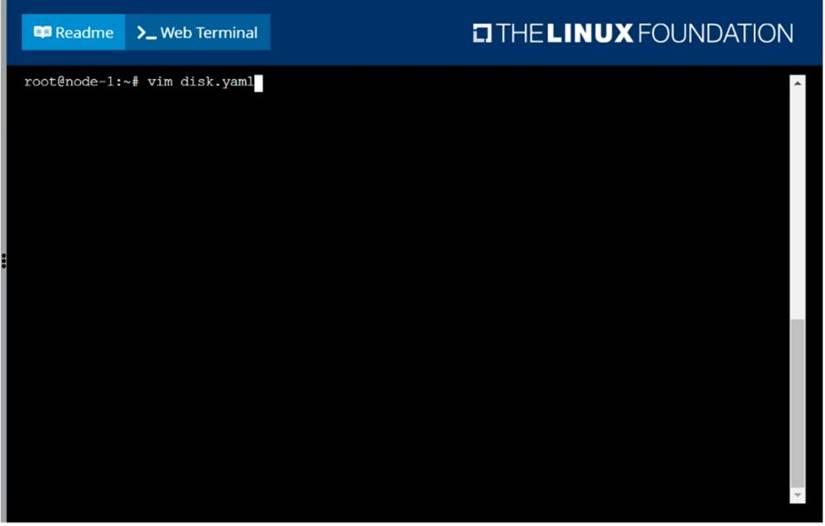
F:\Work\Data Entry Work\Data Entry\20200827\CKA\6 B.JPGF:\Work\Data
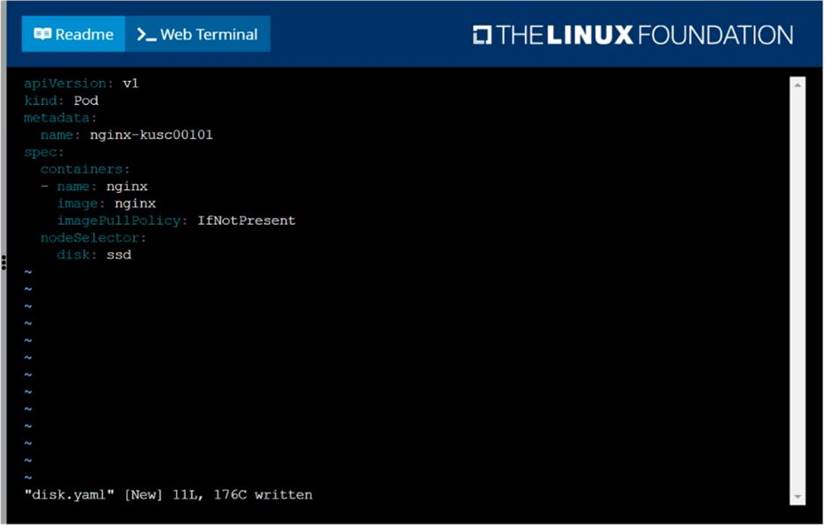
F:\Work\Data Entry Work\Data Entry\20200827\CKA\6 C.JPG
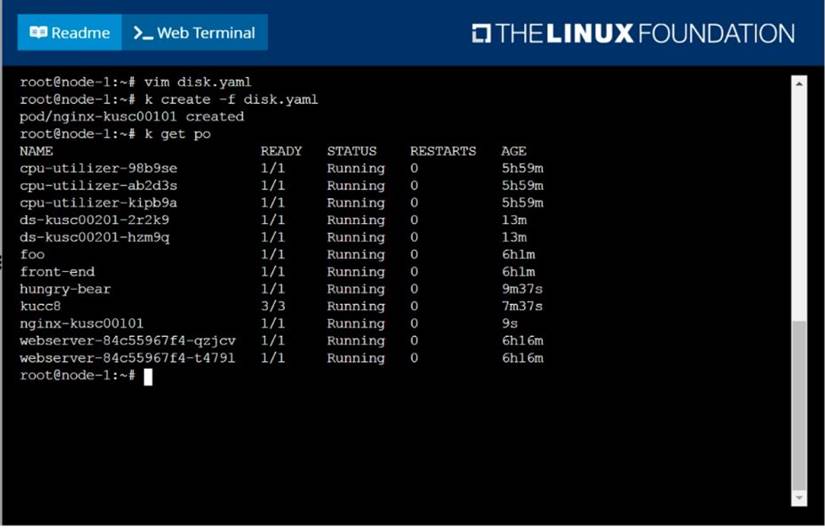
F:\Work\Data Entry Work\Data Entry\20200827\CKA\6 D.JPG
Does this meet the goal?
- A. Yes
- B. Not Mastered
Answer: A
NEW QUESTION 9
CORRECT TEXT
List all the pods sorted by name
Solution:
kubectl get pods --sort-by=.metadata.name
Does this meet the goal?
- A. Yes
- B. Not Mastered
Answer: A
NEW QUESTION 10
CORRECT TEXT
List the nginx pod with custom columns POD_NAME and POD_STATUS
Solution:
kubectl get po -o=custom-columns="POD_NAME:.metadata.name, POD_STATUS:.status.containerStatuses[].state"
Does this meet the goal?
- A. Yes
- B. Not Mastered
Answer: A
NEW QUESTION 11
CORRECT TEXT
Score: 7%
Task
Reconfigure the existing deployment front-end and add a port specification named http exposing port 80/tcp of the existing container nginx.
Create a new service named front-end-svc exposing the container port http.
Configure the new service to also expose the individual Pods via a NodePort on the nodes on which they are scheduled.
Solution:
Solution:
kubectl get deploy front-end
kubectl edit deploy front-end -o yaml
#port specification named http
#service.yaml
apiVersion: v1
kind: Service
metadata:
name: front-end-svc
labels:
app: nginx
spec:
ports:
- port: 80
protocol: tcp
name: http
selector:
app: nginx
type: NodePort
# kubectl create -f service.yaml
# kubectl get svc
# port specification named http
kubectl expose deployment front-end --name=front-end-svc --port=80 --tarport=80 -- type=NodePort
Does this meet the goal?
- A. Yes
- B. Not Mastered
Answer: A
NEW QUESTION 12
CORRECT TEXT
Task Weight: 4%
Task
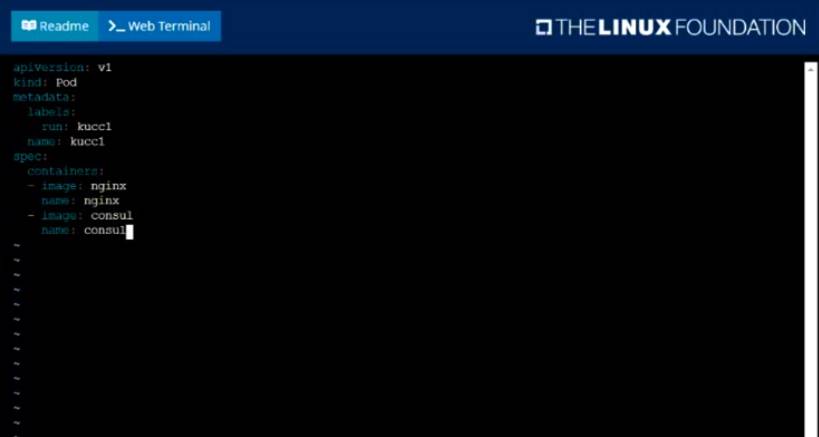
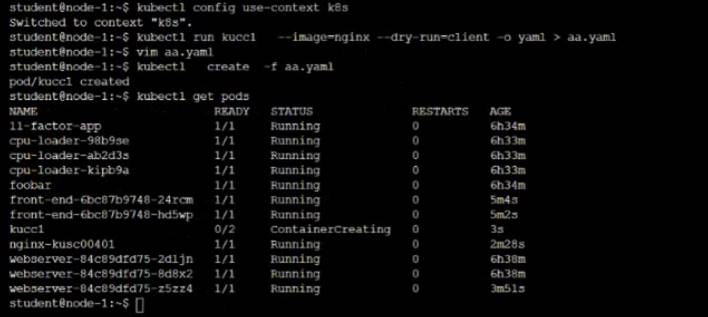
Schedule a Pod as follows:
• Name: kucc1
• App Containers: 2
• Container Name/Images: o nginx
o consul
Solution:
Solution:

Graphical user interface, text, application
Description automatically generated
Text Description automatically generated
Does this meet the goal?
- A. Yes
- B. Not Mastered
Answer: A
NEW QUESTION 13
CORRECT TEXT
Perform the following tasks:
✑ Add an init container to hungry-bear (which has been defined in spec file
/opt/KUCC00108/pod-spec-KUCC00108.yaml)
✑ The init container should create an empty file named/workdir/calm.txt
✑ If /workdir/calm.txt is not detected, the pod should exit
✑ Once the spec file has been updated with the init container definition, the pod should be created
- A.
Answer: Seethesolutionbelow.
Explanation:
solution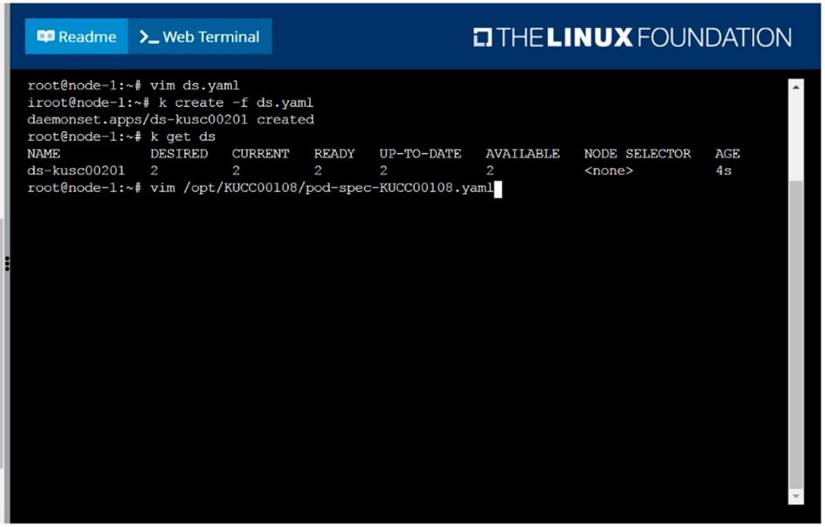
F:\Work\Data Entry Work\Data Entry\20200827\CKA\4 B.JPG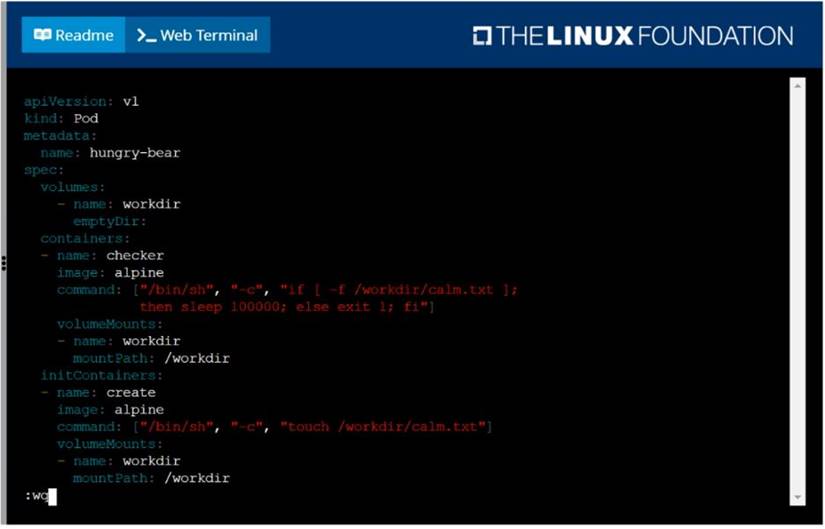
F:\Work\Data Entry Work\Data Entry\20200827\CKA\4 C.JPG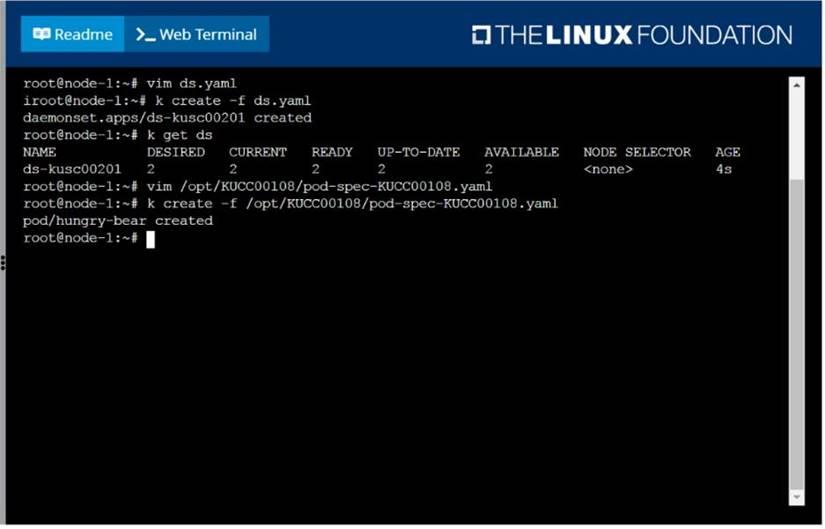
F:\Work\Data Entry Work\Data Entry\20200827\CKA\4 D.JPG
NEW QUESTION 14
CORRECT TEXT
Score: 4%
Task
Check to see how many nodes are ready (not including nodes tainted NoSchedule ) and write the number to /opt/KUSC00402/kusc00402.txt.
Solution:
Solution:
kubectl describe nodes | grep ready|wc -l
kubectl describe nodes | grep -i taint | grep -i noschedule |wc -l
echo 3 > /opt/KUSC00402/kusc00402.txt
#
kubectl get node | grep -i ready |wc -l
# taintsnoSchedule
kubectl describe nodes | grep -i taints | grep -i noschedule |wc -l
#
echo 2 > /opt/KUSC00402/kusc00402.txt
Does this meet the goal?
- A. Yes
- B. Not Mastered
Answer: A
NEW QUESTION 15
CORRECT TEXT
Task Weight: 4%
Task
Scale the deployment webserver to 3 pods.
Solution:
Solution:

Does this meet the goal?
- A. Yes
- B. Not Mastered
Answer: A
NEW QUESTION 16
CORRECT TEXT
Create a pod with environment variables as var1=value1.Check the environment variable in pod
Solution:
kubectl run nginx --image=nginx --restart=Never --env=var1=value1
# then
kubectl exec -it nginx -- env
# or
kubectl exec -it nginx -- sh -c 'echo $var1'
# or
kubectl describe po nginx | grep value1
Does this meet the goal?
- A. Yes
- B. Not Mastered
Answer: A
NEW QUESTION 17
CORRECT TEXT
Score: 4%
Context
You have been asked to create a new ClusterRole for a deployment pipeline and bind it to a specific ServiceAccount scoped to a specific namespace.
Task
Create a new ClusterRole named deployment-clusterrole, which only allows to create the following resource types:
• Deployment
• StatefulSet
• DaemonSet
Create a new ServiceAccount named cicd-token in the existing namespace app-team1. Bind the new ClusterRole deployment-clusterrole lo the new ServiceAccount cicd-token ,
limited to the namespace app-team1.
Solution:
Solution:
Task should be complete on node k8s -1 master, 2 worker for this connect use command [student@node-1] > ssh k8s
kubectl create clusterrole deployment-clusterrole --verb=create -- resource=deployments,statefulsets,daemonsets
kubectl create serviceaccount cicd-token --namespace=app-team1
kubectl create rolebinding deployment-clusterrole --clusterrole=deployment-clusterrole -- serviceaccount=default:cicd-token --namespace=app-team1
Does this meet the goal?
- A. Yes
- B. Not Mastered
Answer: A
NEW QUESTION 18
CORRECT TEXT
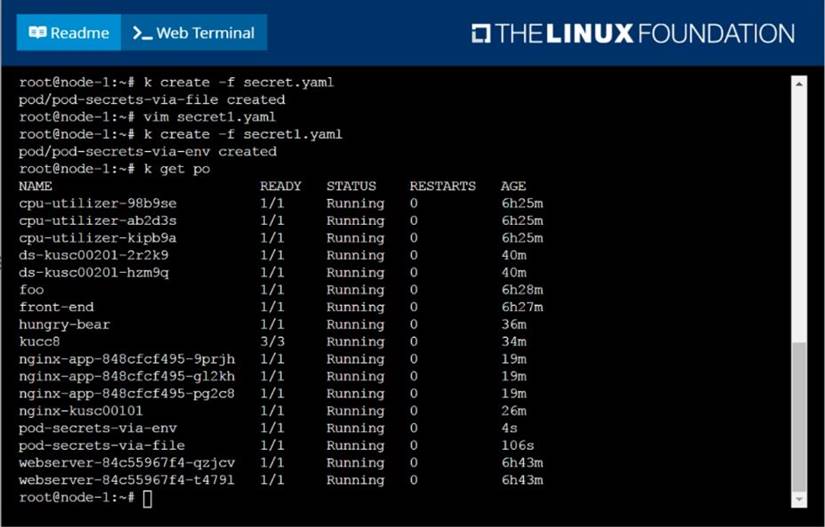
Create a Kubernetes secret as follows:
✑ Name: super-secret
✑ password: bob
Create a pod named pod-secrets-via-file, using the redis Image, which mounts a secret named super-secret at /secrets.
Create a second pod named pod-secrets-via-env, using the redis Image, which exports
password as CONFIDENTIAL
Solution:
solution
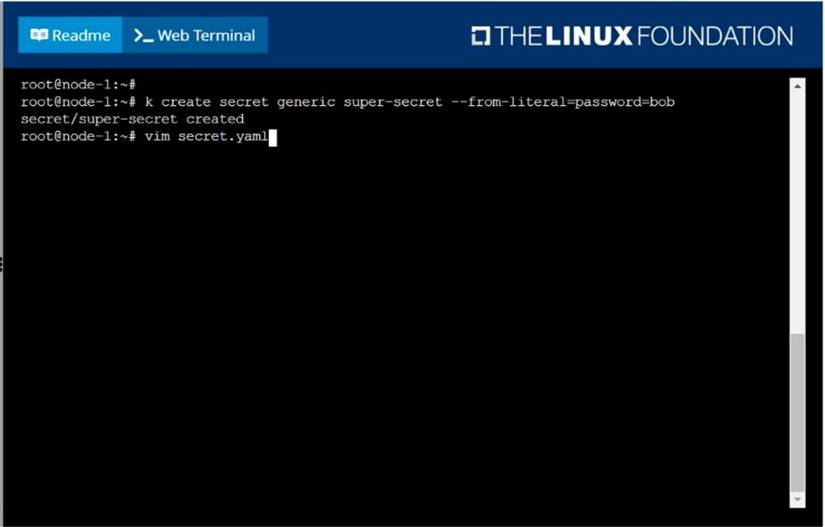
F:\Work\Data Entry Work\Data Entry\20200827\CKA\12 B.JPG
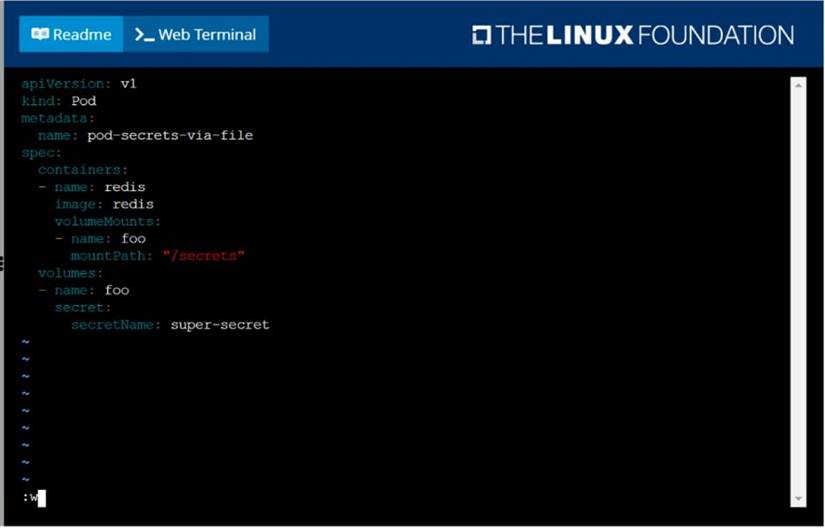
F:\Work\Data Entry Work\Data Entry\20200827\CKA\12 C.JPG
F:\Work\Data Entry Work\Data Entry\20200827\CKA\12 D.JPG
Does this meet the goal?
- A. Yes
- B. Not Mastered
Answer: A
NEW QUESTION 19
......
100% Valid and Newest Version CKA Questions & Answers shared by Certleader, Get Full Dumps HERE: https://www.certleader.com/CKA-dumps.html (New 67 Q&As)
