
Act now and download your Red-Hat EX294 test today! Do not waste time for the worthless Red-Hat EX294 tutorials. Download Replace Red-Hat Red Hat Certified Engineer (RHCE) exam exam with real questions and answers and begin to learn Red-Hat EX294 with a classic professional.
Also have EX294 free dumps questions for you:
NEW QUESTION 1
Create a playbook called balance.yml as follows:
* The playbook contains a play that runs on hosts in balancers host group and uses the balancer role.
--> This role configures a service to loadbalance webserver requests between hosts in the webservers host group.curl
--> When implemented, browsing to hosts in the balancers host group (for example
http://node5.example.com)
should produce the following output:
Welcome to node3.example.com on 192.168.10.z
--> Reloading the browser should return output from the alternate web server: Welcome to node4.example.com on 192.168.10.a
* The playbook contains a play that runs on hosts in webservers host group and uses the phphello role.
--> When implemented, browsing to hosts in the webservers host group with the URL / hello.php should produce the following output:
Hello PHP World from FQDN
--> where FQDN is the fully qualified domain name of the host. For example,
browsing
to http://node3.example.com/hello.php, should produce the following output: Hello PHP World from node3.example.com
*
Similarly, browsing to http://node4.example.com/hello.php, should produce the following output:
Hello PHP World from node4.example.com
Solution:
Solution as:
# pwd
/home/admin/ansible/
# vim balancer.yml
--
- name: Including phphello role hosts: webservers
roles:
- ./roles/phphello
- name: Including balancer role hosts: balancer
roles:
- ./roles/balancer wq!
# ansible-playbook balancer.yml --syntax-check
# ansible-playbook balancer.yml
Does this meet the goal?
- A. Yes
- B. Not Mastered
Answer: A
NEW QUESTION 2
Use Ansible Galaxy with a requirements file called /home/admin/ansible/roles/ install.yml to download and install roles to /home/admin/ansible/roles from the following URLs:
http://classroom.example.com /role1.tar.gz The name of this role should be balancer
http://classroom.example.com /role2.tar.gz The name of this role should be phphello
Solution:
Solution as:
# pwd
/home/admin/ansible/roles
# vim install.yml
--
src: http://classroom.example.com/role1.tar.gz name: balancer
src: http://classroom.example.com/role2.tar.gz name: phphello
wq!
# pwd
/home/admin/ansible
# ansible-galaxy install -r roles/install.yml -p roles
Does this meet the goal?
- A. Yes
- B. Not Mastered
Answer: A
NEW QUESTION 3
Create an empty encrypted file called myvault.yml in /home/sandy/ansible and set the password to
notsafepw. Rekey the password to iwejfj2221. See the
Solution:
ansible-vault create myvault.yml
Create new password: notsafepw Confirm password: notsafepw ansible-vault rekey myvault.yml
Current password: notsafepw New password: iwejfj2221 Confirm password: iwejfj2221
Does this meet the goal?
- A. Yes
- B. Not Mastered
Answer: A
NEW QUESTION 4
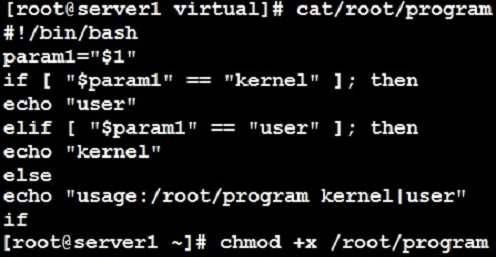
Create a Shell script /root/program:
The shell script will come back to ”user” parameter when you are entering ”kernel” parameter.
The shell script will come back to ”kernel” when you are entering ”user” parameter.
It will output the standard error when this script ”usage:/root/program kernel|user” don’t input any parameter or the parameter you inputted is entered as the requirements.
Solution:
Does this meet the goal?
- A. Yes
- B. Not Mastered
Answer: A
NEW QUESTION 5
Create a playbook that changes the default target on all nodes to multi-user tarqet. Do this in playbook file called target.yml in /home/sandy/ansible
Solution:
- name: change default target hosts: all
tasks:
- name: change target file:
src: /usr/lib/systemd/system/multi-user.target dest: /etc/systemd/system/default.target state: link
Does this meet the goal?
- A. Yes
- B. Not Mastered
Answer: A
NEW QUESTION 6
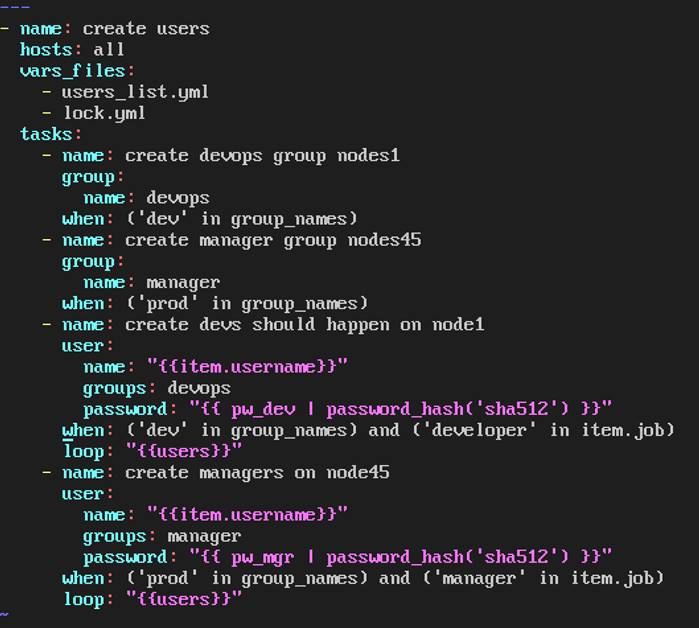
Create the users in the file usersjist.yml file provided. Do this in a playbook called users.yml located at
/home/sandy/ansible. The passwords for these users should be set using the lock.yml file from TASK7. When running the playbook, the lock.yml file should be unlocked with secret.txt file from TASK 7.
All users with the job of 'developer' should be created on the dev hosts, add them to the group devops, their password should be set using the pw_dev variable. Likewise create users with the job of 'manager' on the proxy host and add the users to the group 'managers', their password should be set using the pw_mgr variable.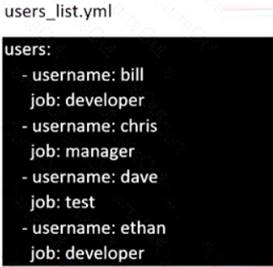
Solution:
ansible-playbook users.yml –vault-password-file=secret.txt
Does this meet the goal?
- A. Yes
- B. Not Mastered
Answer: A
NEW QUESTION 7
Create an ansible vault password file called lock.yml with the password reallysafepw in the
/home/sandy/ansible directory. In the lock.yml file define two variables. One is pw_dev and the password is 'dev' and the other is pw_mgr and the password is 'mgr' Create a regular file called secret.txt which contains the password for lock.yml.
Solution:
ansible-vault create lock.yml
New Vault Password: reallysafepw Confirm: reallysafepw
In File:

Does this meet the goal?
- A. Yes
- B. Not Mastered
Answer: A
NEW QUESTION 8
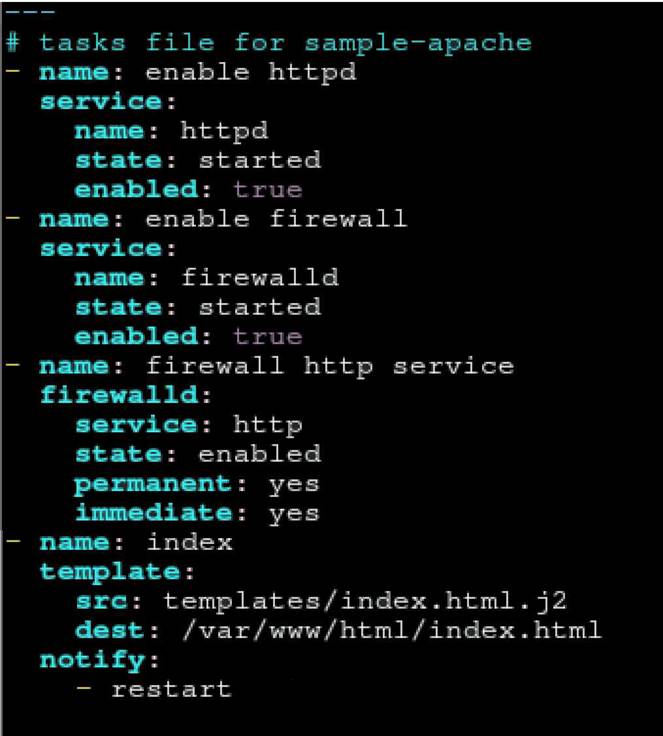
Create a jinja template in /home/sandy/ansible/ and name it hosts.j2. Edit this file so it looks like the one below. The order of the nodes doesn't matter. Then create a playbook in /home/sandy/ansible called hosts.yml and install the template on dev node at /root/myhosts
Solution:
Solution as:
Does this meet the goal?
- A. Yes
- B. Not Mastered
Answer: A
NEW QUESTION 9
Create user accounts
-----------------------
--> A list of users to be created can be found in the file called user_list.yml
which you should download from http://classroom.example.com/user_list.yml and
save to /home/admin/ansible/
--> Using the password vault created elsewhere in this exam, create a playbook called create_user.yml
that creates user accounts as follows:
--> Users with a job description of developer should be:
--> created on managed nodes in the "dev" and "test" host groups assigned the password from the "dev_pass"
variable and these user should be member of supplementary group "devops".
--> Users with a job description of manager should be:
--> created on managed nodes in the "prod" host group assigned the password from the "mgr_pass" variable
and these user should be member of supplementary group "opsmgr"
--> Passwords should use the "SHA512" hash format. Your playbook should work using the vault password file created elsewhere in this exam.
while practising you to create these file hear. But in exam have to download as per questation.
user_list.yml file consist:
--
user:
- name: user1 job: developer
- name: user2 job: manager
Solution:
Solution as:
# pwd
/home/admin/ansible
#
wget http://classroom.example.com/user_list.yml
# cat user_list.yml
# vim create_user.yml
--
- name: hosts: all vars_files:
- ./user_list.yml
- ./vault.yml tasks:
- name: creating groups group:
name: "{{ item }}" state: present
loop:
- devops
- opsmgr
- name: creating user user:
name: "{{ item.name }}" state: present
groups: devops
password: "{{ dev_pass|password_hash ('sha512') }}" loop: "{{ user }}"
when: (inventory_hostname in groups['dev'] or inventory_hostname in groups['test']) and item.job == "developer"
- name: creating user user:
name: "{{ item.name }}" state: present
groups: opsmgr
password: "{{ mgr_pass|password_hash ('sha512') }}" loop: "{{ user }}"
when: inventory_hostname in groups['prod'] and item.job == "manager" wq!
# ansible-playbook create_user.yml -–vault-password-file=password.txt -–syntax-check
# ansible-playbook create_user.yml -–vault-password-file=password.txt
Does this meet the goal?
- A. Yes
- B. Not Mastered
Answer: A
NEW QUESTION 10
Create a playbook called timesvnc.yml in /home/sandy/ansible using rhel system role timesync. Set the time to use currently configured nip with the server 0.uk.pool.ntp.org. Enable burst. Do this on all hosts.
Solution:
Solution as:
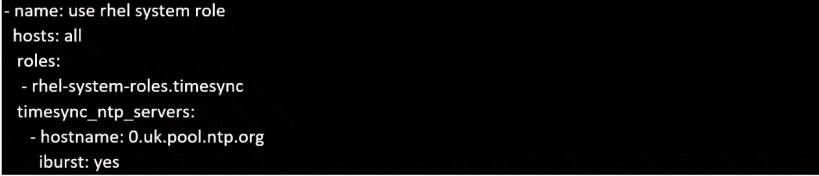
Does this meet the goal?
- A. Yes
- B. Not Mastered
Answer: A
NEW QUESTION 11
Create and run an Ansible ad-hoc command.
--> As a system administrator, you will need to install software on the managed nodes.
--> Create a shell script called yum-pack.sh that runs an Ansible ad-hoc command to create yum-repository on each of the managed nodes as follows:
--> repository1
----------
* 1. The name of the repository is EX407
* 2. The description is "Ex407 Description"
* 3. The base URL is http://content.example.com/rhel8.0/x86_64/dvd/BaseOS/
* 4. GPG signature checking is enabled
* 5. The GPG key URL is http://content.example.com/rhel8.0/x86_64/dvd/RPM-GPG-KEYredhat- release
* 6. The repository is enabled
--> repository2
----------
* 1. The name of the repository is EXX407
* 2. The description is "Exx407 Description"
* 3. The base URL is http://content.example.com/rhel8.0/x86_64/dvd/AppStream/
* 4. GPG signature checking is enabled
* 5. The GPG key URL is http://content.example.com/rhel8.0/x86_64/dvd/ RPM-GPG-KEYredhat- release
* 6. The repository is enabled
Solution:
Solution as:
# pwd
/home/admin/ansible
# vim yum-pack.sh
#!/bin/bash
ansible all -m yum_repository -a 'name=EX407 description="Ex407 Description"
baseurl=http://content.example.com/rhel8.0/x86_64/dvd/BaseOS/
gpgcheck=yes
gpgkey=http://content.example.com/rhel8.0/x86_64/dvd/RPM-GPG-KEY-redhat-release
enabled=yes'
ansible all -m yum_repository -a 'name=EXX407 description="Exx407 Description"
baseurl=http://content.example.com/rhel8.0/x86_64/dvd/AppStream/
gpgcheck=yes
gpgkey=http://content.example.com/rhel8.0/x86_64/dvd/RPM-GPG-KEY-redhat-release
enabled=yes'
!wq
# chmod +x yum-pack.sh
# bash yum-pack.sh
# ansible all -m command -a 'yum repolist all'
Does this meet the goal?
- A. Yes
- B. Not Mastered
Answer: A
NEW QUESTION 12
......
P.S. Downloadfreepdf.net now are offering 100% pass ensure EX294 dumps! All EX294 exam questions have been updated with correct answers: https://www.downloadfreepdf.net/EX294-pdf-download.html (35 New Questions)
