
we provide Real Microsoft MS-203 free exam which are the best for clearing MS-203 test, and to get certified by Microsoft Microsoft 365 Messaging. The MS-203 Questions & Answers covers all the knowledge points of the real MS-203 exam. Crack your Microsoft MS-203 Exam with latest dumps, guaranteed!
Free MS-203 Demo Online For Microsoft Certifitcation:
NEW QUESTION 1
You need to resolve the issue for the transport department users.
What is the best way to achieve the goal? More than one answer choice may achieve the goal. Select the
BEST answer.
- A. Move the public folder mailbox that contains TransportPF to a server in the main office.
- B. Move TransportPF to a public folder mailbox hosted in the main office.
- C. Modify the default public folder mailbox for all the transport department users.
- D. Instruct the transport department users to add TransportPF to their Favorites list in Outlook.
Answer: B
Explanation:
References:
https://docs.microsoft.com/en-us/exchange/recipients/mailbox-moves?view=exchserver-2019
NEW QUESTION 2
You have a Microsoft Exchange Server 2019 organization named contoso.com and an Exchange Online tenant.
You plan to implement a hybrid deployment.
You have the certificates shown in the following table.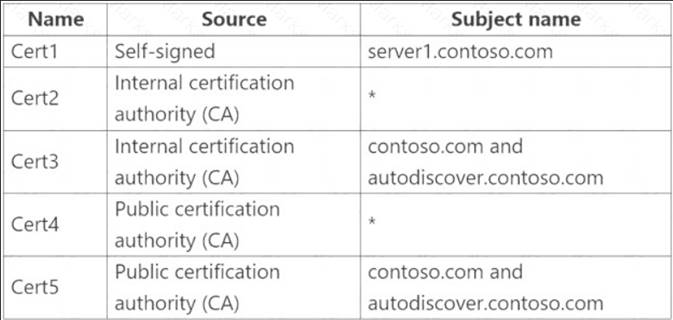
You need to identify which certificates can be assigned in the Microsoft Office 365 Exchange Hybrid Configuration wizard.
Which certificates should you identify?
- A. Cert4 and Cert5 only
- B. Cert2 and Cert3 only
- C. Cert1 only
- D. Cert3 and Cert5 only
- E. Cert2 and Cert4 only
- F. Cert2, Cert3, Cert4, and Cert5 only
Answer: A
Explanation:
Reference:
https://docs.microsoft.com/en-us/exchange/certificate-requirements
NEW QUESTION 3
Your company has a Microsoft Exchange Server 2019 hybrid deployment.
You are migrating mailboxes to Exchange Online by using remote mailbox move requests.
A recent security breach at the company required that the passwords of all privileged accounts be changed. Since the password change, mailbox move requests are failing.
You need to ensure that the mailbox migration can resume. What should you do first?
- A. From Exchange on-premises, run Set-MigrationEndpoint.
- B. From Exchange on-premises, run Set-MigrationConfig.
- C. From Exchange Online, run Set-MigrationConfig.
- D. From Exchange Online, run Set-MigrationEndpoint.
- E. Run iisreset /noforce on all the Exchange servers that have MRSProxy enabled.
Answer: A
Explanation:
Reference:
https://docs.microsoft.com/en-us/powershell/module/exchange/move-and-migration/set-migrationendpoint?view
NEW QUESTION 4
You have a Microsoft Exchange Server 2019 hybrid deployment. You plan to implement Hybrid Modern Authentication (HMA).
You retrieve the Exchange virtual directory settings, and you discover the following output.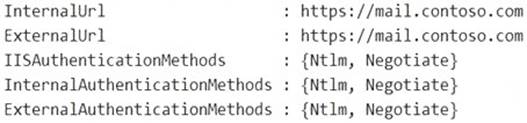
You need to prepare the virtual directories for the planned implementation of HMA. What should you do?
- A. Add OAuth as an authentication method.
- B. Remove NTLM as an authentication method.
- C. Delete https://mail.contoso.com from the ExternalUrl value.
- D. Modify the InternalUrl value to http://mail.contoso.com.
Answer: A
Explanation:
Reference:
https://docs.microsoft.com/en-us/microsoft-365/enterprise/configure-exchange-server-for-hybrid-modernauthent
NEW QUESTION 5
Note: This question is part of a series of questions that present the same scenario. Each question in the series contains a unique solution that might meet the stated goals. Some question sets might have more than one correct solution, while others might not have a correct solution.
After you answer a question in this section, you will NOT be able to return to it. As a result, these questions will not appear in the review screen.
You have a Microsoft Exchange Server 2019 hybrid deployment. All user mailboxes are hosted in Microsoft 365. All outbound SMTP email is routed through the on-premises Exchange organization.
A corporate security policy requires that you must prevent credit card numbers from being sent to internet recipients by using email.
You need to configure the deployment to meet the security policy requirement.
Solution: From the Exchange organization, you modify the properties of the Send connectors. Does this meet the goal?
- A. Yes
- B. No
Answer: B
Explanation:
You should create a Data Loss Prevention (DLP) policy.
NEW QUESTION 6
You have two mailboxes named Mailbox1 and Mailbox2 that have the ProhibitSendReceiveQuota parameter set to 50 G.B
From a Microsoft Exchange Online tenant, you run the following PowerShell command.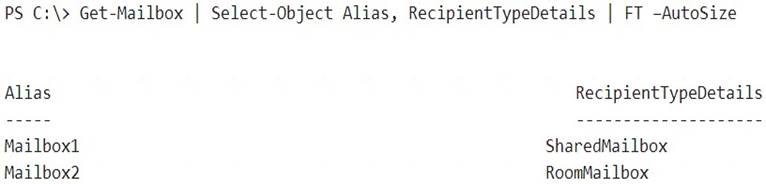
You receive the license status of each mailbox and discover the configurations shown in the following table.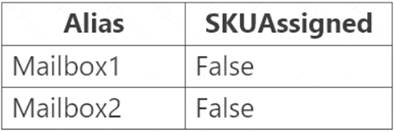
You need to increase the quota for Mailbox1 and Mailbox2. What should you do first?
- A. Assign a license to each mailbox.
- B. Convert each mailbox into an equipment mailbox.
- C. Enable an archive for each mailbox.
- D. Place both mailboxes on retention hold.
Answer: A
Explanation:
Shared and resource mailboxes don't require a license. However, without a license, these mailboxes are limited to 50 GB. To increase the mailbox size, an E3 or E5 license must be assigned. This will increase the mailbox to 100 GB.
Reference:
https://docs.microsoft.com/en-us/office365/servicedescriptions/exchange-online-service-description/exchange-o
NEW QUESTION 7
You have a Microsoft Exchange Server 2019 organization.
You need to ensure that a user named User1 can prevent mailbox content from being deleted if the content contains the words Fabrikam and Confidential.
What should you do?
- A. Add User1 to the Discovery Management management role group.
- B. Assign the Legal Hold and Mailbox Import Export management roles to User1.
- C. Add User1 to the Records Management management role group.
- D. Add User1 to the Compliance Management management role group.
Answer: A
Explanation:
Alternatively, assign the Mailbox Search and Legal Hold management roles to User1 Reference:
https://docs.microsoft.com/en-us/exchange/policy-and-compliance/holds/holds?view=exchserver-2019
NEW QUESTION 8
Your company has a Microsoft Exchange Server 2019 hybrid deployment.
The company has four departments that have the mailboxes shown in the following table.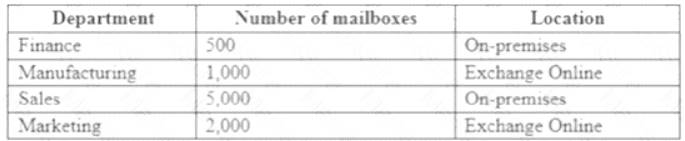
The mailboxes are configured as shown in the following table.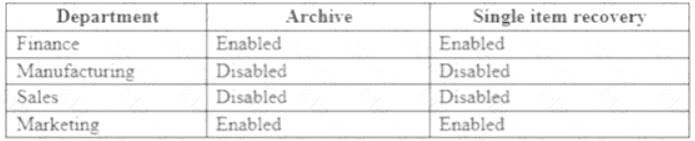
You have two administrators named Admin1 and Admin2 that are assigned the permissions shown in the following table.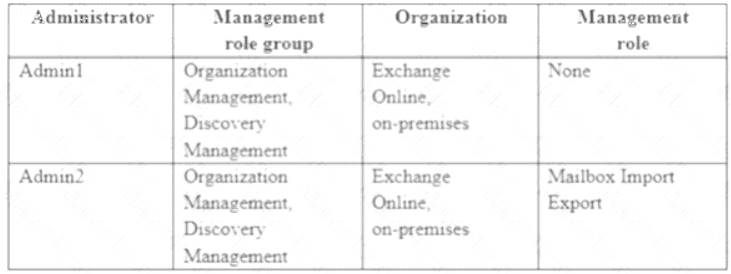
For each of the following statement, select yes if the statement is true. otherwise, select No. NOTE: Each correct selection is worth one point.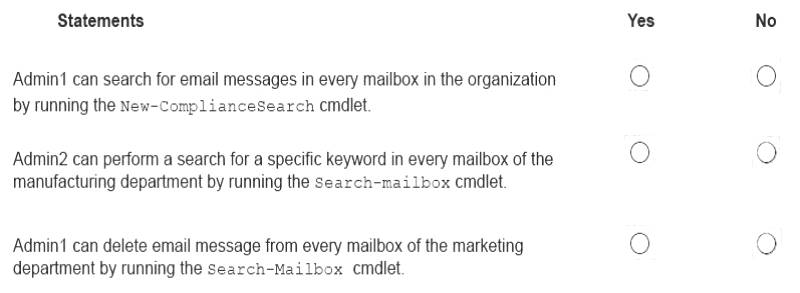
- A. Mastered
- B. Not Mastered
Answer: A
Explanation:
References:
https://docs.microsoft.com/en-us/exchange/discovery-management-exchange-2013-help https://docs.microsoft.com/en-us/powershell/module/exchange/mailboxes/search-mailbox?view=exchange-ps
NEW QUESTION 9
You need to configure the environment to support the planned changes for email addresses.
How should you complete the command? To answer, select the appropriate options in the answer area. NOTE: Each correct selection is worth one point.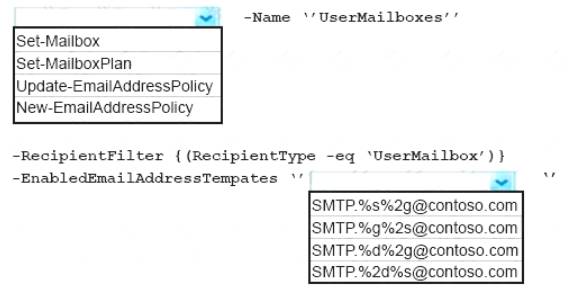
- A. Mastered
- B. Not Mastered
Answer: A
Explanation:
References:
https://docs.microsoft.com/en-us/powershell/module/exchange/email-addresses-and-address-books/new-emailad https://docs.microsoft.com/en-us/Exchange/email-addresses-and-address-books/email-address-policies/email-ad
NEW QUESTION 10
You have a Microsoft Exchange Server 2019 hybrid deployment that contains the users shown in the following table.
You need to provide each user with an archive mailbox that is stored in Exchange Online.
Which admin center should you use to perform the configuration for each user? To answer, drag the appropriate admin centers to the correct users. Each admin center may be used once, more than once, or not at all. You may need to drag the split bar between panes or scroll to view content.
NOTE: Each correct selection is worth one point.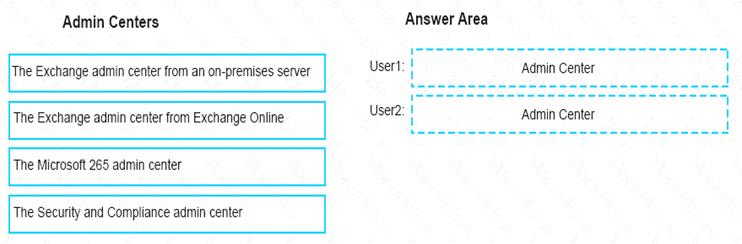
- A. Mastered
- B. Not Mastered
Answer: A
Explanation:
References:
https://docs.microsoft.com/en-us/office365/securitycompliance/enable-archive-mailboxes https://docs.microsoft.com/en-us/exchange/hybrid-deployment/create-cloud-based-archive
NEW QUESTION 11
You have a Microsoft Exchange Online subscription that uses a namespace of litwareinc.com. You create a connector in Exchange Online that is configured as shown in the following exhibit.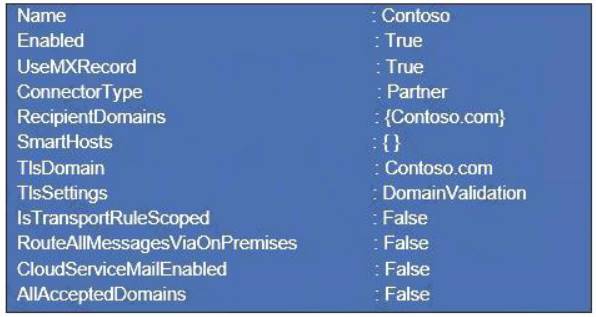
Use the drop-down menus to select the answer choice that completes each statement based on the information presented in the graphic.
NOTE: Each correct selection is worth one point.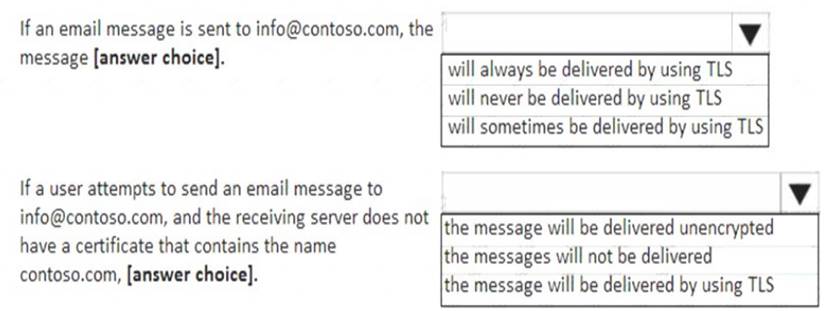
- A. Mastered
- B. Not Mastered
Answer: A
Explanation: 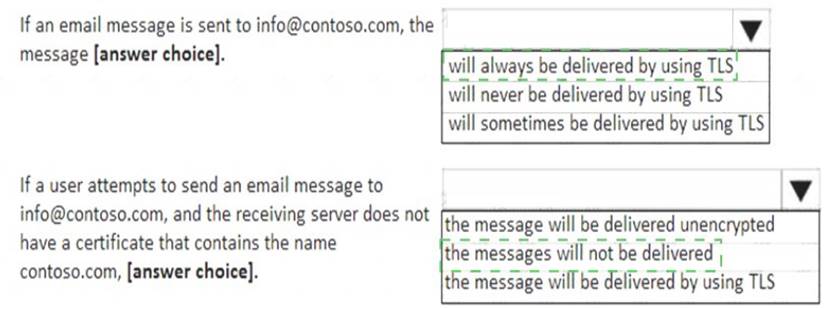
NEW QUESTION 12
You have a Microsoft Exchange Online tenant named contoso.com.
You create a partnership with two other companies named fabhkam.com and wingtiptoys.com. All the mailboxes of fabnkam.com are hosted in Microsoft 365. All the mailboxes of wingtiptoys.com are hosted in an on-premises Exchange Server 2019 organization.
You need to ensure that all the email messages sent from contoso.com to fabrikam.com and wingtiptoys.com is encrypted by using TLS.
What should you do?
- A. Configure one connector.
- B. Create an organizational relationship.
- C. Create two remote domains.
- D. Run the Office 365 Exchange Hybrid Configuration wizard.
- E. Configure two mail flow rules.
Answer: A
Explanation:
Reference:
https://docs.microsoft.com/en-us/exchange/mail-flow-best-practices/use-connectors-to-configure-mail-flow/set
NEW QUESTION 13
You have a Microsoft Exchange Online subscription.
You need to generate a CSV file containing all the email messages that failed to send from the user1@contoso.com email address during the last 30 days.
What are two possible ways to achieve the goal? Each correct answer presents part of the solution.
NOTE: Each correct selection is worth one point.
- A. From Exchange Online PowerShell, run the Get-MessageTrace cmdlet.
- B. From the Exchange admin center, run a message trace.
- C. From the Security & Compliance admin center, export the mailbox audit logs.
- D. From Exchange Online PowerShell, run the Get-MessagetraceDetail cmdlet.
- E. From the Security & Compliance admin center, run a message trace.
Answer: BD
Explanation:
References:
https://docs.microsoft.com/en-us/exchange/monitoring/trace-an-email-message/run-a-message-trace-andview-re https://docs.microsoft.com/en-us/powershell/module/exchange/mail-flow/get-messagetracedetail?view=exchang
NEW QUESTION 14
HOTSPOT
You have a Microsoft Exchange Online subscription.
You run the following command.
Set-ActiveSyncOrganizationSettings –DefaultAccessLevel Block
You run Get-ActiveSyncDeviceAccessRule | f1 Identity, AccessLevel, Characteristic, QueryString and you receive the following output.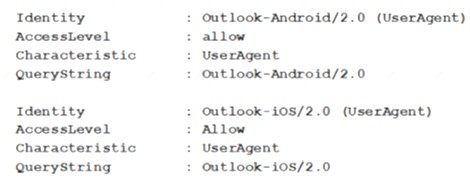
For each of the following statements, select Yes if the statement is true. Otherwise, select No. NOTE: Each correct selection is worth one point.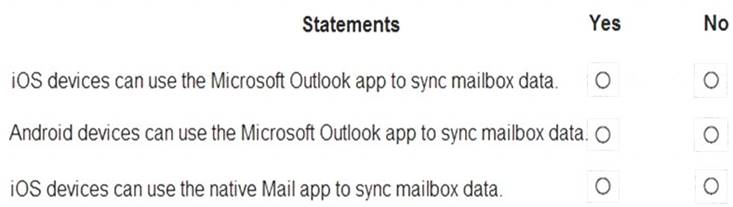
- A. Mastered
- B. Not Mastered
Answer: A
Explanation: 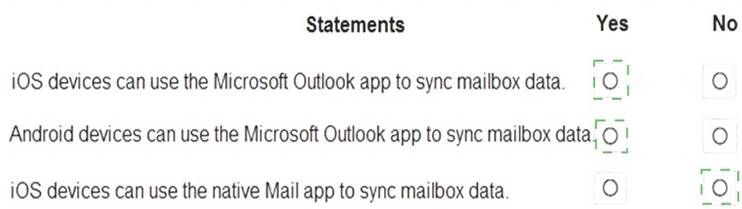
NEW QUESTION 15
Note: This question is part of a series of questions that present the same scenario. Each question in the
series contains a unique solution that might meet the stated goals. Some question sets might have more than one correct solution, while others might not have a correct solution.
After you answer a question in this section, you will NOT be able to return to it. As a result, these questions will not appear in the review screen.
You have a Microsoft Exchange Server 2019 organization that contains 200 mailboxes.
You need to add a second email address to each mailbox. The address must have a syntax that uses the first letter of each user’s last name, followed by the user’s first name, and then @fabrikam.com.
Solution: You convert all the mailboxes to shared mailboxes, and then you run the Set-Mailbox cmdlet and specify the –EmailAddressPolicyEnabled $true parameter.
Does this meet the goal?
- A. Yes
- B. No
Answer: A
Explanation:
Reference:
https://docs.microsoft.com/en-us/exchange/email-addresses-and-address-books/email-address-policies/email-add Email address policies define the rules that create email addresses for recipients in your Exchange organization.
The basic components of an email address policy are:
Email address templates: Define the email address format for the recipients (for example
<firstname>@contoso.com or <lastname>.<firstname>@contoso.com).
Recipient filter: Specifies the recipients whose email addresses are configured by the policy.
Priority: Specifies the order to apply the email address policies (important if a recipient is identified by more than one policy).
The EmailAddressPolicyEnabled parameter specifies whether to apply email address policies to this recipient. Valid values are:
$true: Email address policies are applied to this recipient. This is the default value.
$false: Email address policies aren't applied to this recipient.
NEW QUESTION 16
You have a Microsoft Exchange Server 2019 organization. Users access their email by using Microsoft Outlook 2019.
The users report that when a mailbox is provisioned for a new user, there is a delay of many hours before the new user appears in the global address list (GAL). From Outlook on the web, the users can see the new user in the GAL immediately.
You need to reduce the amount of time it takes for new users to appear in the GAL in Outlook 2019. What should you do?
- A. Modify the default email address policy.
- B. Create as address book policy (ABP).
- C. Create a scheduled task that runs the Update-GlobalAddressList cmdlet.
- D. Modify the offline address (OAB) schedule.
Answer: D
Explanation:
References:
https://www.howto-outlook.com/howto/oabupdate.htm#syncschedules
NEW QUESTION 17
Note: This question is part of a series of questions that present the same scenario. Each question in the series contains a unique solution that might meet the stated goals. Some question sets might have more than one correct solution, while others might not have a correct solution.
After you answer a question in this section, you will NOT be able to return to it. As a result, these questions will not appear in the review screen.
You have a Microsoft Exchange Server 2019 hybrid deployment. All user mailboxes are hosted in Microsoft 365. All outbound SMTP email is routed through the on-premises Exchange organization.
A corporate security policy requires that you must prevent credit card numbers from being sent to internet recipients by using email.
You need to configure the deployment to meet the security policy requirement.
Solution: From the Exchange organization, you create a data loss prevention (DLP) policy. Does this meet the goal?
- A. Yes
- B. No
Answer: A
Explanation:
Reference:
https://docs.microsoft.com/en-us/microsoft-365/compliance/data-loss-prevention-policies?view=o365-worldwid
NEW QUESTION 18
You manage a Microsoft Exchange Server 2019 hybrid deployment. All user mailboxes are located both on-premises and in the cloud.
You need to configure the deployment so that the on-premises mailboxes can access the public folders. Which three commands should you run? Each correct answer presents part of the solution.
NOTE: Each correct selection is worth one point.
- A. Sync-MailPublicFolders.ps1
- B. Set-OrganizationConfig –PublicFoldersEnabled Remote
- C. Import-PublicFolderMailboxes.ps1
- D. Sync-MailPublicFoldersCloudToOnprem.ps1
- E. Set-OrganizationConfig –PublicFoldersEnabled Local –RemotePublicFolderMailboxes PFMailbox1
Answer: BCD
Explanation:
Reference:
https://docs.microsoft.com/en-us/exchange/hybrid-deployment/set-up-exo-hybrid-public-folders
NEW QUESTION 19
You need to resolve the email delivery delay issue. What should you do?
- A. From the Security & Compliance admin center, modify the safe attachments policy
- B. From the Security & Compliance admin center, create a supervision policy.
- C. From the Exchange admin center in Exchange Online, modify the antimalware policy.
- D. From the Exchange admin center in Exchange Online, modify the spam filter policy.
Answer: A
Explanation:
References:
https://docs.microsoft.com/en-us/office365/securitycompliance/dynamic-delivery-and-previewing
NEW QUESTION 20
You have a Microsoft Exchange Server 2019 hybrid deployment.
You are migrating mailboxes from the on-premises organization to Exchange Online.
From the Exchange admin center, you create a new migration batch that includes 25 mailboxes, and then you select Manual Complete the batch.
Later, you must complete the migration of a mailbox named user1@litware.com in the batch as soon as possible. You discover that the status of the migration batch is Syncing, but the status of the move request for user1@litware.com is Synced.
You need to complete the migration of the user1@litware.com mailbox to Exchange Online as soon as possible.
How should you complete the command? To answer, select the appropriate options in the answer area.
NOTE: Each correct selection is worth one point.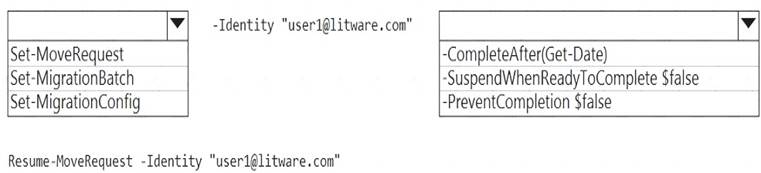
- A. Mastered
- B. Not Mastered
Answer: A
Explanation:
Reference:
https://docs.microsoft.com/en-us/powershell/module/exchange/move-and-migration/set-moverequest?view=exc
NEW QUESTION 21
You have 1,000 user accounts that are each licensed for Microsoft 365. Each user account has a Microsoft
Exchange Online mailbox.
Ten of the user accounts are configured as service accounts for applications. The applications send event notifications to the mailboxes of the service accounts by using SMTP. The developers of each application have delegated access to the mailbox of their respective application.
You need to ensure that all the event notifications sent by the applications are retained in the service account mailboxes so that new developers can review older notifications. The developers must be able to view only the notifications for their respective application.
What should you do?
- A. Replace the service account mailboxes with a single user mailbox that contains a folder for each application.
- B. Replace the service account mailboxes with a single user mailbox that contains Power Automate rules.
- C. Convert the service account mailboxes into shared mailboxes.
- D. Convert the service account mailboxes into mail-enabled users.
Answer: C
NEW QUESTION 22
You need to recommend a solution that meets the security requirements for protecting users. What should you recommend?
- A. From the Security & Compliance admin center, create an ATP safe attachments policy.
- B. From the Exchange admin center in Exchange Online, create a spam filter policy.
- C. From the Security & Compliance admin center, create an ATP anti-phishing policy.
- D. From the Security & Compliance admin center, create an ATP Safe Links policy.
Answer: D
Explanation:
All users must be protected from accessing unsecure websites when they click on URLs embedded in email messages.
NEW QUESTION 23
You have a Microsoft Exchange Server 2019 hybrid deployment.
You run the Get-HybridConfiguration cmdlet and receive the output shown in the following exhibit.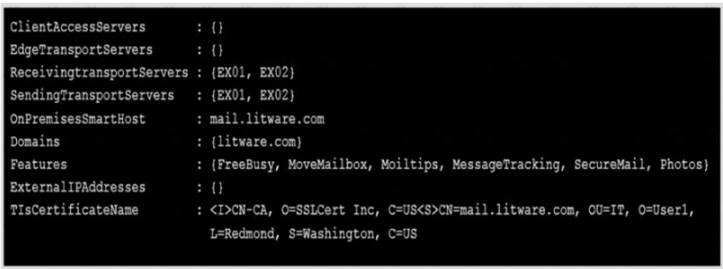
Use the drop-down menus to select the answer choice that completes each statement based on the information presented in the graphic.
NOTE: Each correct selection is worth one point.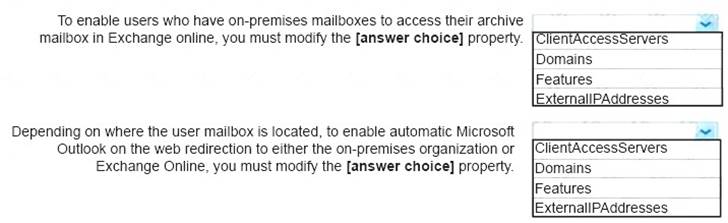
- A. Mastered
- B. Not Mastered
Answer: A
Explanation:
References:
https://docs.microsoft.com/en-us/powershell/module/exchange/federation-and-hybrid/set-hybridconfiguration?vi
NEW QUESTION 24
......
P.S. Certleader now are offering 100% pass ensure MS-203 dumps! All MS-203 exam questions have been updated with correct answers: https://www.certleader.com/MS-203-dumps.html (81 New Questions)
